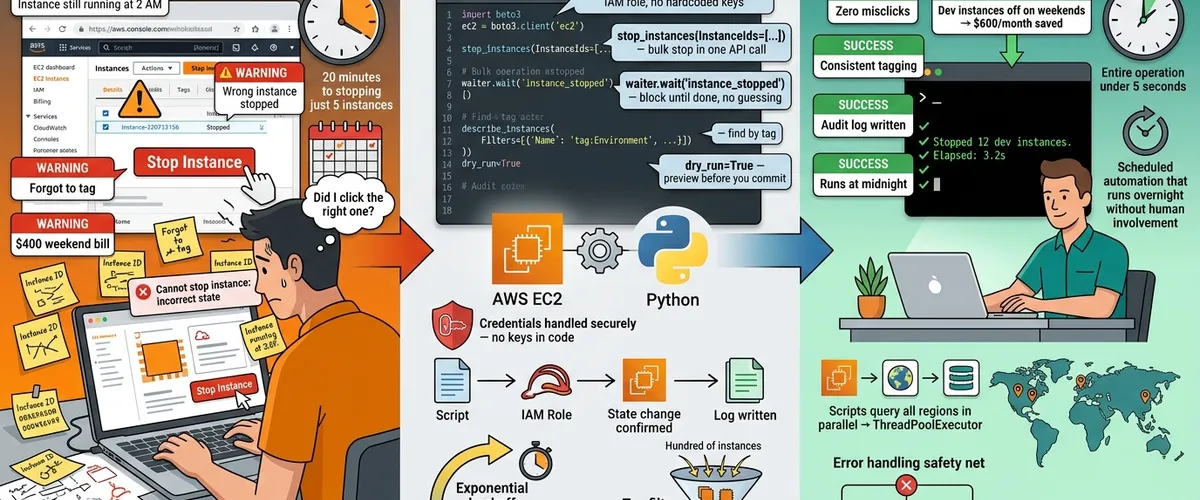
If you’ve ever spent 20 minutes clicking through the AWS Console just to stop a handful of dev instances, you already know the pain. It’s tedious, it doesn’t scale, and one wrong click can ruin your afternoon.
That’s where Boto3 comes in. It’s the official AWS SDK for Python, and it lets you talk to AWS services, including EC2, directly from your code. Instead of pointing and clicking, you write a script once and run it whenever you need it. Your code doesn’t get tired, doesn’t misclick, and works the same at 3 AM as it does at 3 PM.
This guide covers everything you need to get comfortable with EC2 automation: setting up authentication, starting and stopping instances, waiting for state changes, filtering by tags, running bulk operations, and handling errors.
Why automate EC2 management with Boto3?
Why bother writing code when the AWS Console already does the job?
Fair question. The console is fine when you’ve got two or three instances. But once you’re managing a real environment, manual work starts costing you more than time.
Every action you take through the console depends on a human doing it right, every single time. With Boto3, you write the logic once, and it runs consistently regardless of who’s on call or how tired they are.
Here’s where automation pays off most:
- Scheduled shutdowns: Stop dev and staging instances overnight or on weekends. There’s no reason to pay for servers that nobody’s using at 2 AM.
- Consistent tagging: Every instance your script touches gets tagged correctly. No more missing
EnvironmentorOwnertags because someone forgot. - Incident response: When something goes wrong, your runbook can stop a compromised instance or spin up a replacement without waiting for a human to log in.
- Audit trails: Log every action with timestamps, so you’ve got a clear record of what happened, when, and why.
- Fewer mistakes: Repetitive manual work breeds errors. Scripts don’t forget steps or click the wrong button.
Once your automation is in place, managing 200 instances takes roughly the same effort as managing two.
Setting up Boto3 and authenticating with AWS
How do you connect Boto3 to your AWS account securely?
Start with the install:
pip install boto3Now, authentication. This is where a lot of people make mistakes, so it’s worth doing right from the start. The method you use should depend on where your code runs.
Option 1: IAM roles (best for EC2 and Lambda)
If your script runs on an EC2 instance or a Lambda function, attach an IAM role to that resource. Boto3 picks up the credentials automatically from the instance metadata service. You don’t need to touch a key file or set any environment variables.
import boto3
# No keys needed here Boto3 reads the IAM role attached to this instanceec2_client = boto3.client('ec2', region_name='us-east-1')
# Quick check to confirm the connection worksresponse = ec2_client.describe_instances()print('Connected via IAM role good to go.')This is the cleanest approach for production. There are no credentials to rotate, leak, or accidentally commit to Git.
Option 2: named profiles (best for local development)
When you’re working locally, use a named AWS CLI profile. It keeps credentials in ~/.aws/credentials where they belong, not in your source code.
# Run this once in your terminal to set up a profileaws configure --profile myprojectimport boto3
# Load credentials from the 'myproject' profile in ~/.aws/credentialssession = boto3.Session(profile_name='myproject')ec2_client = session.client('ec2', region_name='us-east-1')
print(f'Using profile: {session.profile_name}')You can have multiple profiles for different accounts or environments, which makes switching between dev and prod much easier.
A word on hardcoded credentials: Don’t do it. Not in scripts, not in config files checked into source control, not anywhere. Use IAM roles in production and named profiles locally. If you’re using access keys, rotate them regularly and give them only the permissions they actually need.
Starting and stopping EC2 instances
How do you start and stop instances programmatically with Boto3?
This is probably why you’re here. Boto3 uses start_instances and stop_instances for these operations. Both are simple calls, but there are a few details worth knowing.
Stopping an instance
import boto3from botocore.exceptions import ClientError
def stop_instance(instance_id: str, region: str = 'us-east-1') -> dict: """Stop a running EC2 instance and return the state transition.""" ec2 = boto3.client('ec2', region_name=region)
try: response = ec2.stop_instances(InstanceIds=[instance_id])
# AWS tells us both the old state and the new state state_info = response['StoppingInstances'][0] previous = state_info['PreviousState']['Name'] current = state_info['CurrentState']['Name']
print(f'{instance_id}: {previous} -> {current}') return response
except ClientError as e: print(f'Could not stop instance: {e.response["Error"]["Code"]} - {e}') raise
# Usagestop_instance('i-0abcd1234ef567890')Starting an instance
import boto3from botocore.exceptions import ClientError
def start_instance(instance_id: str, region: str = 'us-east-1') -> dict: """Start a stopped EC2 instance and return the state transition.""" ec2 = boto3.client('ec2', region_name=region)
try: response = ec2.start_instances(InstanceIds=[instance_id])
state_info = response['StartingInstances'][0] previous = state_info['PreviousState']['Name'] current = state_info['CurrentState']['Name']
print(f'{instance_id}: {previous} -> {current}') return response
except ClientError as e: code = e.response['Error']['Code']
# Don't crash if the instance is already running if code == 'IncorrectInstanceState': print(f'{instance_id} is already in the desired state.') else: raise
# Usagestart_instance('i-0abcd1234ef567890')One thing worth noting: both methods accept a list of instance IDs, so you can act on multiple instances in a single API call. If you’re managing more than one instance, that’s a lot cleaner than looping and calling separately.
# Stop multiple instances at once no loop neededec2 = boto3.client('ec2', region_name='us-east-1')ec2.stop_instances(InstanceIds=[ 'i-0abcd1234ef567890', 'i-0efgh5678ij901234', 'i-0klmn9012op345678',])The response tells you the previous and current state for each one, which makes logging and auditing easy.
Using Boto3 waiters to block until a state is reached
How do you know when an instance has actually finished starting or stopping?
Here’s a common mistake: you call start_instances, assume it’s done, and immediately try to SSH in. But the instance is still booting. Your script fails, and now you’re debugging something that wasn’t actually broken.
The fix is waiters. A Boto3 waiter is a built-in polling loop that keeps checking the AWS API until your instance reaches the state you want. It handles the timing for you and raises an error if something goes wrong or takes too long.
import boto3from botocore.exceptions import WaiterError
def start_and_wait(instance_id: str, region: str = 'us-east-1'): """Start an instance and block until it's fully running.""" ec2 = boto3.client('ec2', region_name=region)
ec2.start_instances(InstanceIds=[instance_id]) print(f'Starting {instance_id}...')
waiter = ec2.get_waiter('instance_running')
try: waiter.wait( InstanceIds=[instance_id], WaiterConfig={ 'Delay': 15, # Check every 15 seconds 'MaxAttempts': 40 # Give up after ~10 minutes } ) print(f'{instance_id} is running.')
except WaiterError as e: print(f'Waiter timed out: {e}') raise
def stop_and_wait(instance_id: str, region: str = 'us-east-1'): """Stop an instance and block until it's fully stopped.""" ec2 = boto3.client('ec2', region_name=region)
ec2.stop_instances(InstanceIds=[instance_id]) print(f'Stopping {instance_id}...')
waiter = ec2.get_waiter('instance_stopped')
try: waiter.wait( InstanceIds=[instance_id], WaiterConfig={'Delay': 15, 'MaxAttempts': 40} ) print(f'{instance_id} is stopped.')
except WaiterError as e: print(f'Waiter failed: {e}') raiseThe four most useful EC2 waiters are instance_running, instance_stopped, instance_terminated, and instance_exists. Each one polls describe_instances under the hood and checks the state automatically, so you don’t have to.
If you want to wait on multiple instances at once, just pass all the IDs together:
# Wait for several instances to stop one waiter call handles all of themwaiter = ec2.get_waiter('instance_stopped')waiter.wait( InstanceIds=['i-0abc123', 'i-0def456', 'i-0ghi789'], WaiterConfig={'Delay': 15, 'MaxAttempts': 40})print('All instances are stopped.')Tip: Tune
DelayandMaxAttemptsbased on your actual instances. A small instance with a simple AMI might be running in under a minute. A larger one running a heavy bootstrap script could take five or ten. If your waiter times out too often, bump upMaxAttemptsbefore adding more complex logic.
Filtering and querying instances
How do you find the right instances without knowing their IDs ahead of time?
Hardcoding instance IDs is a trap. Instances get replaced, IDs change, and suddenly your script is managing the wrong thing, or nothing at all. A better approach is to query by attributes you control, like tags or state.
Querying by state
import boto3
def get_instances_by_state(state: str, region: str = 'us-east-1') -> list: """ Return all instances in a given state. Valid states: 'running', 'stopped', 'pending', 'stopping', 'terminated' """ ec2 = boto3.client('ec2', region_name=region)
response = ec2.describe_instances( Filters=[{'Name': 'instance-state-name', 'Values': [state]}] )
# describe_instances groups results into Reservations, so we flatten them instances = [] for reservation in response['Reservations']: instances.extend(reservation['Instances'])
return instances
# Find everything that's currently runningrunning = get_instances_by_state('running')print(f'{len(running)} running instance(s) found.')
for inst in running: print(f" {inst['InstanceId']} {inst['InstanceType']} {inst['Placement']['AvailabilityZone']}")Querying by tags
import boto3
def get_instances_by_tag(tag_key: str, tag_value: str, region: str = 'us-east-1') -> list: """Find instances that have a specific tag key/value pair.""" ec2 = boto3.client('ec2', region_name=region)
# AWS filter syntax for tags is 'tag:<key>' response = ec2.describe_instances( Filters=[{'Name': f'tag:{tag_key}', 'Values': [tag_value]}] )
instances = [] for reservation in response['Reservations']: instances.extend(reservation['Instances'])
return instances
# Find all production instancesprod = get_instances_by_tag('Environment', 'production')
for inst in prod: # Pull the Name tag if it exists, otherwise label it 'unnamed' name = next( (t['Value'] for t in inst.get('Tags', []) if t['Key'] == 'Name'), 'unnamed' ) print(f" {inst['InstanceId']} {name} {inst['State']['Name']}")You can stack filters together, too. AWS applies them with AND logic, so you’ll only get instances that match all of them:
# Only running instances in the production environment both filters must matchresponse = ec2.describe_instances( Filters=[ {'Name': 'tag:Environment', 'Values': ['production']}, {'Name': 'instance-state-name', 'Values': ['running']} ])That single call replaces what would otherwise be a manual filter in the console or a clunky post-processing loop in code.
Bulk operations: stopping instances by tag or VPC
How do you stop an entire group of instances at once without listing each ID manually?
This is where scripting really earns its keep. Instead of hunting down individual instance IDs, you describe what you want, collect the IDs, and stop them all in one shot.
Stop all instances in a VPC
import boto3
def stop_instances_in_vpc(vpc_id: str, region: str = 'us-east-1') -> list: """Stop all running instances in a given VPC.""" ec2 = boto3.client('ec2', region_name=region)
# Find every running instance in this VPC response = ec2.describe_instances( Filters=[ {'Name': 'vpc-id', 'Values': [vpc_id]}, {'Name': 'instance-state-name', 'Values': ['running']} ] )
instance_ids = [ inst['InstanceId'] for r in response['Reservations'] for inst in r['Instances'] ]
if not instance_ids: print(f'Nothing running in {vpc_id}.') return []
print(f'Stopping {len(instance_ids)} instance(s) in {vpc_id}...') ec2.stop_instances(InstanceIds=instance_ids)
return instance_ids
stopped = stop_instances_in_vpc('vpc-0abc12345def67890')print(f'Stopped: {stopped}')Stop all instances with a specific tag
import boto3
def stop_instances_by_tag( tag_key: str, tag_value: str, region: str = 'us-east-1', dry_run: bool = True) -> list: """ Stop all running instances that match a tag. Set dry_run=True to preview what would be stopped without actually doing it. """ ec2 = boto3.client('ec2', region_name=region)
response = ec2.describe_instances( Filters=[ {'Name': f'tag:{tag_key}', 'Values': [tag_value]}, {'Name': 'instance-state-name', 'Values': ['running']} ] )
instance_ids = [ inst['InstanceId'] for r in response['Reservations'] for inst in r['Instances'] ]
if not instance_ids: print(f'No running instances tagged {tag_key}={tag_value}.') return []
if dry_run: print(f'[DRY RUN] Would stop {len(instance_ids)} instance(s):') for iid in instance_ids: print(f' - {iid}') return instance_ids
ec2.stop_instances(InstanceIds=instance_ids) print(f'Stopped {len(instance_ids)} instance(s) tagged {tag_key}={tag_value}.')
return instance_ids
# Always preview before committingstop_instances_by_tag('Environment', 'dev', dry_run=True)
# When you're confident, flip the flag# stop_instances_by_tag('Environment', 'dev', dry_run=False)Always build a
dry_runmode into your bulk scripts. It takes two minutes to add and can save you from a very bad day. Preview first, execute second.
Error handling: throttling, permissions, and invalid states
What happens when your Boto3 script hits an error, and how do you handle it cleanly?
AWS APIs fail. Not often, but enough that your production scripts need to be ready for it. The three most common issues you’ll run into are rate limiting, missing permissions, and trying to do something that doesn’t make sense for the instance’s current state.
Here’s a function that handles all of them gracefully:
import boto3import timefrom botocore.exceptions import ClientError
def robust_stop_instance( instance_id: str, region: str = 'us-east-1', max_retries: int = 3) -> bool: """ Stop an instance with sensible error handling and retry logic. Returns True on success, False if the operation can't be completed. """ ec2 = boto3.client('ec2', region_name=region)
for attempt in range(1, max_retries + 1): try: response = ec2.stop_instances(InstanceIds=[instance_id]) state = response['StoppingInstances'][0]['CurrentState']['Name'] print(f'Stopped {instance_id}. Current state: {state}') return True
except ClientError as e: code = e.response['Error']['Code']
if code in ('RequestLimitExceeded', 'Throttling'): # Back off exponentially and try again wait_time = 2 ** attempt print(f'Rate limited. Waiting {wait_time}s before retry {attempt}/{max_retries}...') time.sleep(wait_time)
elif code == 'UnauthorizedOperation': # No point retrying this is a permissions issue print(f'Permission denied: {e.response["Error"]["Message"]}') print('Check the IAM policy on your role or profile.') return False
elif code == 'IncorrectInstanceState': # Instance might already be stopped or terminated print(f'{instance_id} is in an unexpected state. Skipping.') return False
elif code == 'InvalidInstanceID.NotFound': # Wrong region, or the instance no longer exists print(f'{instance_id} not found in {region}.') return False
else: # Something unexpected surface it clearly print(f'Unexpected error [{code}]: {e}') raise
print(f'Gave up after {max_retries} attempts.') return FalseThe key error codes to know:
RequestLimitExceeded/Throttling: You’re hitting the AWS API rate limit. Use exponential backoff and retry.UnauthorizedOperation: The IAM role or user doesn’t have the right permission. No amount of retrying will fix this. You need to update the policy.IncorrectInstanceState: You’re trying to do something the instance’s current state doesn’t allow, like stopping an instance that’s already stopped.InvalidInstanceID.NotFound: The instance ID doesn’t exist in that region. Double-check both the ID and the region.
Frequently asked questions
Yes, and it’s pretty easy to do. Just create a separate client for each region you need. You can loop over a list of region names and run the same operations in each one. If you need it to go fast, concurrent.futures lets you run those calls in parallel.
import boto3from concurrent.futures import ThreadPoolExecutor
regions = ['us-east-1', 'eu-west-1', 'ap-southeast-1']
def count_running(region): ec2 = boto3.client('ec2', region_name=region) resp = ec2.describe_instances( Filters=[{'Name': 'instance-state-name', 'Values': ['running']}] ) count = sum(len(r['Instances']) for r in resp['Reservations']) print(f'{region}: {count} running instance(s)')
# Query all regions at the same time instead of one by onewith ThreadPoolExecutor() as pool: pool.map(count_running, regions)At a minimum you’ll need ec2:StartInstances, ec2:StopInstances, ec2:DescribeInstances, and ec2:DescribeInstanceStatus. If you’re filtering by tags, add ec2:DescribeTags too. Scope permissions as tightly as you can using IAM condition keys, especially for production environments.
A fixed sleep is a guess. A waiter actually checks. Waiters poll the AWS API and return the moment the state changes, which means they’re faster when things go smoothly and more informative when they don’t. If the timeout is exceeded, you get a WaiterError you can handle, rather than a script that silently moves on assuming everything is fine.
Yes. boto3.client('ec2') is the low-level interface that maps directly to API calls and returns raw dictionaries. boto3.resource('ec2') gives you a higher-level, object-oriented interface with things like ec2.Instance('i-0abc123'). Both work, but the client is more flexible for filtering and bulk operations, which is why most automation scripts use it.
Mostly yes. start_instances, stop_instances, and describe_instances all work with spot instances. The main difference is that spot instances can be interrupted by AWS when capacity is reclaimed, so your automation should be ready for unexpected state changes. Use describe_spot_instance_requests to check spot-specific status and watch for interruption notices.
describe_instances only returns up to 1,000 results per call. For bigger environments, use a paginator instead of calling directly:
import boto3
ec2 = boto3.client('ec2', region_name='us-east-1')paginator = ec2.get_paginator('describe_instances')
instances = []# paginate() handles NextToken automatically no manual looping neededfor page in paginator.paginate(Filters=[{'Name': 'instance-state-name', 'Values': ['running']}]): for reservation in page['Reservations']: instances.extend(reservation['Instances'])
print(f'Total running instances: {len(instances)}')The paginator handles NextToken automatically, so you’ll always get everything without extra logic.
Use the dry_run pattern shown in the bulk operations section. Run with dry_run=True first to see exactly which instances would be affected before you commit. Beyond that, test in a staging account or a non-production VPC. Some Boto3 calls also support a DryRun=True parameter at the API level, which validates your permissions without making any changes.
References
- Boto3 Documentation EC2 Client
- Boto3 Documentation Waiters
- Boto3 Documentation Paginators
- Boto3 Documentation Session and Credential Configuration
- AWS EC2 API Reference DescribeInstances
- AWS EC2 API Reference StartInstances & StopInstances
- AWS IAM Best Practices
- AWS IAM Roles for EC2
- AWS EC2 Instance Lifecycle
- AWS EC2 Tagging Your Resources
- Botocore Exceptions Reference
- AWS EC2 Spot Instance Interruptions
- Python
concurrent.futuresThreadPoolExecutor - AWS CLI Configuration and Credential Files
- AWS Well-Architected Framework Operational Excellence Pillar