Why Helm matters
The Kubernetes manifest problem
Managing Kubernetes manifests at scale becomes a nightmare.
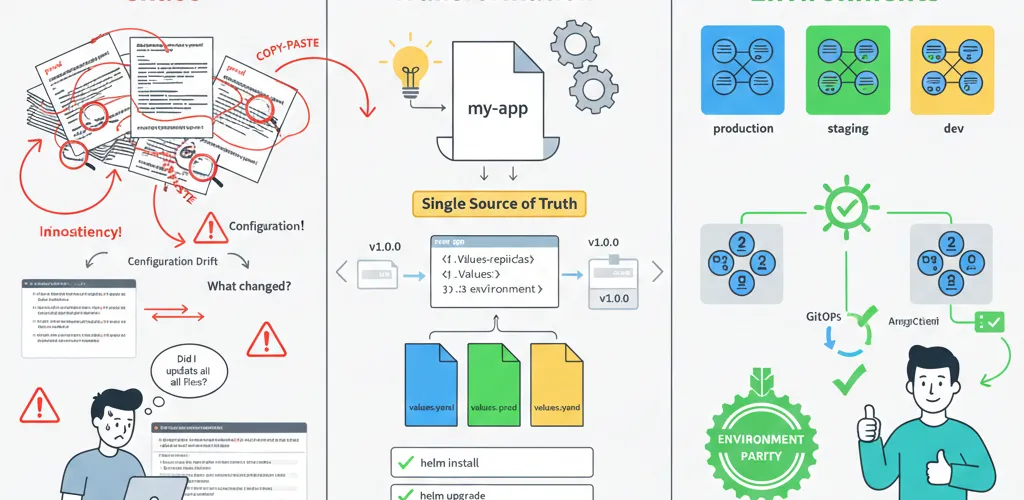
You have a deployment for dev, staging and production. Each one is 90% identical: same containers, same services, different replicas and resource limits and environment variables. Copy the YAML, edit a few lines, deploy. That works right up until someone edits dev and forgets staging, or a typo lands in production and nobody notices until users report the outage.
Helm packages a Kubernetes application as a chart with templates, values and a version number. The YAML you deploy is generated from one source instead of maintained in three places.
Where hand-written YAML breaks down
Environment Fragmentation:prod-deployment.yaml ← Different values hardcodedstaging-deployment.yaml ← Needs 3 edits for proddev-deployment.yaml ← Inconsistent structure
Result:• Configurations drift• Changes in one place aren't replicated• Rollback = manually revert files• New environments = copy-paste hellThe fix: Helm charts
What Helm is
Helm is package management for Kubernetes, like npm for Node.js or pip for Python.
- Charts: Helm packages containing templated Kubernetes manifests
- Values: Configuration that gets injected into templates (replicas, image tags, resources)
- Releases: Deployed instances of charts, tracked with versions for easy rollback
- Repos: Central repositories where teams share charts
What you get
- Single chart, multiple environments: Use template variables instead of duplicating YAML
- Templating system:
{{ .Values.replicas }}→ substituted with values from env-specific file - Dependency management: Charts can depend on other charts (PostgreSQL, Redis, etc.)
- Versioning & rollback: Every deployment tracked, instant rollback to previous version
- Validation: Helm validates charts before deployment
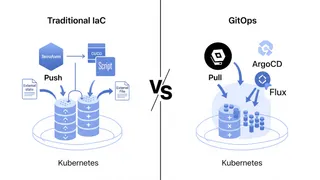
- GitOps ready: Store charts in Git, deploy from Git
Chart structure
Directory layout
my-app/├── Chart.yaml # Chart metadata (name, version, description)├── values.yaml # Default values├── values-dev.yaml # Dev environment overrides├── values-staging.yaml # Staging overrides├── values-prod.yaml # Production overrides├── templates/│ ├── deployment.yaml # Templated Kubernetes Deployment│ ├── service.yaml # Service manifest│ ├── configmap.yaml # ConfigMap for config│ ├── hpa.yaml # Horizontal Pod Autoscaler (prod only)│ └── _helpers.tpl # Template helpers/functions└── README.md # Chart documentationChart.yaml
apiVersion: v2name: my-appdescription: A Helm chart for my microservicetype: applicationversion: 1.0.0 # Chart versionappVersion: '1.2.3' # Application versionmaintainers: - name: Your TeamTemplating
Basic values templating
# Default values for all environmentsreplicaCount: 1
image: repository: myregistry.azurecr.io/my-app tag: '1.2.3' pullPolicy: IfNotPresent
resources: requests: memory: '128Mi' cpu: '100m' limits: memory: '256Mi' cpu: '500m'
environment: 'dev'debug: true# Production overridesreplicaCount: 3 # More replicas for load
resources: requests: memory: '512Mi' cpu: '500m' limits: memory: '1Gi' cpu: '2000m'
environment: 'production'debug: false # Disable debug loggingA templated deployment
apiVersion: apps/v1kind: Deploymentmetadata: name: {{.Release.Name}} namespace: {{.Release.Namespace}}spec: replicas: {{.Values.replicaCount}} # Injected from values selector: matchLabels: app: {{.Chart.Name}} template: metadata: labels: app: {{.Chart.Name}} spec: containers: - name: {{.Chart.Name}} image: '{{ .Values.image.repository }}:{{ .Values.image.tag }}' imagePullPolicy: {{.Values.image.pullPolicy}} env: - name: ENVIRONMENT value: {{.Values.environment}} - name: DEBUG value: '{{ .Values.debug }}' ports: - containerPort: 8080 resources: requests: memory: {{.Values.resources.requests.memory | quote}} cpu: {{.Values.resources.requests.cpu | quote}} limits: memory: {{.Values.resources.limits.memory | quote}} cpu: {{.Values.resources.limits.cpu | quote}}Conditional logic in templates
Environment-specific configuration
spec: {{- if eq .Values.environment "production" }} replicas: 3 {{- else if eq .Values.environment "staging" }} replicas: 2 {{- else }} replicas: 1 {{- end }}Resources that exist only in some environments
{{- if eq .Values.environment "production" }}apiVersion: autoscaling/v2kind: HorizontalPodAutoscalermetadata: name: {{ .Release.Name }}spec: scaleTargetRef: apiVersion: apps/v1 kind: Deployment name: {{ .Release.Name }} minReplicas: 3 maxReplicas: 10 metrics: - type: Resource resource: name: cpu target: type: Utilization averageUtilization: 70{{- end }}Conditional security settings
spec: {{- if eq .Values.environment "production" }} securityContext: runAsNonRoot: true runAsUser: 1000 fsReadOnlyRootFilesystem: true {{- end }}Managing multiple environments
Environment-specific values files
Deploy to dev:helm install my-app . -f values.yaml -f values-dev.yaml
Deploy to staging:helm install my-app . -f values.yaml -f values-staging.yaml
Deploy to prod:helm install my-app . -f values.yaml -f values-prod.yamlValues priority (the last one wins)
# Later files override earlier oneshelm install my-app \ -f values.yaml \ # Base defaults -f values-prod.yaml \ # Override for prod --set environment=production # Override from CLI (highest priority)Chart dependencies
Depending on PostgreSQL
dependencies: - name: postgresql version: '13.0.0' repository: https://charts.bitnami.com/bitnamiInstalling dependencies
# Download dependencieshelm dependency update
# Then deploy (PostgreSQL chart auto-installs)helm install my-app . -f values-prod.yaml
Values for a sub-chart
# My app valuesreplicaCount: 3
# PostgreSQL sub-chart valuespostgresql: enabled: true auth: password: 'prod-secure-password' primary: persistence: size: 100Gi metrics: enabled: trueRelease management
The basic commands
# Install a releasehelm install my-app ./chart -f values-prod.yaml
# Upgrade to new versionhelm upgrade my-app ./chart -f values-prod.yaml
# Check release historyhelm history my-app
# Rollback to previous version (instant!)helm rollback my-app 2
# Delete releasehelm uninstall my-app
A deployment run, start to finish
# 1. Make changes to chart# 2. Test locallyhelm install test-release . -f values-dev.yaml
# 3. Test succeeded, upgradehelm uninstall test-release
# 4. Deploy to productionhelm upgrade my-app . -f values-prod.yaml
# 5. Verifykubectl get pods -l app=my-app
# 6. If something's wrong, instant rollbackhelm rollback my-app
GitOps integration
Storing charts in Git
git repository structure:├── charts/│ ├── my-app/│ │ ├── Chart.yaml│ │ ├── values.yaml│ │ ├── values-dev.yaml│ │ ├── values-prod.yaml│ │ └── templates/│ └── other-app/├── .gitignore└── README.mdGitOps with ArgoCD
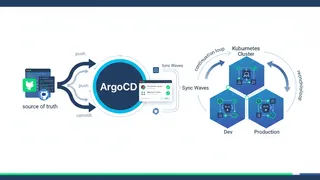
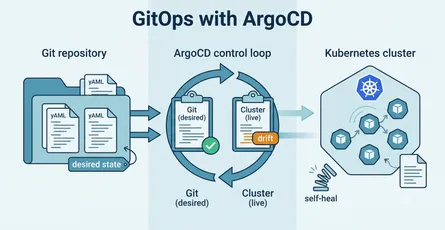
ArgoCD watches your Git repo and automatically keeps your Kubernetes cluster in sync:
apiVersion: argoproj.io/v1alpha1kind: Applicationmetadata: name: my-app-prodspec: project: default source: repoURL: https://github.com/myteam/infrastructure targetRevision: main path: charts/my-app helm: values: | environment: production replicaCount: 3 destination: server: https://kubernetes.default.svc namespace: prod syncPolicy: automated: prune: true selfHeal: trueDeploy workflow:
1. Developer updates Chart in Git2. Commits and pushes3. ArgoCD detects change4. Automatically syncs to Kubernetes5. Helm applies new deployment6. Services updated with zero downtimeGoing further with templates
Helper functions
{{- define "my-app.labels" -}}helm.sh/chart: {{ include "my-app.chart" . }}app.kubernetes.io/name: {{ include "my-app.name" . }}app.kubernetes.io/version: {{ .Chart.AppVersion | quote }}{{- end }}
{{- define "my-app.name" -}}{{ .Chart.Name }}{{- end }}# Reuse helpermetadata: labels: {{- include "my-app.labels" . | nindent 4}}Loops
env:{{- range $key, $value := .Values.env }}- name: {{ $key }} value: {{ $value | quote }}{{- end }}Best practices
1. Version charts semantically
version: 2.1.0 # MAJOR.MINOR.PATCH# MAJOR: Breaking changes# MINOR: New features# PATCH: Bug fixes2. Use namespaces
# Deploy each environment to different namespacehelm install app . -n production -f values-prod.yamlhelm install app . -n staging -f values-staging.yamlhelm install app . -n dev -f values-dev.yaml3. Lint before you deploy
# Validate chart syntaxhelm lint ./chart
# Dry-run to see what will be deployedhelm install --dry-run my-app ./chart -f values-prod.yaml
4. Test charts
helm test my-app # Run chart tests5. Validate values against a schema
{ '$schema': 'https://json-schema.org/draft-07/schema#', 'type': 'object', 'properties': { 'replicaCount': {'type': 'integer', 'minimum': 1}, 'image': {'type': 'object', 'properties': {'tag': {'type': 'string'}}}, },}A complete minimal example
Chart structure
my-service/├── Chart.yaml├── values.yaml├── values-prod.yaml└── templates/ ├── deployment.yaml └── service.yamlDeploying it
# Devhelm install my-service . -f values.yaml -f values-dev.yaml
# Productionhelm upgrade my-service . -f values.yaml -f values-prod.yaml --install
# Rollback if neededhelm rollback my-service
Wrapping up
Helm replaces four copies of a deployment with one chart and four values files.
Templated manifests, values per environment and numbered releases mean a rollback is one command instead of an archaeology session in Git history. Pair it with ArgoCD and the cluster follows the repo. The templating language is the price of admission, and it is a real cost, but it buys you environments that actually match.