If you’ve spent any time with Kubernetes, you know that networking is often the part that makes people’s heads spin. It feels like magic until something breaks, and then you’re staring at a maze of virtual interfaces and iptables rules. But once you peel back the layers, it’s actually built on some very logical, albeit different, principles. I’ll walk through how it all works so you can feel confident managing your cluster.
What is Kubernetes networking and why does it feel so complex?
Kubernetes networking is about making sure every part of your application can talk to every other part, no matter where they’re running. In the old days of running one app on one server, this was easy. But in a cluster, you have hundreds of containers starting and stopping across dozens of machines.
Kubernetes simplifies this by giving every Pod its own unique IP address. Think of a Pod like a virtual machine or a physical host on a flat network. This “IP-per-Pod” model means you don’t have to worry about port conflicts or managing complex mappings. If two different Pods both want to listen on port 80, they can, because they have different IP addresses.
There are three big rules that every Kubernetes network must follow:
- All Pods can talk to all other Pods without using Network Address Translation (NAT).
- Nodes can talk to all Pods on that node (and vice-versa) without NAT.
- A Pod sees its own IP as exactly the same IP that other Pods see for it.
These rules create a predictable environment where your apps can just use standard networking. The complexity usually comes from how we implement these rules, especially when we start moving packets across different physical servers.
How does the Container Network Interface (CNI) connect your cluster?
Kubernetes doesn’t actually handle the networking itself. Instead, it uses something called the Container Network Interface, or CNI. You can think of CNI as a standardized plug-in system. When the cluster starts a Pod, it calls the CNI plugin and says, “Hey, I need a network for this Pod. Can you set it up?”.
The CNI plugin does two main jobs:
- Connectivity: It creates the virtual “wires” (interfaces) and connects the Pod to the rest of the network.
- IP Management (IPAM): It picks a unique IP address from a pool and assigns it to the Pod.
You can see which CNI you’re using by checking the configuration files on your nodes or looking at the pods running in your kube-system namespace.
# A quick way to see which CNI pods are running in your clusterkubectl get pods -n kube-system | grep -E "calico|cilium|flannel"How do you choose between Calico, Cilium, and Flannel?
Choosing a CNI is a big decision because it affects your cluster’s speed, security, and how much “work” your nodes have to do. Here’s a quick look at the big three:
Flannel: the simple option
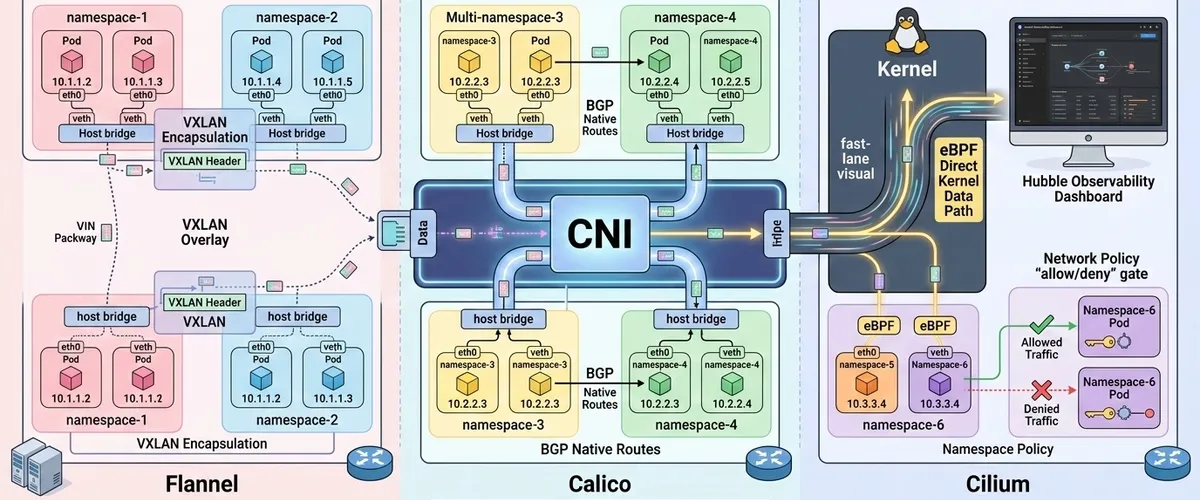
Flannel is the “old reliable” of the group. It’s very easy to set up and uses an overlay network (usually VXLAN) to wrap your traffic and send it between nodes. It’s great for small clusters or development environments where you don’t need fancy security rules. The downside? It doesn’t support Network Policies natively, so you can’t easily block traffic between Pods.
Calico: the industry standard
Calico is incredibly versatile. It can run as an overlay, or it can use BGP to route traffic natively without the extra “wrapping” (encapsulation), which makes it very fast. It’s famous for its security engine that handles Network Policies well.
Cilium: the performance powerhouse
Cilium is the new favorite for high-performance clusters. It uses a Linux kernel technology called eBPF to handle packets. By working directly in the kernel, it skips a lot of the traditional networking overhead. It also gives you amazing visibility into what’s happening on your network through a tool called Hubble.
| Feature | Flannel | Calico | Cilium |
|---|---|---|---|
| Ease of use | Very high | Moderate | Moderate |
| Security policies | None (native) | Excellent | Advanced (L7) |
| Performance | Good | Very High | Elite |
| Resource cost | Very low | Moderate | Higher |
How does pod-to-pod communication actually work?
Let’s look at how a packet gets from Pod A to Pod B. Inside the Pod, there’s a virtual interface called eth0. This is connected to a “virtual cable” (a veth pair) that leads out to a bridge on the host node.
If Pod B is on the same node, the bridge just passes the packet over. But if Pod B is on a different node, things get interesting. Depending on your CNI, the packet might be:
- Encapsulated: Wrapped in a new packet (like an envelope) to be sent over the physical network.
- Routed: Sent directly if the physical network knows where the Pod IPs are.
You can check your Pod’s internal networking setup with a simple command:
# Look at the IP and routes inside a running podkubectl exec <pod-name> -- ip addr show eth0kubectl exec <pod-name> -- ip route showHow can you use network policies for security?
By default, every Pod in a cluster can talk to every other Pod. In a production environment, that’s a bit like leaving all your office doors unlocked. NetworkPolicy resources are how you lock those doors.
A Network Policy is basically a set of rules that says “only Pod A can talk to Pod B on port 80”. One thing to remember: these policies are “allow-lists.” Once you apply a policy to a Pod, everything else is blocked by default.
I always recommend starting with a “default-deny” policy. That way no traffic moves unless you specifically say it’s okay.
# A "Default Deny" policy that blocks all incoming and outgoing traffic in a namespaceapiVersion: networking.k8s.io/v1kind: NetworkPolicymetadata: name: default-deny namespace: my-appspec: podSelector: {} # This empty selector matches ALL pods in the namespace policyTypes: - Ingress - EgressOnce you’ve locked everything down, you can add specific “allow” rules for your services.
# This policy allows the 'frontend' to talk to the 'backend' on port 5432apiVersion: networking.k8s.io/v1kind: NetworkPolicymetadata: name: allow-frontend-to-backend namespace: my-appspec: podSelector: matchLabels: app: backend # The pods we are protecting ingress: - from: - podSelector: matchLabels: app: frontend # The only pods allowed to talk to them ports: - protocol: TCP port: 5432What’s the best way to handle multi-tenancy?
If you’re sharing a cluster between different teams (multi-tenancy), you need to make sure they don’t step on each other’s toes.
Namespaces are your first line of defense. They give you a way to logically group resources. You should combine these with Resource Quotas so one team doesn’t accidentally use up all the CPU or memory in the cluster.
For “hard” isolation, say if you’re running code for different customers, you might want node isolation. That keeps sensitive workloads off the same physical server as other tenants.
How do you debug connectivity issues when things go wrong?
When a connection fails, don’t just guess. Use a systematic approach. Start with the Pod and work your way out.
- Check the Pods: Are they running? Do they have IPs?
kubectl get pods -o wide- Check Endpoints: If you’re using a Service, are there actually Pods behind it?
kubectl get endpoints <service-name>- Use a debug Pod: I love using
netshoot. It’s a Pod packed with every networking tool you’ll ever need.
# Spin up a temporary debug pod to test connectionskubectl run debug-pod --rm -it --image=nicolaka/netshoot -- /bin/bash
# Inside the pod, you can test DNS and connectivitynslookup my-servicecurl -v http://my-service:8080
One common “gotcha” is the MTU (Maximum Transmission Unit). If your network uses an overlay (like VXLAN), it adds some extra data to every packet. If the total size goes over 1500 bytes, the packet might get dropped. If your small requests work but large file uploads fail, you’re probably hitting an MTU issue.
FAQ: Frequently Asked Questions on Kubernetes Networking
This is usually a DNS issue. First, check if your CoreDNS pods are actually running: kubectl get pods -n kube-system -l k8s-app=kube-dns. If they are, check their logs for errors.
Pod-to-Pod is direct. But Pods are ephemeral and their IPs change. Pod-to-Service uses a stable “ClusterIP” that stays the same, even if the underlying Pods are replaced.
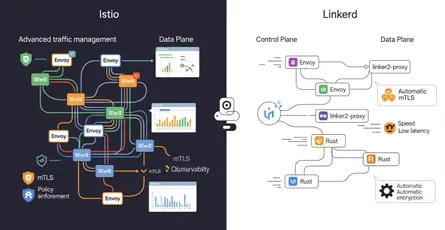
A Service Mesh like Istio or Linkerd is great for things like automatic encryption (mTLS) and advanced routing (like canary deployments). But they add complexity. If you just need basic connectivity, a good CNI and some Network Policies are often enough.
Nope. Kubernetes provides the model, but it needs a CNI plugin to actually do the work of connecting things.
You can use an Egress Network Policy. By specifying which internal CIDR ranges are allowed and leaving out everything else, you effectively block external access.
Pro tips for production networking
To wrap things up, here are a few best practices for your production clusters:
- Plan your IP space: Make sure your Pod and Service CIDR ranges are big enough for future growth.
- Use default-deny: It’s much safer to explicitly allow traffic than to try to block everything bad.
- Monitor latency: Tools like Cilium’s Hubble can show you exactly where packets are slowing down, which is a lifesaver when debugging performance issues.
Networking in Kubernetes is a deep topic, but if you focus on the basics of Pod IPs, CNI plugins, and Network Policies, you’ll be well on your way to mastering it.
References
- Cluster Networking | Kubernetes, accessed on March 7, 2026, https://kubernetes.io/docs/concepts/cluster-administration/networking/
- Network Plugins | Kubernetes, accessed on March 7, 2026, https://kubernetes.io/docs/concepts/extend-kubernetes/compute-storage-net/network-plugins/
- Container Network Interface (CNI) Specification - GitHub, accessed on March 7, 2026, https://github.com/containernetworking/cni
- Calico Documentation | Tigera, accessed on March 7, 2026, https://docs.tigera.io/calico/latest/about/
- Cilium Documentation, accessed on March 7, 2026, https://docs.cilium.io/
- Kubernetes Network Policy | Kubernetes, accessed on March 7, 2026, https://kubernetes.io/docs/concepts/services-networking/network-policies/
- Kubernetes Network Policy: Use Cases, Examples & Tips [2025] - Tigera.io, accessed on March 7, 2026, https://www.tigera.io/learn/guides/kubernetes-security/kubernetes-network-policy/
- ahmetb/kubernetes-network-policy-recipes - GitHub, accessed on March 7, 2026, https://github.com/ahmetb/kubernetes-network-policy-recipes
- Multi-tenancy | Kubernetes, accessed on March 7, 2026, https://kubernetes.io/docs/concepts/security/multi-tenancy/
- Debugging Kubernetes Networking | by Usha Nila - Medium, accessed on March 7, 2026, https://medium.com/@usha.nila/debugging-kubernetes-networking-c3d55f30dbaF
- How to Diagnose MTU Issues Causing Packet Fragmentation in Kubernetes - OneUptime, accessed on March 7, 2026, https://oneuptime.com/blog/post/2026-02-09-diagnose-mtu-packet-fragmentation/view
- Kubernetes DNS Troubleshooting: Causes & Best Practices - groundcover, accessed on March 7, 2026, https://www.groundcover.com/kubernetes-troubleshooting/dns-issues