Cloud computing changed how businesses pay for technology. Instead of a slow procurement cycle to buy physical servers, a single engineer can spin up thousands of dollars of infrastructure in minutes. That speed is the point. It is also how spending fragments and hides until it outpaces revenue. Cloud budgets get blown routinely, and a large share of every cloud bill goes to resources that sit idle or run far bigger than they need to.
What is FinOps and why does it go beyond cost dashboards?
FinOps, short for Financial Operations, is an operating model that brings finance, engineering, and business leadership into the same conversation about cloud spend. The goal is not to cut costs. It is to get the most business value from every dollar of cloud investment and keep innovation financially sustainable.
Plenty of teams think they are doing FinOps because they opened a dashboard in AWS Cost Explorer. Visibility alone does not change behavior. Hand an engineering team an aggregated monthly bill and you have given them a number, not a decision. A mature practice turns that number into unit economics: cost per customer transaction, cost per active user. Now infrastructure spend reads as a variable tied to business value instead of vague overhead.
The work usually moves through three phases, and you cycle back through them: Inform, Optimize, Operate. Make spend visible, improve efficiency, then bake cost awareness into daily engineering rituals.
How do you implement tagging strategies that drive cost attribution?
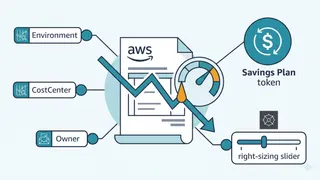
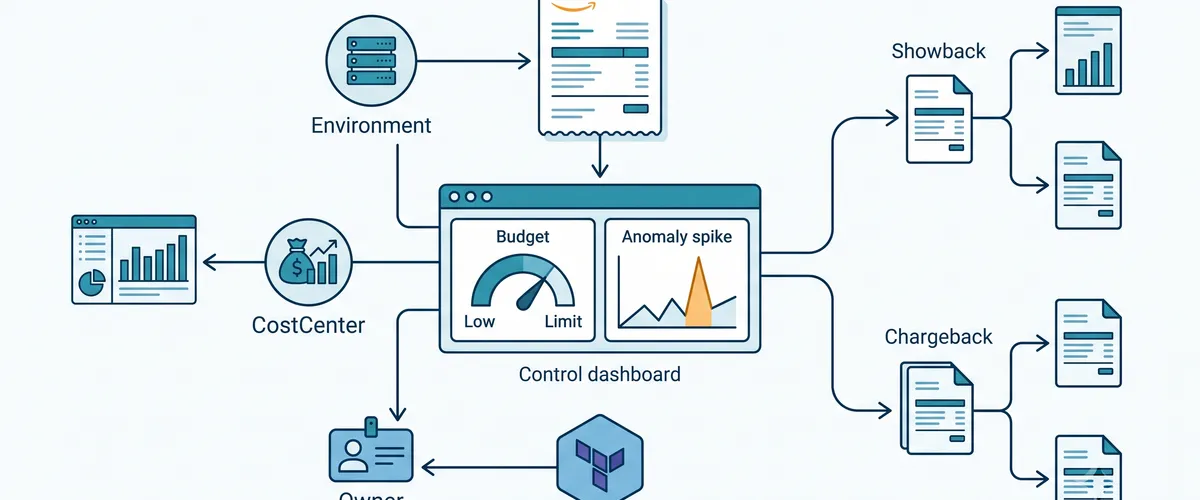
Accurate cost attribution is the backbone of cloud financial management. Without consistent metadata on your resources, reports turn into noise. You cannot map costs to a team, product, or environment when nothing is labeled.
A good tagging strategy balances governance against developer experience. Mandate twenty tags on day one and teams will route around every rule. Start with a small, focused set of mandatory tags instead.
| Tag Key | Example Values | Purpose |
|---|---|---|
CostCenter | Engineering, Marketing | Maps infrastructure to internal accounting for chargeback. |
Environment | Dev, Staging, Prod | Drives per-environment budgets and automated shutdown of non-prod resources. |
Application | PaymentAPI, UserPortal | Enables application-level cost analysis and unit economics. |
Owner | [email protected] | Names the team accountable for the resource. |
ManagedBy | Terraform, CloudFormation | Records how the resource was provisioned, flagging manual console changes. |
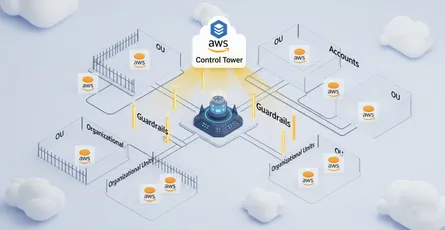
Manual tagging fails at scale. Enforce tags programmatically with AWS Organizations, Service Control Policies, and Infrastructure as Code.
-
Define Organizational Tag Policies. AWS Organizations Tag Policies set the acceptable keys and values across your whole footprint. You can require that any
Environmenttag uses exactlyDev,Staging, orProd, which stops messy variants likeproductionorPROD. -
Add Service Control Policies (SCPs). SCPs block non-compliant resources before they exist. An SCP can deny
ec2:RunInstanceswhen a required tag is missing. -
Embed tags in Infrastructure as Code. Terraform applies default tags to every resource in a provider configuration, giving you a consistent baseline.
-
Validate in the pipeline. Check Terraform plans against your policies before deployment, so compliance issues surface in CI rather than in the bill.
The default_tags block on the AWS provider is the cheapest win here. Every resource created through that provider inherits the tags automatically.
provider "aws" { region = "us-east-1"
default_tags { tags = { Environment = "Prod" CostCenter = "1001" ManagedBy = "Terraform" } }}
# This EC2 instance inherits the provider's default_tags automatically.resource "aws_instance" "app_server" { ami = "ami-0c55b159cbfafe1f0" instance_type = "t3.medium"}Tip
Tag Policy enforcement lives in AWS Organizations, not in the Terraform
provider. Pair default_tags for the baseline with an Organizations Tag
Policy (and an SCP) so drift gets caught centrally. In multi-team setups, a
platform team usually ships a shared Terraform tagging module so the taxonomy
stays identical everywhere.
How do you set up AWS Cost Explorer, Budgets, and anomaly detection?
Even with perfect tagging, costs spike. A misconfigured auto-scaling group, an accidental deploy to an expensive instance type, or a runaway serverless loop can run up a large bill overnight. You need automated guardrails to catch these before the invoice does.
AWS Cost Anomaly Detection uses machine learning to learn your spending baseline. When something unusual shows up, like a sudden jump in data transfer, it alerts you within hours instead of at month end. Monitors are either DIMENSIONAL (scoped to services or linked accounts) or CUSTOM (scoped to cost allocation tags or categories). Build them in Terraform and every new project ships with a tripwire already armed.
# Service-level anomaly monitorresource "aws_ce_anomaly_monitor" "service_monitor" { name = "Core-Services-Anomaly-Monitor" monitor_type = "DIMENSIONAL" monitor_dimension = "SERVICE"}
# Alert the FinOps team when an anomaly's impact exceeds $100resource "aws_ce_anomaly_subscription" "finops_alerts" { name = "FinOps-Critical-Alerts" frequency = "DAILY" monitor_arn_list = [aws_ce_anomaly_monitor.service_monitor.arn]
subscriber { type = "EMAIL" }
threshold_expression { dimension { key = "ANOMALY_TOTAL_IMPACT_ABSOLUTE" values = ["100"] match_options = ["GREATER_THAN_OR_EQUAL"] } }}Anomaly Detection catches the unexpected. AWS Budgets tracks planned spend against a fixed limit and alerts you when forecasted costs cross your monthly allocation. You can create one from the CLI:
aws budgets create-budget \ --account-id 111122223333 \ --budget '{ "BudgetName": "MonthlyBudget", "BudgetLimit": { "Amount": "1000", "Unit": "USD" }, "TimeUnit": "MONTHLY", "BudgetType": "COST" }'Chargeback vs. showback: how do you choose?
Visibility is only the first phase. Next you have to fold those numbers into how the organization actually behaves, and that means picking a showback or chargeback model.
Showback is a reporting mechanism. You show each engineering and product team the cost their workloads generate, but central IT or finance still pays the unified bill. It is the safer place to start. It builds financial awareness and drives optimization without starting turf wars over internal billing.
Chargeback goes further and cross-charges cloud spend straight to each business unit’s profit and loss. Accountability gets real. Over-provision an expensive database fleet and your own budget takes the hit.
Careful here
Chargeback needs very high tagging compliance, and 100% is rarely realistic because of shared resources like transit gateways or multi-tenant Kubernetes clusters. AWS Cost Categories helps. It is a rules engine at the billing level that maps spend to your org structure by logic, so it can absorb minor tagging gaps and keep chargebacks reliable.
How do you optimize with Reserved Instances, Savings Plans, and Spot strategies?
Once visibility and accountability are running, you tune unit economics with commitment-based discounts. Choosing the right one is a trade between how deep the discount goes and how much flexibility your architecture keeps.
| Instrument | Max Discount | Flexibility | Best fit |
|---|---|---|---|
| Compute Savings Plans | ~66% | Very high. Applies across any region, instance family, OS, Fargate, and Lambda. | Dynamic workloads, serverless, and architectures still being modernized (for example, moving to Graviton). |
| EC2 Instance Savings Plans | ~72% | Moderate. Locked to an instance family and region, flexible on size and OS. | Stable EC2 workloads that will not change architecture or region during the term. |
| Standard Reserved Instances | ~75% | Rigid. Locked to instance type, region, OS, and tenancy. Zonal RIs also reserve capacity. | Legacy, ultra-stable environments and mission-critical databases needing capacity guarantees. |
| Database Savings Plans | ~35% | High. Applies across eligible engines (Aurora, RDS, ElastiCache, OpenSearch, and more), regions, and sizes. | Multi-engine database estates that change often. 1-year, No Upfront terms. |
The common mistake is chasing the biggest headline discount for a workload you are about to modernize. Buy a 3-year EC2 Instance Savings Plan for the m5 family, then migrate the app to m7g Graviton for better price-performance, and the m5 commitment is stranded. You pay for it anyway. The small premium on a Compute Savings Plan is cheap insurance against exactly that.
Database Savings Plans extend the flexible, spend-based model to the data tier. Covering engines including Aurora, RDS, and OpenSearch, they reach roughly 35% on a 1-year, No Upfront basis, which suits teams whose database mix keeps shifting.
Keeping discounts fair with RISP group sharing
In a multi-account AWS Organization, Consolidated Billing aggregates usage and automatically applies unused Savings Plans or RIs from one account to eligible usage in another. That maximizes total savings, but it breaks strict chargeback: a business unit that funded a 3-year commitment can watch its discount land on another department’s workloads.
RISP (Reserved Instances and Savings Plans) group sharing, built on Cost Categories, fixes that with two modes:
-
Prioritized group sharing. Commitments apply first to the purchasing account, then to its defined group (say, one business unit), and only spill over to the rest of the org if capacity is left.
-
Restricted group sharing. Commitments stay isolated inside the defined group. Unused capacity does not spill over, which keeps budgets fully segregated.
Set those boundaries and FinOps teams can keep chargeback accurate while the departments that fund a commitment actually benefit from it.
How do you make engineering teams responsible for their cloud spend?
Tooling is the foundation. Adoption is cultural. Keep cost management locked inside finance and engineers will treat it as someone else’s constraint bolted on from outside. Accountability comes from folding cost awareness into the engineering lifecycle itself.
Shift cost left. Let engineers see the financial impact of a design before it ships. Wire cost estimation into pull requests so a change to a Terraform template shows its effect on the monthly bill right there in review. Treat cost as a first-class design constraint next to security and performance.
Define service ownership. Every significant resource or microservice needs a named owner, accountable for its cost efficiency as well as its uptime.
Make the rituals real. Cost reviews should not be an annual budgeting event. Put cost metrics into sprint reviews and operational readiness checks. Track things like tag coverage and how long it takes to remediate an anomaly.
Make spend visible, attribute it accurately with disciplined tagging, automate the guardrails, and align your discount strategy with your architecture roadmap. Do that and the cloud bill stops being a monthly surprise and becomes a number you can forecast and defend. The cloud gives you the flexibility to move fast. FinOps gives you the discipline to keep doing it sustainably.
Frequently Asked Questions
Cost Explorer gives you visibility, which is the starting line, not the finish. FinOps is the operating model on top of it: turning the aggregated bill into unit economics, assigning ownership, automating guardrails, and building rituals so teams change what they provision. A dashboard reports the number. FinOps changes the behavior behind it.
Start with showback. It shows each team the cost of its own workloads while finance still pays the unified bill, so you build awareness without triggering fights over internal billing. Move to chargeback only once your tagging is trustworthy and shared-cost allocation (via AWS Cost Categories) is in place.
Reserved Instances and EC2 Instance Savings Plans offer deeper discounts but lock you to an instance family and region. If you later migrate, for example to Graviton, that commitment is stranded and you keep paying for it. A Compute Savings Plan gives up a few points of discount for flexibility across families, regions, Fargate, and Lambda. For any workload you plan to modernize, that flexibility is cheap insurance.
Keep the mandatory set small, around five tags, and enforce it in code rather than by policy memo. Use the provider’s default_tags for a baseline, AWS Organizations Tag Policies for allowed keys and values, and an SCP to block non-compliant resources. Validate Terraform plans in CI so problems surface in review, not in production or on the invoice.
RISP group sharing controls how Reserved Instances and Savings Plans are shared across a multi-account AWS Organization. By default, Consolidated Billing spreads unused commitments anywhere in the org, which breaks strict chargeback. Prioritized sharing keeps commitments with the purchasing account and its group first; restricted sharing isolates them entirely. Use it when a business unit funds its own commitments and needs to see the benefit land on its own budget.
References
- AWS Organizations Tag Policies and Service Control Policies
- Terraform AWS provider:
default_tagsand cost-management resources - AWS Cost Anomaly Detection with Terraform (
aws_ce_anomaly_monitor,aws_ce_anomaly_subscription) - Managing costs with AWS Budgets from the AWS CLI
- Savings Plans vs. Reserved Instances decision guide
- AWS Database Savings Plans announcement
- Cross-account sharing and Consolidated Billing in AWS
- FinOps Foundation: framework and cultural practices