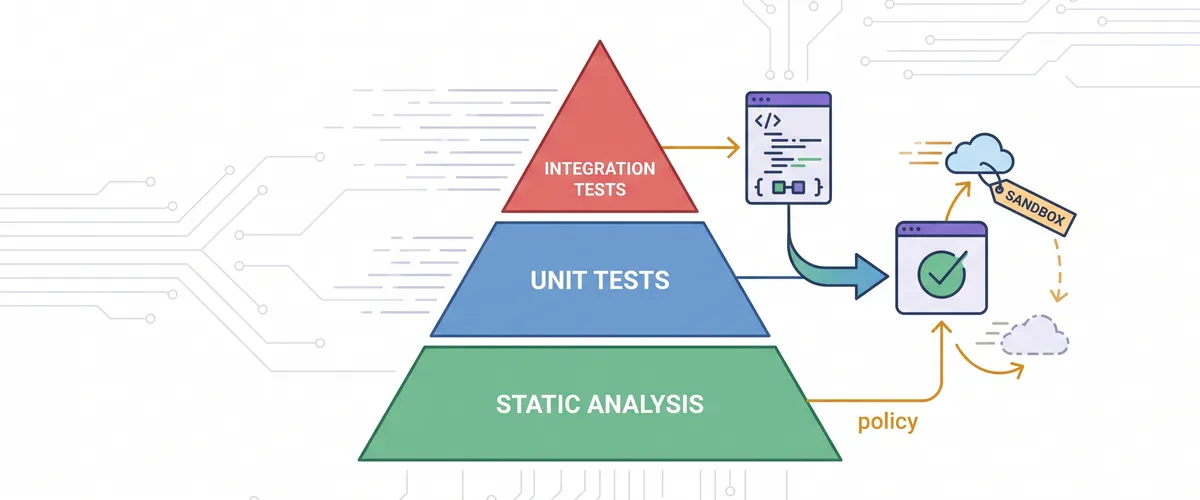
If you treat infrastructure as code, you have to test it like code. Most of us have lived the alternative. You change one input on a shared module, run a quick plan against staging, and merge. A few hours later you learn that the harmless change replaced a database because of a dependency you did not see in the plan. Manual review and eyeballing plan output do not catch that class of regression. Infrastructure needs an automated testing strategy, and Terraform now gives you enough tooling to build a real one.
Why infrastructure code needs testing
Application teams lean on automated tests to catch regressions before a merge. Infrastructure teams often lean on intuition and a manual deploy check instead, which gives you slow feedback and fragile environments.
Testing infrastructure validates your logic, blocks misconfigurations, and speeds up review. Good tests also double as documentation: if someone edits a routing module next year, the tests tell them immediately when they break network isolation. The point is confidence that the code does what you expect, even as provider versions bump and cloud APIs shift under you.
The Terraform testing pyramid
Infrastructure testing works best as a pyramid, same as application testing. The base is fast and cheap and runs constantly. As you move up, tests get more thorough but cost more time and money.
| Layer | Tools | Speed | Cost | Purpose |
|---|---|---|---|---|
| Static analysis | terraform validate, tflint | ms | free | Syntax, naming, missing vars, provider rules, no cloud calls |
| Unit tests | native terraform test | seconds | free | Inputs, outputs, conditional logic with mocked providers |
| Integration | Terratest (Go) | minutes | cloud fees | Provision real resources and confirm the cloud accepts them |
A real strategy uses all three: catch syntax on your machine, validate logic in the pull request, and verify a true deployment before you tag a module version.
Static analysis: catch errors before the cloud does
The base of the pyramid parses your config and looks for problems without ever calling your provider.
Start with terraform validate. It checks syntax, confirms required arguments are present, and makes sure variable references resolve. It has limits, though: it does not know whether an instance type actually exists or whether your tags follow policy.
For the deeper checks, add tflint, a pluggable linter that inspects provider-specific rules. It catches things like an invalid EC2 instance type or deprecated syntax that basic validation misses. Configure it with a .tflint.hcl at the repo root:
plugin "terraform" { enabled = true preset = "recommended"}
plugin "aws" { enabled = true version = "0.30.0" source = "github.com/terraform-linters/tflint-ruleset-aws"}Keep the fast checks one command away locally so you run them without thinking:
terraform fmt -recursiveterraform init -backend=false # no remote state needed just to validateterraform validatetflint --init && tflint -f compactTip
Run terraform init -backend=false for validation and unit tests. It fetches providers and modules so the config can be evaluated, without touching remote state or needing cloud credentials.
Unit tests with native terraform test
For years, testing Terraform meant reaching for a third-party tool. That changed in Terraform 1.6, which added a native test framework, followed by provider mocking in 1.7. Native tests use HCL, so you do not learn a new language just to test a module.
Tests live in files ending in .tftest.hcl, and terraform test discovers them automatically. A common layout keeps them in a tests/ directory next to the module:
Directorymodules/
Directorys3-bucket/
- main.tf
- variables.tf
- outputs.tf
Directorytests/
- bucket_naming.tftest.hcl
- bucket_mocked.tftest.hcl
Here is a unit test for a module that builds an S3 bucket name from variables. Because it is a unit test, we do not want to create anything, so command = plan runs the plan in memory and we assert against the planned values.
variables { bucket_prefix = "my-application" environment = "prod"}
run "validates_bucket_name_format" { command = plan
assert { condition = aws_s3_bucket.main.bucket == "my-application-prod-bucket" error_message = "The S3 bucket name did not match the expected naming convention." }}terraform test builds the plan and evaluates each assert. If a condition is false, the run fails and prints your message. You can also assert on outputs with a full apply when you want to check computed values that only exist after creation:
run "exposes_bucket_arn_output" { command = apply
assert { condition = can(regex("^arn:aws:s3:::", output.bucket_arn)) error_message = "bucket_arn output is not a valid S3 ARN." }}Mock providers so tests need no cloud credentials
A plan still authenticates to the provider to refresh state and read schemas. To run fully offline, or in CI without credentials, use mock_provider. It returns the real provider schema but generates fake data for computed attributes instead of calling the cloud.
mock_provider "aws" { override_during = plan # generate mock values during the plan phase}
variables { bucket_prefix = "test" environment = "dev"}
run "test_with_mocks" { command = plan
assert { condition = aws_s3_bucket.main.bucket == "test-dev-bucket" error_message = "Bucket name mismatch under mocks." }}With mocks, Terraform fills computed attributes with placeholders: 0 for numbers, false for booleans, and a random 8-character string for strings. When your logic depends on a specific computed value, pin it with override_resource so the assertion is deterministic:
run "uses_known_arn" { command = plan
override_resource { target = aws_s3_bucket.main values = { arn = "arn:aws:s3:::my-application-prod-bucket" } }
assert { condition = aws_s3_bucket.main.arn == "arn:aws:s3:::my-application-prod-bucket" error_message = "The overridden ARN was not used." }}Integration tests with Terratest in Go
Unit tests are fast, but they cannot promise the cloud will accept your config. A plan can pass and still fail on apply because of an IAM permission, a quota, or an API constraint. For real confidence you provision actual resources, check them, and tear them down. Terratest is the standard tool for that, and it runs in Go.
package test
import ( "fmt" "strings" "testing"
"github.com/gruntwork-io/terratest/modules/random" "github.com/gruntwork-io/terratest/modules/terraform" "github.com/stretchr/testify/assert")
func TestTerraformAwsInstance(t *testing.T) { t.Parallel() // run alongside other independent tests
// Randomize names so parallel runs never collide. uniqueID := strings.ToLower(random.UniqueId())
terraformOptions := &terraform.Options{ TerraformDir: "../../modules/ec2_instance", Vars: map[string]interface{}{ "instance_type": "t2.micro", "name": fmt.Sprintf("terratest-%s", uniqueID), "environment": "testing", }, }
// `defer` guarantees cleanup even if an assertion fails or panics. defer terraform.Destroy(t, terraformOptions)
terraform.InitAndApply(t, terraformOptions)
instanceID := terraform.Output(t, terraformOptions, "instance_id") assert.NotEmpty(t, instanceID, "The EC2 instance ID should not be empty")}The defer terraform.Destroy(...) line is the important one. In Go, defer runs at the end of the function no matter how it exits, so the resources come down even when the test fails partway through. That is what keeps a failed run from leaving you a bill.
Spinning resources up and down safely
Testing against a real cloud adds real risks. Two tests that create resources with the same name collide. A crashed runner skips the destroy and leaves you paying for idle infrastructure. A few habits keep it safe.
- Randomize resource names. Never use static strings in integration tests. Feed a unique id (
random.UniqueId()) into your module variables so parallel runs do not collide. - Use a dedicated test account. Never run automated integration tests in production or staging. Keep a separate AWS account or Azure subscription for CI.
- Run tests in parallel. Cloud provisioning is slow, so use
t.Parallel()on independent tests to cut total pipeline time. - Add a cleanup safety net. When a runner crashes,
defernever runs. Schedule a nightly cron with a sweeper (for examplecloud-nuke) to delete leftover resources in the test account.
Wire it into GitHub Actions
Tests only help if they run every time. Put the whole pyramid in CI so it fires on every pull request. For cloud auth, do not store long-lived AWS keys as secrets. Use OpenID Connect so the workflow requests short-lived, temporary credentials at run time.
name: Terraform Module CI
on: pull_request: paths: ['**/*.tf', '**/*.tftest.hcl', '**/*_test.go']
# Required for OIDC: let the workflow mint an ID token.permissions: id-token: write contents: read
jobs: static-and-unit: name: Format, Lint, Unit Test runs-on: ubuntu-latest steps: - uses: actions/checkout@v4 - uses: hashicorp/setup-terraform@v3 with: terraform_version: 1.8.0 - name: Check formatting run: terraform fmt -check -recursive - uses: terraform-linters/setup-tflint@v4 with: tflint_version: latest - name: Lint run: | tflint --init tflint -f compact - name: Unit tests (mocked, no cloud creds) run: | terraform init -backend=false terraform test
integration: name: Terratest Integration needs: static-and-unit runs-on: ubuntu-latest steps: - uses: actions/checkout@v4 - name: Configure AWS credentials via OIDC uses: aws-actions/configure-aws-credentials@v4 with: role-to-assume: arn:aws:iam::123456789012:role/github-actions-terratest aws-region: us-east-1 - uses: actions/setup-go@v5 with: go-version: '1.22' - name: Run Terratest working-directory: ./tests/integration run: go test -v -timeout 45mWith this in place, no broken syntax, failing logic, or apply-blocking error reaches main. Reviewers spend their time on architecture instead of hunting for a misspelled variable.
Frequently Asked Questions
Yes, for different jobs. Native terraform test is fast unit testing of your logic, especially with mocked providers, and it is free. Terratest provisions real resources and checks them through the cloud SDK, which is the only way to catch apply-time failures like IAM or quota issues. Use native tests for logic and Terratest for the real deployment.
command = plan evaluates a plan in memory and asserts against planned values, so nothing is created. command = apply actually applies the config, which lets you assert on computed outputs that only exist after creation. Plan runs are the default choice for fast unit tests; apply runs cost time and, without mocks, real resources.
Yes. Add a mock_provider block. It returns the provider schema but generates fake values for computed attributes instead of calling the cloud, so the test runs fully offline. Use override_resource when a specific computed value needs to be deterministic.
Three things: defer terraform.Destroy(...) so cleanup runs even on failure, unique resource names so parallel runs do not collide, and a nightly sweeper (like cloud-nuke) in the dedicated test account to catch anything a crashed runner leaves behind.
Long-lived keys stored as secrets are a standing liability: if they leak, they work until someone rotates them. OIDC establishes a trust relationship so the workflow requests short-lived credentials at run time, scoped to a specific role. Nothing durable to steal.
Always in a dedicated, isolated account or subscription, never production or staging. Give the CI role only the permissions the tests need, and keep the blast radius of a bad test inside that sandbox.