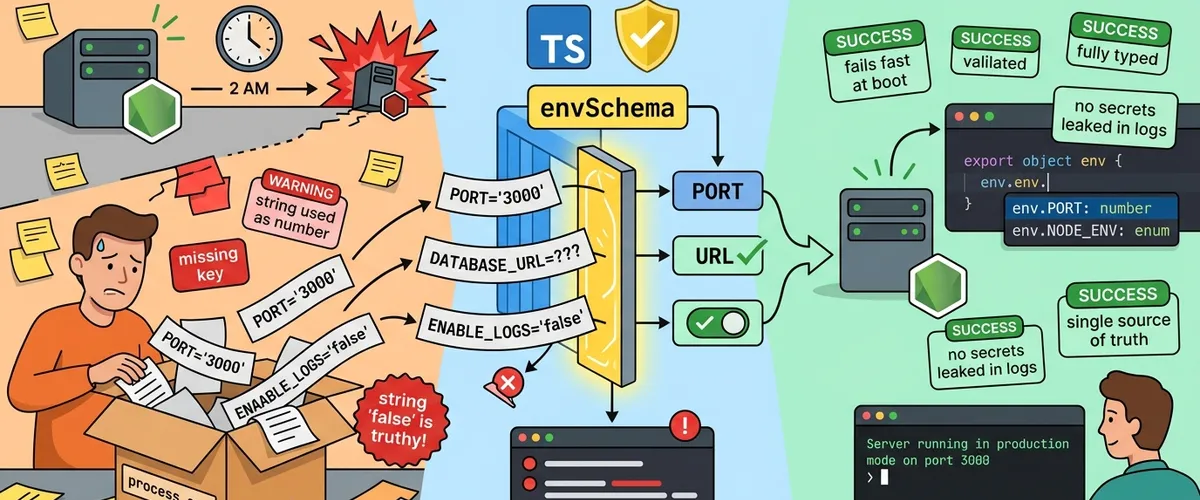
Most Node.js apps treat process.env like a trusted friend. You reach into it whenever you need a value, assume the key is there, assume it’s spelled right, and assume the string is actually the type you want. Since process.env hands you everything as a plain string, you end up parsing ports into integers and turning "false" into a real boolean all over the codebase.
The fix is small and boring in the best way: validate your environment once, at startup, with a schema. If the config is wrong, the app refuses to boot and tells you exactly what’s broken before a single request is served. Here’s how to do it with Zod and a little bit of TypeScript.
The Problem
Why does reading straight from process.env keep biting you?
Silent configuration drift
The Problem In most Node.js apps it is normal to grab values straight from process.env whenever and wherever you need them. You probably load these into your environment from a local file, but that setup never actually checks if your data makes sense. Your code just assumes every setting is present, spelled correctly, and formatted right. And because process.env treats everything as a string, you find yourself parsing variables by hand all over the place. That’s where subtle bugs creep in: maybe you forgot to parse a port into an integer, or a string that says "false" gets evaluated as truthy.
The real-world impact
When these settings break, your application usually doesn’t crash right away. Instead, you get painful runtime errors much later. Miss a database URL or an API key, and your server might start up perfectly fine. It’s only hours later, when a user triggers a specific request, that the app suddenly blows up. These delayed failures make debugging a nightmare because the crash happens far from the actual mistake.
Careful here
Hunting for a one-character typo in your environment config during a live production outage is exactly the kind of 2 AM stress nobody signed up for. The earlier you catch it, the cheaper it is.
The Solution
How do you catch bad config before the app even starts?
The startup schema assertion
To put an end to this, set up a validation schema that runs the second your application boots. With Zod, you write a clear, strict schema describing exactly what your environment should look like. This runs before any of your server logic starts, so an invalid configuration won’t let the app launch at all. Zod checks the values and converts strings into real numbers, booleans, or objects.
It helps to picture it as a mapping. Your raw environment is just string keys paired with string values pulled from :
Zod’s parser maps that loose, unstructured data into a strictly typed configuration space :
where is the valid typed domain for each key, such as for ports, a format-compliant URI for the database connection, or a value from a fixed enum.
Tip
The Fix: one schema, verified the moment your app turns on. The rest of your system then works with safe, fully typed values instead of messy raw strings.
Quick takeaways
Where this fits in your project
Before the code, here’s where each piece lives.
Directoryyour-app/
Directorysrc/
- env.ts the schema and the validated env export
- index.ts imports env at the very top
- server.ts uses the typed config
- .env local values, gitignored
- .env.example documented keys, committed
- package.json
The whole trick is that env.ts runs its validation on import, so importing it from your entry file is what makes a broken config stop the boot.
Building the validator
Four small pieces, wired together once.
First, install Zod (and dotenv so you can load a local .env while developing):
npm install zod dotenvpnpm add zod dotenvyarn add zod dotenvbun add zod dotenvNow build it up step by step.
- Load the local environment. Pull
.envintoprocess.envbefore anything else runs, and bring in Zod.
import dotenv from 'dotenv';import {z} from 'zod';
// Load our local .env file before we validate anythingdotenv.config();- Declare a strict schema. Spell out every variable you need and the type you expect. Zod handles strings, coerced numbers, booleans, and custom enums for you, and
z.infergives you a matching TypeScript type for free.
// Define the validation rules and expected types for our variablesexport const envSchema = z.object({ NODE_ENV: z .enum(['development', 'production', 'staging', 'test']) .default('development'), PORT: z.coerce.number().min(1).max(65535).default(3000), DATABASE_URL: z .string() .url({message: 'DATABASE_URL must be a valid connection URL'}), JWT_SECRET: z .string() .min(32, {message: 'JWT_SECRET must be at least 32 characters long'}), ENABLE_LOGS: z.preprocess((val) => val === 'true', z.boolean()).default(true),});
// Infer the strict TypeScript type directly from our schemaexport type EnvConfig = z.infer<typeof envSchema>;- Parse once and fail loudly. Run the schema against
process.env. If anything is wrong, print a clean list of issues and exit before the server starts.
// Parse the environment and handle any validation failures gracefullyconst validateEnv = (): EnvConfig => { const result = envSchema.safeParse(process.env);
if (!result.success) { console.error('Environment validation failed during boot:');
// Print each issue clearly without leaking any sensitive data result.error.issues.forEach((issue) => { const propertyPath = issue.path.join('.'); console.error(` - [${propertyPath}]: ${issue.message}`); });
// Terminate the process immediately process.exit(1); }
return result.data;};
// Export our validated configuration so the rest of the app can use itexport const env = validateEnv();- Import it at the very top of your entry file. Because validation runs on import, a broken config stops the process before
app.listenis ever reached.
import {env} from './env';import express from 'express';
const app = express();
// The port is now guaranteed to be a valid, parsed numberapp.listen(env.PORT, () => { console.log(`Server is running in ${env.NODE_ENV} mode on port ${env.PORT}`);});Usage and Benefits
What do you actually get out of this?
Architectural advantages
Why This Helps This pattern saves you from writing repetitive null checks and manual parsing logic throughout your codebase. You don’t have to wonder whether a variable is undefined or whether a port was correctly parsed into a number. Some developers prefer to extend the global ProcessEnv type in TypeScript for editor autocomplete, but that only helps at compile time. It won’t stop a runtime error when a variable is missing or a boolean string is parsed incorrectly. By validating at startup, you get both editor autocomplete and guaranteed runtime safety.
Diagnostic console output
If you miss a variable or format one incorrectly, the app halts immediately and prints a neat, readable error message. This feedback makes it easy to see exactly what went wrong so you can fix it right away.
$ npm run dev
Environment validation failed during boot: - [DATABASE_URL]: DATABASE_URL must be a valid connection URL - [PORT]: Number must be less than or equal to 65535 - [JWT_SECRET]: JWT_SECRET must be at least 32 characters longWorth knowing
Notice the output shows the field path and the message, never the value. A bad
JWT_SECRET or DATABASE_URL won’t end up in your production logs.
Comparing validation approaches
Is Zod really the best fit, or just the popular one?
Here’s a quick look at how Zod stacks up against other common ways developers handle configuration checks.
| Validation Pattern | Type Safety (TypeScript) | Automatic Coercion | Boilerplate Required | Error Output Detail |
|---|---|---|---|---|
| Zod Schema | Native type inference | High, built-in | Low definition overhead | Detailed, structured issues |
| Joi Library | Requires manual types | Moderate | Medium validation block | Detailed schema errors |
| Custom Script | Manual type assertions | Manual conversion code | High custom coding | Whatever you write yourself |
Manual scripts and older libraries get the job done, but Zod gives you full TypeScript inference, automatic coercion, and clean error reporting with almost no extra work.
Frequently Asked Questions
Just once, at startup. Validate in a single env.ts module, export the typed env object, and import that everywhere else instead of reading process.env directly. Because the validation runs on import, the check happens exactly one time as the app boots, and every other file consumes already-safe values.
Use Zod’s .optional() for values that may be absent and .default(...) for ones that should fall back to a known value. For example, PORT: z.coerce.number().default(3000) means a missing PORT quietly becomes 3000, while DATABASE_URL: z.string().url() stays required and fails the boot if it’s missing or malformed.
Yes, that’s one of the best parts. z.infer<typeof envSchema> produces a TypeScript type that matches your schema exactly, so the exported env object is fully typed: env.PORT is a number, env.NODE_ENV is the enum, and so on. You get autocomplete and compile-time checks without manually maintaining a separate type.
No. The error handler only logs each issue’s path and message (for example [JWT_SECRET]: must be at least 32 characters long), never the actual value. Your secrets stay out of the logs even when validation fails, which keeps the output safe to surface in CI and production.
This pattern is built for server-side Node.js. In the browser, secrets should never ship in the bundle at all, so rely on your framework’s public-env mechanism instead (like NEXT_PUBLIC_ variables or import.meta.env). Keep this Zod schema on the server, and only expose the handful of values that are genuinely safe for the client.
The core idea is the same: assert your config against a schema at startup. Zod’s edge is native TypeScript inference (no separate type definitions), built-in coercion, and the fact that many projects already use Zod for request and form validation. Reusing one library for both means less to learn and one consistent way to describe data.
References
- Validating Environment Variables in Node.js with Zod - DEV Community
- Environment variables type safety and validation with Zod - creatures.sh
- Ensuring Environment Variable Integrity with Zod in TypeScript - DEV Community
- Validating Environment Variables Like a Pro: Using Zod in Node.js - Medium
- Type-Safe Environment Variables in Node.js with Zod - DEV Community
- How to Configure Node.js for Production with Environment Variables - OneUptime