Ruby on Rails: Convention Over Configuration
Ruby on Rails: Convention Over Configuration
Up to 20 questions, shuffled on every run
Rails is productive because it decided things for you. The router derives a controller and action from a verb and a path, the controller infers its template from its own name, and Active Record infers table names, column types and primary keys from the schema. You get a lot for very little typing, and the same trade means debugging Rails often requires knowing which convention is quietly in play.
This quiz targets the places where those conventions have sharp edges: the difference between save and save! inside a transaction, why editing a migration that already ran is a bad idea, and how includes turns 101 queries into 2.
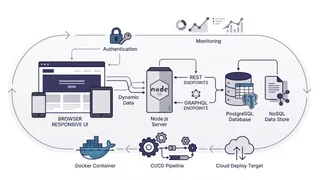
Several questions here are really about production behaviour rather than syntax, so it is worth seeing where each Rails piece lands when you deploy it. The web and worker processes come from the same image and scale separately, migrations run as a one-off task rather than in an entrypoint, and Puma’s thread count multiplied by your replica count has to stay under the database connection limit.
Read the explanations even on the questions you get right. Most of them name a specific failure mode rather than restating the correct answer, and those failure modes are the reason the distinction exists.
Answer key and explanations12 questions
The quiz above draws 12 questions at random from these 12, so a second attempt will not be the same run. Everything in the pool is listed here.
In Rails MVC, where does business logic belong?
AnswerIn the model, or in service objects the model layer owns
Controllers coordinate: they receive params, invoke domain behaviour, and pick a response. Logic in a controller cannot be reused by a background job, a rake task, or a different endpoint, and it is awkward to test. "Fat model, skinny controller" is the traditional phrasing; on larger apps the model layer often grows into service objects and POROs rather than one enormous class.
What does `resources :articles` generate in `config/routes.rb`?
AnswerSeven routes: index, new, create, show, edit, update, destroy
It generates seven routes mapping to index, new, create, show, edit, update and destroy. There are seven actions but only four distinct URL patterns, because show, update and destroy all live at /articles/:id and are distinguished by HTTP verb. Use `only:` or `except:` to generate a subset rather than declaring routes you never implement.
What is the difference between `has_many :through` and `has_and_belongs_to_many`?
Answer`:through` uses a real model for the join, so the relationship can carry its own attributes
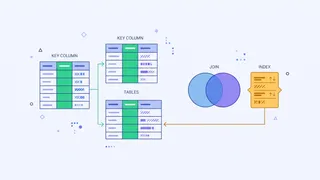
`has_and_belongs_to_many` uses a plain join table with no model, so the relationship can hold no data of its own. `has_many :through` routes the association through a real model, so the join can have its own columns, validations, callbacks and timestamps. Since almost every many-to-many relationship eventually needs an attribute on the join, `:through` is the safer default.
What does `Article.includes(:author)` do that `Article.all` does not?
AnswerIt loads authors up front, replacing N+1 queries with a fixed small number
It eager loads the association, turning the N+1 pattern into a fixed number of queries. Without it, iterating 100 articles and reading `article.author` issues 1 query for articles plus 100 for authors. With it, Rails issues 2 queries and matches the records in memory. Note that `includes` decides between a separate query and a LEFT OUTER JOIN depending on context; use `references` when you need to filter on the joined table.
A migration has been run in production. What is the correct way to change it?
AnswerWrite a new migration that makes the additional change
Write a new migration. Rails records applied migrations by timestamp in `schema_migrations`, so editing an already-run migration leaves your database in a state the file no longer describes, and anyone who already ran it never picks up the change. `rails db:rollback` then editing is acceptable locally, before the migration has been shared or deployed, and never after.
What happens when a `before_action` callback calls `redirect_to`?
AnswerThe chain halts and the controller action is never executed
The filter chain halts and the action never runs. Any callback that renders or redirects stops the chain, which is exactly the mechanism `authenticate_user!` relies on. If a callback needs to stop processing without rendering, it must call `head :forbidden` or similar, because a callback that neither renders nor redirects lets the action proceed.
What is the difference between `save` and `save!` on an Active Record model?
Answer`save` returns false on validation failure, `save!` raises an exception
`save` returns false when validation fails, so you must check the return value or the failure passes silently. `save!` raises `ActiveRecord::RecordInvalid`. The bang versions matter inside transactions and background jobs: an unchecked `save` that fails will let a transaction commit as if everything worked, whereas the raise triggers a rollback.
Which of these Active Record calls skips validations and callbacks?
Answer`update_column`
`update_column` writes directly with a single UPDATE, skipping validations, callbacks and the updated_at timestamp. `update` and `update_attribute` differ subtly: `update` runs validations, while `update_attribute` skips validations but still runs callbacks and touches timestamps. These distinctions are a frequent source of bugs where a model reaches an invalid state without any error.
What does `strong parameters` protect against?
AnswerMass assignment of parameters the developer never intended to expose
It prevents mass assignment of attributes you did not explicitly permit. Without it, a crafted request containing `user[admin]=true` would set that column if it exists. `params.require(:user).permit(:name, :email)` allows exactly those keys and drops anything else, so adding a sensitive column to a table does not silently make it settable from a form.
In a Rails app, what is the practical difference between `Rails.cache` and a Sidekiq queue backed by the same Redis?
AnswerCache entries may be evicted; queued jobs must not be, so they need different eviction policies
A cache is expendable: losing it costs performance, not correctness, so it can use an eviction policy and a memory limit. A job queue is a durable work log, and losing it means work never happens. Sharing one Redis with `maxmemory-policy allkeys-lru` will happily evict queued jobs to make room for cache entries. Use separate instances or at least separate databases with different eviction policies.
What does `rails db:migrate` do that `rails db:schema:load` does not?
AnswerIt runs each pending migration in sequence, including any data changes inside them
`db:migrate` runs each pending migration in order, executing your data transformations along the way. `db:schema:load` wipes the database and recreates the structure from `db/schema.rb` in one step, ignoring migrations entirely and running none of their data changes. Use `schema:load` to set up a fresh database quickly, and never on a database with data you want to keep.
Why does `Article.where(published: true).count` differ from `Article.where(published: true).size` in some cases?
Answer`count` always queries the database, while `size` uses the loaded records if they are already in memory
`count` always issues a SQL COUNT query. `size` checks whether the relation is already loaded: if it is, it counts the in-memory array without touching the database; if not, it issues a COUNT. So `size` is the better default when you may already have the records, and `count` is what you want when you deliberately need a fresh number without loading rows. `length` always loads the records first.