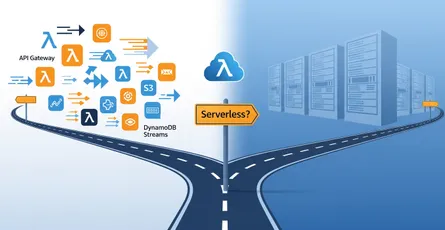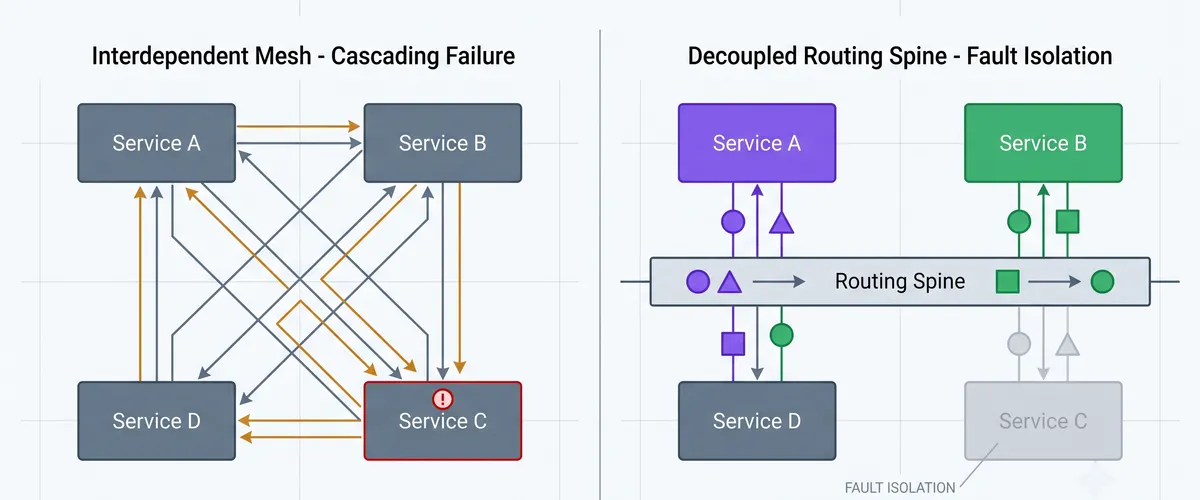
Microservices usually start reasonably. Service A calls Service B over REST. Then B needs something from C. Six months later there is a web of synchronous calls, and when C has a latency spike it surfaces as a 500 in A. You now carry the operational cost of many services with the failure characteristics of one process.
Event-driven architecture inverts the direction of that coupling. Services stop issuing commands to each other and start announcing what happened. Anyone who cares subscribes. EventBridge is the router that makes it practical on AWS.
The short version, if you only read one thing: use a custom bus, put SQS in front of anything fragile, attach a dead-letter queue per target, and treat your event schema as a contract nobody validates for you.
Why this actually decouples anything
In the synchronous version, a producer needs the consumer’s address, its API contract, and its retry semantics. Three pieces of knowledge, each of which becomes a reason to redeploy the producer when the consumer changes.
With a bus in the middle, the producer publishes a JSON object describing a state change and stops. It does not know whether there is one consumer, ten, or none. Adding a new downstream service becomes a new rule, with no change to the upstream code and no coordinated deploy.
Be clear-eyed about the trade, because it is a real one. You have removed a runtime dependency and added a schema dependency. The event shape is now the contract between services, and nothing enforces it. I come back to that below, because it is where this architecture bites hardest.
The three pieces
Event bus receives events. Rules are JSON filters attached to a bus. Targets are where a matching event goes, up to five per rule.
Native integrations cover most of what you need without glue code:
| Target | Reach for it when |
|---|---|
| Lambda | asynchronous processing, short units of work |
| SQS | you need a buffer, or somewhere failures can wait |
| Step Functions | the work has multiple steps and you want per-step retries |
| API destinations | forwarding to a third-party webhook, with built-in rate limiting |
| Another event bus | cross-account or cross-region routing |
Tip
Put SQS between the bus and anything fragile rather than wiring EventBridge straight to Lambda. Direct invocation works, but it gives you nowhere for a message to wait when the consumer is unhealthy or a downstream API is rate limiting you. A queue costs almost nothing and turns a burst into a backlog instead of a pile of failures.
Pattern matching, which has exactly two rules
Rules are declarative JSON, and the evaluation is strict but small enough to hold in your head.
{ "source": ["com.acme.orders"], "detail-type": ["OrderCreated"], "detail": { "status": ["pending", "processing"], "amount": [{"numeric": [">=", 1000]}] }}That reads as: from com.acme.orders, and type OrderCreated, and status is pending or processing, and amount at least 1000. Fields present on the event but absent from the pattern are ignored entirely.
Beyond exact matches you get prefix, suffix, anything-but, exists, numeric ranges, cidr, and $or for alternatives spanning different fields. Between them these remove a lot of if statements from consumer code, which is the point: filtering in the rule means the consumer never runs at all.
Use a custom bus
Every account has a default bus, and every AWS service event lands on it. CloudTrail, EC2 state changes, all of it. Publishing your domain events there means your rules evaluate against that firehose, and your application traffic sits amongst infrastructure noise.
| Bus | Carries | Use for |
|---|---|---|
| default | AWS service events | infrastructure and security alerting |
| custom | your application events | domain choreography, one bus per bounded context |
| partner | integrated SaaS providers | ingesting third-party webhooks |
A custom bus also gives you a resource policy, so you can state exactly which accounts and roles may publish. In a multi-account setup that is how a workload account publishes into a shared-services bus without being given broad permissions.
Schemas are the part that will hurt you
An event shape is an API. If producers change it freely, consumers break, and they break quietly, because a rule that no longer matches does not error. It simply stops firing.
The envelope is fixed; your data lives in detail:
{ "version": "0", "id": "abc12345-6789-0def-1234-567890abcdef", "detail-type": "OrderCreated", "source": "com.acme.orders", "account": "123456789012", "time": "2026-11-03T12:34:56Z", "region": "eu-west-1", "resources": [], "detail": {"orderId": "ORD-2026-001", "amount": 150.0}}Rules that keep this survivable:
- Add fields, never remove or retype them. A new optional field breaks nobody. A renamed one breaks every consumer silently.
- Version in
detail-typewhen you must break compatibility, for exampleOrderCreatedandOrderCreated.v2, and run both until consumers have moved. - Turn on Schema Discovery on the bus. It infers schemas from real traffic and registers them, which at minimum tells you what you are actually publishing rather than what you think you are.
- Generate code bindings from the registry for TypeScript, Python, Java or Go, so the event is a typed object in the consumer rather than a dictionary you index into hopefully.
- Alarm on
TriggeredRulesreaching zero for any rule that should fire regularly. This is the only reliable way to catch a rule that has silently stopped matching.
Careful here
The schema failure mode deserves repeating because it defeats normal monitoring. Producer renames status to state. The event publishes successfully. The rule does not match, so no target is invoked, so there is no failed invocation and nothing reaches a dead-letter queue. Every dashboard is green and one consumer has gone quiet. Nobody notices until a customer does.
Errors, and where a dropped event goes
By default EventBridge retries a target for up to 24 hours with exponential backoff, and then discards the event. That last part is the one to internalise: without a dead-letter queue, a persistent failure means permanent data loss.
Attach a DLQ per target, and bound the retries so failures surface in minutes rather than a day:
import * as cdk from 'aws-cdk-lib';import * as events from 'aws-cdk-lib/aws-events';import * as targets from 'aws-cdk-lib/aws-events-targets';import * as sqs from 'aws-cdk-lib/aws-sqs';
const dlq = new sqs.Queue(this, 'TargetDLQ', { retentionPeriod: cdk.Duration.days(14), // maximum, and you want it});
const rule = new events.Rule(this, 'BillingEvents', { eventBus: customBus, eventPattern: {source: ['com.acme.billing']},});
rule.addTarget( new targets.LambdaFunction(consumer, { deadLetterQueue: dlq, // Default is 24h / 185 attempts. Failing fast into the DLQ is usually // better: you find out today rather than tomorrow. maxEventAge: cdk.Duration.hours(2), retryAttempts: 5, }),);Note
The DLQ attaches to the target, not the rule. A rule with three targets needs three DLQs if you want to know which delivery failed. Alarm on ApproximateNumberOfMessagesVisible on each, because a DLQ nobody watches is just a slower way to lose data.
When a target wants a different shape from the event envelope, use an input transformer rather than writing an unwrapping Lambda:
rule.addTarget( new targets.SfnStateMachine(workflow, { input: events.RuleTargetInput.fromObject({ orderId: events.EventField.fromPath('$.detail.orderId'), amount: events.EventField.fromPath('$.detail.amount'), }), }),);Archive and replay, the feature worth setting up before you need it
A bug ships on Friday. The consumer silently drops 500 events over the weekend. In a synchronous system you would be reconstructing those requests from logs and database backups.
With an archive on the bus, you fix the consumer, deploy, and replay the window.
Two details make this safe. Replayed events carry a replay-name field, so a consumer can tell a replay from live traffic and skip side effects like sending email or charging a card. And EventBridge adds a managed rule preventing replayed events from being re-archived, so you cannot create a storage loop.
Tip
Check for replay-name in your consumers from the start, even before you have an archive. Retrofitting it during an incident, while deciding whether replaying 500 events will also send 500 duplicate emails, is not when you want to be reading this code for the first time.
A layout that keeps this manageable
Directoryinfra/
Directorybuses/
- orders-bus.ts
- bus-policy.ts (who may publish)
Directoryrules/
- high-value-orders.ts
- order-cancellations.ts
Directorytargets/
- queue-with-dlq.ts
Directoryevents/
Directoryschemas/ (checked in, reviewed like an API)
- order-created.v1.json
- order-created.v2.json
Directorycontract-tests/
- …
Directoryservices/
Directoryorders/ (producer)
- …
Directoryfulfilment/ (consumer)
- …
Directorynotifications/ (consumer)
- …
The two directories worth arguing for are events/schemas, because putting the contract in version control makes a breaking change visible in review, and contract-tests, which assert a producer’s event still satisfies each consumer’s pattern. That test is what turns the silent-rule failure into a red pipeline.
Frequently Asked Questions
SNS is a simpler and cheaper fan-out: one topic, many subscribers, minimal filtering, and lower latency. EventBridge adds content-based routing on the whole event body, a schema registry, archive and replay, API destinations and cross-account buses. If you need plain fan-out to a few known subscribers, SNS is the right size. If consumers should subscribe to what an event contains rather than which topic it arrived on, EventBridge earns its cost. Plenty of systems use both, with EventBridge routing domain events and SNS handling notification fan-out.
No. Events can arrive out of order, and delivery is at-least-once, so a target may see the same event twice. If order matters, either carry a sequence number or version in the event and let the consumer reject stale updates, or move that part of the flow to something with ordering guarantees such as a FIFO SQS queue or a Kinesis stream partitioned by entity. Designing consumers to be idempotent and order-tolerant is usually less work than acquiring ordering.
The ones that catch people: 256 KB per event, which means large payloads go to S3 and the event carries a pointer; five targets per rule; 300 rules per bus by default, raisable on request; and a PutEvents quota that varies by region and is also raisable. The 256 KB limit is the one to design for from the start, because retrofitting the claim-check pattern later touches every producer and consumer.
aws events test-event-pattern evaluates a pattern against a sample event and returns true or false, which is fast enough to put in a unit test. That is where contract tests live: keep a sample event per schema version, and assert every consumer’s pattern still matches it. For end-to-end confidence, publish a synthetic event into a non-production bus and assert the side effect appeared. The pattern test catches the common failure; the synthetic event catches permissions and target configuration.
Custom events are billed per million published, and matching plus delivery to AWS targets is included, which makes the routing itself inexpensive for most workloads. The costs that surprise people are elsewhere: archive storage scales with retention and volume, cross-region and cross-account delivery adds data transfer, and API destinations are billed per invocation. Also remember any SQS, Lambda and Step Functions charges downstream. Model the archive retention deliberately rather than defaulting to 90 days on a high-volume bus.
Yes, and it is the main reason to use custom buses. Put a resource policy on the bus naming the accounts or organisation allowed to publish, or route from a bus in the producer account to a bus in the consumer account by making the remote bus a target. The cross-account bus-to-bus pattern is usually cleaner in an organisation, because each account keeps its own rules and the permission boundary stays at the bus.
Related but not the same. That was a migration case study: taking 41 overnight cron jobs and working out which were genuinely time-based, with the numbers from doing it. This post is about EventBridge itself, the routing semantics and the operational details. If you want the before-and-after with measured results, read replacing cron chaos with an event-driven pipeline; if you want to understand the router, stay here.
References
- What is Amazon EventBridge
- Event patterns in EventBridge
- Content filtering in event patterns
- Event buses
- Rule targets
- Input transformation
- Event retry policy and dead-letter queues
- Archive and replay events
- EventBridge schema registry
- Code bindings from schemas
- EventBridge quotas
- EventBridge pricing
- Reducing custom code with advanced rules (AWS Compute Blog)