Python Virtual Environments Cheatsheet
A practical reference for venv, pip, requirements files, pyenv version switching, and pipx for isolated global tools.
A fast reference for keeping Python projects isolated and reproducible. It covers creating and activating environments with venv, installing packages with pip, locking dependencies with requirements files and pip-tools, switching interpreter versions with pyenv, and installing global CLI tools cleanly with pipx.
No commands found
Try adjusting your search term
Creating and Activating Environments
Make an isolated environment per project so dependencies never collide.
Create a virtual environment
Use the built-in venv module to create an isolated environment in a project folder.
Create an environment named .venv
Creates a self-contained Python environment in the .venv folder, with its own interpreter and site-packages.
python -m venv .venv- Name it .venv by convention so editors and tools auto-detect it.
- Add .venv/ to your .gitignore; never commit an environment.
Create with a specific interpreter
Uses whichever Python you invoke as the base for the environment, which is how you pin the version.
python3.12 -m venv .venvActivate and deactivate
Activating puts the environment's interpreter and pip first on your PATH.
Activate on macOS or Linux
Your prompt gains a (.venv) prefix and python/pip now point inside the environment.
source .venv/bin/activateActivate on Windows
PowerShell activation. Use .venv\Scripts\activate.bat from cmd.exe instead.
.venv\Scripts\Activate.ps1Deactivate
Restores your original PATH. Works from any shell where the environment is active.
deactivateRemove an environment
Environments are disposable; delete and recreate rather than repairing.
Delete the environment
There is no uninstall command. The environment is just a folder, so removing it is the reset.
rm -rf .venvInstalling Packages with pip
Install, upgrade, and inspect packages inside the active environment.
Install packages
pip installs into whichever environment is currently active.
Install a package
pip install requestsInstall a specific version
Quote version specifiers so the shell does not interpret the characters.
pip install 'django==5.0.*'Editable install of a local project
Links your source in place so code changes take effect without reinstalling. This is the usual setup while developing a package.
pip install -e .Inspect installed packages
See what is installed and whether anything is outdated.
List installed packages
pip listShow outdated packages
pip list --outdatedManaging Dependencies
Capture and restore your dependency set so environments are reproducible.
requirements.txt
Freeze the current environment and restore it elsewhere.
Freeze current dependencies
Writes every installed package and its exact version so others can reproduce the environment.
pip freeze > requirements.txtInstall from requirements.txt
pip install -r requirements.txtDeterministic installs with pip-tools
Separate the packages you ask for from the fully pinned set you install.
Compile a locked requirements file
Produces a fully pinned requirements.txt (including transitive deps and hashes) from your short requirements.in.
# list only top-level deps in requirements.in, then:pip-compile requirements.inSync the environment to the lockfile
Installs exactly what the lockfile says and removes anything that is not in it, so the environment matches the lock precisely.
pip-sync requirements.txtSwitching Python Versions with pyenv
Install and switch between multiple Python versions per machine or per project.
Install and select versions
pyenv manages the Python interpreter itself, independently of your OS Python.
Install a Python version
pyenv install 3.12.4Set the global default
pyenv global 3.12.4Pin a version for one project
Writes a .python-version file so this directory always uses that interpreter.
pyenv local 3.11.9pyenv-virtualenv
Combine a pyenv-managed version with a named virtual environment.
Create a named environment on a chosen version
Creates a virtual environment tied to a specific pyenv Python, which you can then activate by name or auto-activate with pyenv local.
pyenv virtualenv 3.12.4 myproject-3.12Global CLI Tools with pipx
Install Python command-line tools globally without polluting any project environment.
Install and run tools
pipx gives each tool its own hidden environment while exposing its command on your PATH.
Install a CLI tool
Installs ruff in its own isolated environment but makes the ruff command available everywhere.
pipx install ruffRun a tool once without installing
Downloads into a temporary environment, runs the command, and cleans up. Handy for a tool you need once.
pipx run cowsay mooWas this useful?
Continue on this topic
The same subject, covered a different way from the cheatsheet above.
 Article
10+ Secret Git Commands That Will Save Hours Every Week
Discover 10+ secret Git commands that will save hours every week! Learn advanced Git techniques for undoing mistakes, managing commits, automating workflows, and optimizing repositories. Perfect for DevOps and GitHub users.
 Quiz
QuizPython: Programming Fundamentals & Best Practices
Test your knowledge of Python fundamentals with this quiz covering data types, functions, loops, conditionals, list comprehensions, classes, exception handling, and Python programming best practices.
 Code snippet
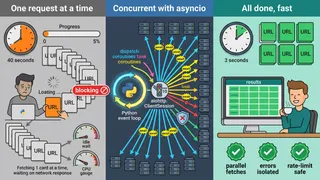
Python Async HTTP Requests with aiohttp: Fetch Multiple URLs Concurrently
A Python snippet demonstrating concurrent HTTP requests using aiohttp and asyncio. Covers creating sessions, fetching multiple URLs in parallel, handling errors gracefully, and controlling concurrency with semaphores.
 Roadmap
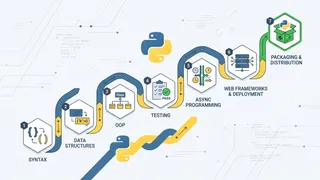
Python Developer Beginner to Expert
A roadmap for Python from syntax and data structures through the object model, typing, testing, async, web frameworks, packaging, and running Python in production.
You might also enjoy
More posts on similar topics
Git
- Mohammad Abu Mattar
- Version Control
- Git
- SCM
- Collaboration
- Development Tools
Git is a distributed version control system. Developers use it to track code changes, collaborate with teams, and manage project history. Most software teams build their workflow around it. Key co
jq
- Mohammad Abu Mattar
- CLI Tool
- Config & Data Formats
- DevOps
jq clicked for me the day I stopped thinking of it as a JSON string transformer. It is a stream of values, and every filter takes a stream in and emits a stream out. That one idea explains the parts t
Screen
- Mohammad Abu Mattar
- Terminal
- Screen
- Tools
- Development
- System Administration
Getting started GNU Screen is a terminal multiplexer that gives you:Sessions: Full terminal environments that persist even if you disconnect Windows: Multiple terminals (tabs) within
Tmux
- Mohammad Abu Mattar
- Terminal
- Tmux
- Tools
- Development
- System Administration
Tmux is a terminal multiplexer for managing multiple terminal sessions, windows, and panes within a single screen. This cheatsheet covers the commands, keybindings, and configuration options for every
Vim
- Mohammad Abu Mattar
- Editor
- Text Editor
- Terminal
- Command Line
- Productivity
Vim is a highly configurable text editor built to make creating and changing any kind of text very efficient. It is included as "vi" with most UNIX systems. The sections below cover Vim commands, sho
VS Code
- Mohammad Abu Mattar
- Editor
- Text Editor
- Developer Tools
- Productivity
- Programming
- Shortcuts
A quick reference for Visual Studio Code: keyboard shortcuts, editor features, and working habits for editing and navigation.
6 related posts