Quick Tip
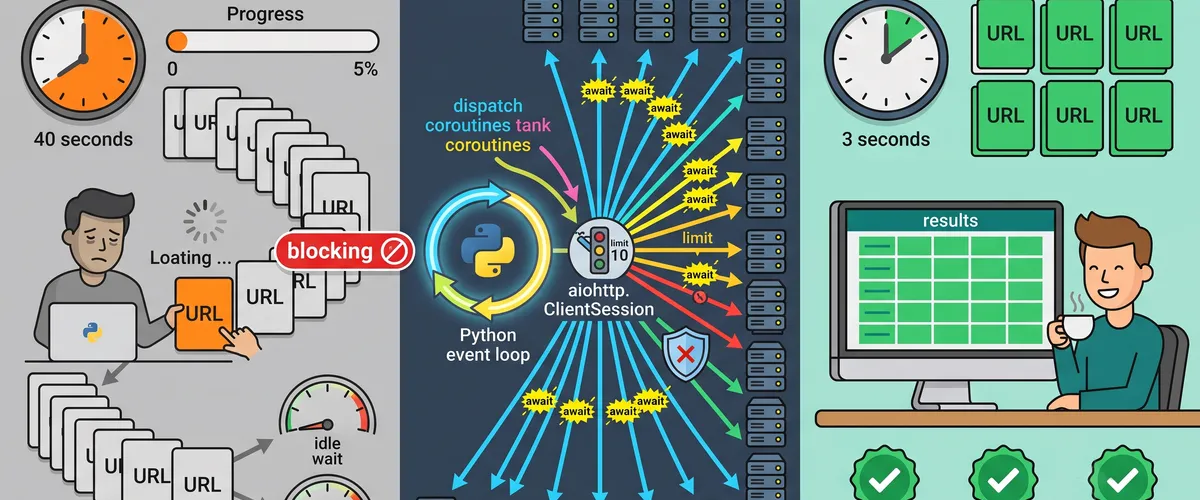
Reuse one aiohttp session, fan your requests out with asyncio.gather, and cap them with a semaphore to fetch hundreds of URLs in the time one loop would take.
The Problem
The Problem
A script that fetches a list of URLs with requests in a plain for loop spends almost all of its time doing nothing. Each call opens a connection, sends the request, and then blocks until the response comes back before the next one even starts. The network is slow and your CPU is fast, so the program just sits and waits, one round trip at a time.
Why sequential requests waste time
HTTP is I/O bound. The bottleneck isn’t your code, it’s the latency of each request. If a single call takes 200ms and you have 200 URLs, a sequential loop takes 40 seconds, and 39 of those seconds are pure waiting. Nothing about that work needs to happen in order, yet the loop forces it to.
The real-world impact
That waiting shows up as slow batch jobs, sluggish data-collection scripts, and API clients that time out because they can’t keep up. Scale the list up and it gets worse linearly: a report that pulls from a few hundred endpoints turns a quick task into a coffee break, and a service that fans out to several upstreams makes every user wait for the slowest chain of calls.
The Solution
The Fix
Use aiohttp with asyncio so the requests overlap. While one call waits on the network, the event loop starts the next one. Reuse a single ClientSession so connections get pooled, launch everything with asyncio.gather, and put a Semaphore in front to keep the number of in-flight requests sane.
Script Implementation
Setup and imports
Start with the async pieces you need: asyncio for the event loop and aiohttp for the HTTP calls. A small result type keeps the return values easy to read.
#!/usr/bin/env python3"""fetch_urls.py - fetch many URLs concurrently with aiohttp."""import asyncioimport timefrom dataclasses import dataclass
import aiohttp
# Cap how many requests run at once. Tune to the server and your rate limits.MAX_CONCURRENCY = 10REQUEST_TIMEOUT = aiohttp.ClientTimeout(total=15)
@dataclassclass Result: url: str status: int | None # HTTP status, or None if the request never completed body: str | None # response text on success error: str | None # error message on failureFetching one URL safely
Each fetch takes the shared session and the semaphore. The semaphore blocks once MAX_CONCURRENCY requests are already in flight, so the rest queue up instead of stampeding the server. The try/except keeps a single bad URL from crashing the whole batch.
async def fetch_one( session: aiohttp.ClientSession, sem: asyncio.Semaphore, url: str,) -> Result: # The semaphore is the throttle: only MAX_CONCURRENCY of these run at once. async with sem: try: async with session.get(url) as response: # Read the body while the connection is still open. text = await response.text() return Result(url, response.status, text, None) except aiohttp.ClientError as exc: # Network, DNS, or connection errors land here. return Result(url, None, None, f"client error: {exc}") except asyncio.TimeoutError: return Result(url, None, None, "timed out")Fetching the whole batch
Create one session and one semaphore, then build a task per URL and hand them all to asyncio.gather. Because every fetch_one already catches its own errors, gather returns a clean list of Result objects with no partial failures to unpack.
async def fetch_all(urls: list[str]) -> list[Result]: sem = asyncio.Semaphore(MAX_CONCURRENCY) # One session for the whole run so connections get pooled and reused. async with aiohttp.ClientSession(timeout=REQUEST_TIMEOUT) as session: tasks = [fetch_one(session, sem, url) for url in urls] # gather runs them concurrently and preserves input order. return await asyncio.gather(*tasks)Entry point
Wrap the run in asyncio.run, then print a short summary. Timing the run makes the win obvious the first time you compare it to a sequential loop.
def main() -> None: urls = [f"https://httpbin.org/delay/1?id={i}" for i in range(20)]
start = time.perf_counter() results = asyncio.run(fetch_all(urls)) elapsed = time.perf_counter() - start
ok = sum(1 for r in results if r.status == 200) failed = [r for r in results if r.error] print(f"fetched {ok}/{len(results)} in {elapsed:.2f}s") for r in failed: print(f" failed: {r.url} ({r.error})")
if __name__ == "__main__": main()Usage and Benefits
Why This Helps
One session, one semaphore, and one gather call turn a linear wait into an overlapping one. The requests still take the same time individually, but they no longer take that time one after another, so a batch that scaled with the number of URLs now scales with your concurrency limit instead.
Real invocations
# Install the dependency first.pip install aiohttp
# Run the script. Twenty 1-second requests finish in about 2-3 seconds,# not 20, because up to MAX_CONCURRENCY of them run at the same time.python fetch_urls.pyTuning concurrency for the target
There’s no universal number for MAX_CONCURRENCY. A generous internal API might handle 50 in-flight requests; a rate-limited public one might block you above 5. Start low, watch for 429 responses, and raise it until you hit the server’s comfort zone.
# Lower the limit for a strict public API to avoid 429s.MAX_CONCURRENCY = 5
# Raise it for a fast internal service that can take the load.MAX_CONCURRENCY = 50Comparison
How the concurrent approach stacks up against the other common ways to fetch a list of URLs.
| Approach | Concurrent | Connection reuse | Concurrency control | Best for |
|---|---|---|---|---|
aiohttp + asyncio.gather | Yes | Yes, pooled | Yes, semaphore | Large async I/O-bound fetches |
requests in a for loop | No | Per session only | N/A | A handful of simple calls |
requests + ThreadPool | Yes | Yes | Pool size | Mixing with blocking code |
httpx.AsyncClient | Yes | Yes, pooled | Yes, limits/semaphore | Async with a requests-like API |
The threaded pool is a fine middle ground when the rest of your code is synchronous, but an event loop scales to far more concurrent connections without spinning up a thread per request.
Frequently Asked Questions
A ClientSession owns a connection pool. Reusing it lets aiohttp keep TCP and TLS connections alive across requests, which skips the handshake cost on every call. Creating a fresh session per request throws that away and leaks connections. Open one session for the batch, pass it to every fetch, and close it with async with when you’re done.
Without a limit, asyncio.gather starts every request at once. A thousand URLs means a thousand simultaneous connections, which can exhaust file descriptors on your side and trip rate limits or overload the server on the other. The semaphore caps how many run concurrently: each async with sem acquires a slot and releases it when the request finishes, so the rest wait their turn.
Catch the errors inside each task, which is what fetch_one does with its try/except. Because every coroutine returns a Result instead of raising, asyncio.gather never sees an exception and returns a full list. If you’d rather let exceptions propagate, use asyncio.gather(*tasks, return_exceptions=True) and inspect the returned values, some of which will be exception objects.
Yes. gather returns results in the same order you passed the awaitables, regardless of which requests finish first. So results[i] always corresponds to urls[i], even though the fetches complete out of order. If you don’t care about order and want to process results as they arrive, look at asyncio.as_completed instead.
Reach for a thread pool with requests when the surrounding code is synchronous and you don’t want to convert it to async just for a few calls. Reach for httpx.AsyncClient when you want an async client with an API closer to requests, or you need HTTP/2. aiohttp shines when you’re already in an async application and need to fan out to many endpoints at high concurrency.
Pass an aiohttp.ClientTimeout to the session, as the snippet does with REQUEST_TIMEOUT. A total timeout bounds the whole request, including connect and read. When it’s exceeded, aiohttp raises asyncio.TimeoutError, which the except in fetch_one turns into a clean failed Result instead of a hung coroutine.