A VPC is one of the few things in AWS you cannot meaningfully refactor later. You can resize an instance, swap a database engine, rewrite a service. You cannot change a VPC’s primary CIDR block, and you cannot peer two VPCs whose ranges overlap. The decisions that hurt most are the ones made in the first hour by someone who did not realise they were decisions.
These are the ones worth getting right, in the order they bite.
Tip 1: plan the CIDR before you type it
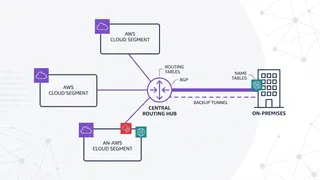
The default suggestion is 10.0.0.0/16, which is why so many accounts have it, which is why so many peering attempts fail. Overlapping CIDRs cannot be peered or attached to the same Transit Gateway, and the only fixes are re-addressing an entire VPC or hiding behind NAT.
Allocate from a plan even if you only have one VPC today:
10.20.0.0/16 production eu-west-110.21.0.0/16 staging eu-west-110.22.0.0/16 development eu-west-110.30.0.0/16 production us-east-110.40.0.0/16 reserved for an acquisition or a partner VPNThen subnet inside each /16 with a readable scheme rather than a tight one:
10.20.0.0/24 public AZ-a 10.20.1.0/24 public AZ-b10.20.10.0/24 private app AZ-a 10.20.11.0/24 private app AZ-b10.20.20.0/24 isolated db AZ-a 10.20.21.0/24 isolated db AZ-bThe tier is encoded in the third octet, so anyone reading a route table or a flow log can tell what a subnet is for without looking it up.
Careful here
Do not size subnets to today’s instance count. A /24 gives 251 usable addresses (AWS reserves five per subnet), and a /16 VPC holds 256 of them, so being generous costs you nothing. Being stingy costs you an afternoon when an EKS cluster assigns a pod IP per pod and exhausts a /26.
Tip 2: three tiers, not two
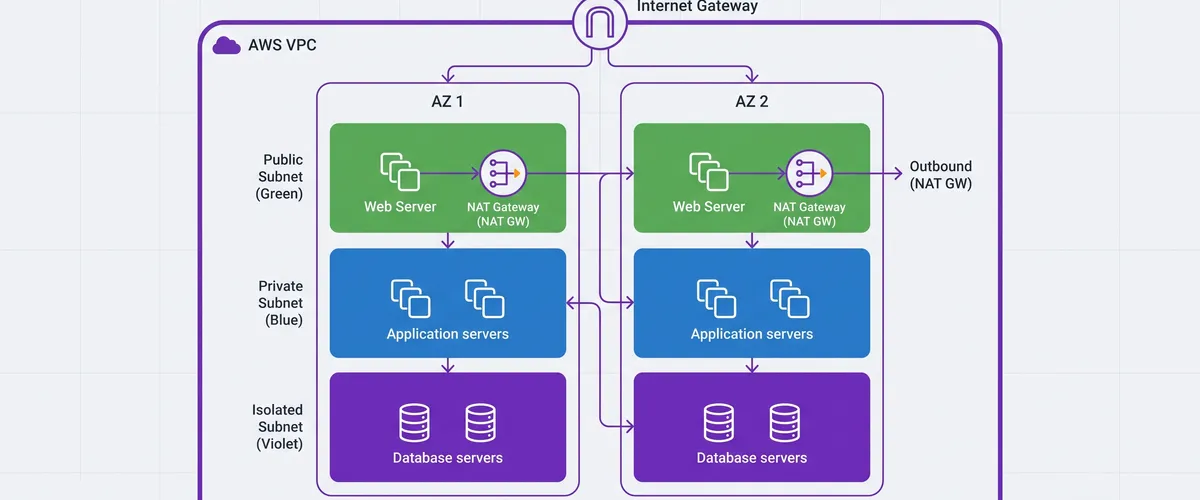
Public and private is the usual split, and it leaves your database in the same subnet as your application. Add a third tier with no route to the internet at all:
The isolated tier is the cheapest security control in this list. It costs one extra route table and it means a compromised database host cannot exfiltrate anything outbound, because there is no path. No security group rule to misconfigure, no egress filter to bypass. The route simply does not exist.
Tip 3: understand what makes a subnet “public”
There is no public flag. A subnet is public if and only if its route table sends 0.0.0.0/0 to an internet gateway. That is the entire definition, and internalising it removes most route table confusion:
rtb-public 0.0.0.0/0 -> igw-abc123 associated: 10.20.0.0/24, 10.20.1.0/24rtb-private-a 0.0.0.0/0 -> nat-in-az-a associated: 10.20.10.0/24rtb-private-b 0.0.0.0/0 -> nat-in-az-b associated: 10.20.11.0/24rtb-data (no default route) associated: 10.20.20.0/24, 10.20.21.0/24Note there are two private route tables, one per AZ, not one shared. That per-AZ split is the point of the next tip.
Tip 4: one NAT Gateway per AZ, always
A single NAT Gateway shared by both AZs saves roughly $32 a month and creates a cross-AZ dependency. If the AZ holding that NAT fails, every private subnet pointing at it loses outbound connectivity, including the one in the healthy AZ. You have paid for multi-AZ and kept a single point of failure.
# One NAT per AZ, and a route table per AZ pointing at its local one.resource "aws_nat_gateway" "this" { for_each = aws_subnet.public allocation_id = aws_eip.nat[each.key].id subnet_id = each.value.id}
resource "aws_route_table" "private" { for_each = aws_subnet.private vpc_id = aws_vpc.this.id
route { cidr_block = "0.0.0.0/0" # each.key is the AZ, so a subnet always exits through its OWN AZ's NAT. nat_gateway_id = aws_nat_gateway.this[each.key].id }}Tip
NAT Gateways charge per hour and per GB processed. Pulling container images, writing to S3 and talking to Systems Manager through a NAT is pure waste, because those are AWS services reachable through VPC endpoints. Adding gateway endpoints for S3 and DynamoDB (free) plus interface endpoints for ECR and SSM often pays for itself within days on a busy cluster. Check the BytesOutToDestination metric on your NAT before deciding it is not worth it.
Tip 5: reference security groups, not CIDRs
This is the single highest-value habit in the list. Between tiers, allow traffic from a security group rather than an address range:
# Good: the rule follows the workload, wherever it lands.resource "aws_vpc_security_group_ingress_rule" "db_from_app" { security_group_id = aws_security_group.db.id referenced_security_group_id = aws_security_group.app.id from_port = 5432 to_port = 5432 ip_protocol = "tcp"}
# Fragile: silently stops covering anything you add later.# cidr_ipv4 = "10.20.10.0/24"The CIDR version works perfectly until the day you add 10.20.12.0/24 for a new service. Then new instances cannot reach the database, the rule looks correct, and nobody connects the two facts quickly. The security-group reference keeps working because it describes what may connect rather than where it happens to live.
Tip 6: leave NACLs alone unless you have a specific reason
Security groups are stateful. Allow a connection in, and the reply is allowed out automatically. NACLs are stateless and evaluate rules in numbered order, so every direction needs its own rule.
A connection that establishes and then hangs, or works in one direction only, is almost always a NACL missing the ephemeral range on the return path. Unless you need a coarse subnet-wide deny, which security groups cannot express, keep NACLs at the default allow-all and do your access control in security groups.
Tip 7: turn on flow logs before you need them
Flow logs are the only way to answer “was that traffic blocked, and by what” after the fact. Enable them at VPC level to a log group with a short retention, and they cost very little:
A REJECT tells you a security group or NACL dropped it. No record at all tells you the packet never arrived, which points at routing instead. That distinction saves a lot of guessing.
The mistakes, ranked by how much they cost
| Mistake | Why it hurts |
|---|---|
10.0.0.0/16 by default | cannot peer with anyone who did the same; unfixable without re-addressing |
| One NAT Gateway for all AZs | an AZ failure takes out private egress everywhere |
| Database in the private app subnet | no outbound isolation, so a compromise can exfiltrate |
| Security group rules as CIDRs | silently fail to cover subnets added later |
| Custom NACLs | stateless, so the return path breaks in ways that look like app bugs |
| Subnets sized to today | EKS and Lambda burn addresses fast; /26 runs dry |
| No VPC endpoints | NAT per-GB charges for traffic that never needed to leave AWS |
| No flow logs | every connectivity question becomes speculation |