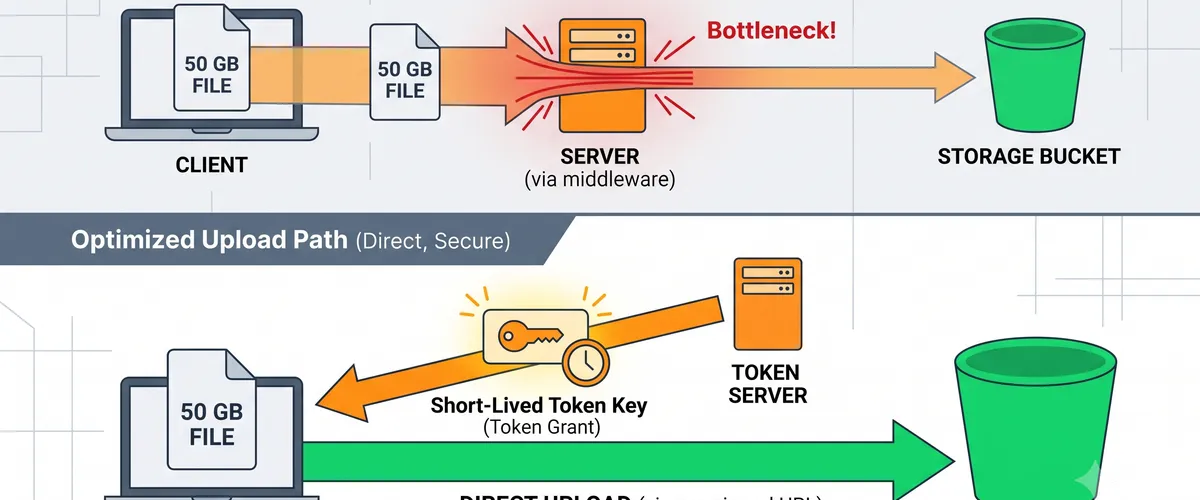
Routing file uploads through your API server is the default that nobody questions, and it is usually the wrong one. The bytes travel to your compute, sit in memory or a temp file, then travel again to S3. You pay for the transfer twice, your request timeouts have to accommodate the slowest client on the worst connection, and on Lambda you hit a hard wall at 6 MB of payload regardless of how patient you are.
Pre-signed URLs move the transfer off your critical path. Your server does one cheap thing, which is to sign a URL that grants a narrow, time-limited permission, and the client uploads directly to S3.
The flow
The important detail is step 4. The thick arrow bypasses your compute entirely, which is what removes the payload limit, the timeout risk, and half the cost.
Generating a PUT URL
This is the whole mechanism. getSignedUrl does not call S3; it computes a signature locally from your credentials and the request you describe, so it is fast and free.
import {S3Client, PutObjectCommand} from '@aws-sdk/client-s3';import {getSignedUrl} from '@aws-sdk/s3-request-presigner';import {randomUUID} from 'node:crypto';
const s3 = new S3Client({region: process.env.AWS_REGION});
const ALLOWED_TYPES = new Set([ 'image/jpeg', 'image/png', 'image/webp', 'application/pdf',]);const MAX_BYTES = 25 * 1024 * 1024; // 25 MB
export async function createUploadUrl({userId, filename, contentType, size}) { if (!ALLOWED_TYPES.has(contentType)) { throw new Error(`content type not allowed: ${contentType}`); } if (!Number.isInteger(size) || size <= 0 || size > MAX_BYTES) { throw new Error(`size must be 1..${MAX_BYTES} bytes`); }
// Never build the key from client input. A filename of "../../etc/x" is // harmless in S3, but a filename you later echo into a path is not. const ext = filename.includes('.') ? filename.split('.').pop() : 'bin'; const key = `uploads/${userId}/${randomUUID()}.${ext.toLowerCase()}`;
const url = await getSignedUrl( s3, new PutObjectCommand({ Bucket: process.env.UPLOAD_BUCKET, Key: key, // Both of these become part of the signature. The client MUST send // matching headers or S3 rejects the PUT with 403. ContentType: contentType, ContentLength: size, }), {expiresIn: 300}, );
return {url, key, expiresIn: 300};}Careful here
ContentType and ContentLength are only enforced because they are signed. Omit them and you have issued a URL that accepts any body of any size until it expires. That is an open upload endpoint with your bucket behind it.
The client side
The header the client sends must match what you signed, byte for byte, or S3 returns 403 with a SignatureDoesNotMatch that tells you very little.
async function upload(file) { const res = await fetch('/api/uploads/sign', { method: 'POST', headers: {'Content-Type': 'application/json'}, body: JSON.stringify({ filename: file.name, contentType: file.type, size: file.size, }), }); const {url, key} = await res.json();
// Note: PUT with the raw File as body, and no extra headers beyond the // ones that were signed. Adding x-amz-* headers here breaks the signature. const put = await fetch(url, { method: 'PUT', headers: {'Content-Type': file.type}, body: file, });
if (!put.ok) throw new Error(`upload failed: ${put.status}`); return key;}CORS, the step everyone forgets
A browser PUT to S3 is a cross-origin request. Without this, the upload fails in the browser while working perfectly from curl, which is a memorable afternoon.
[ { "AllowedOrigins": ["https://app.example.com"], "AllowedMethods": ["PUT"], "AllowedHeaders": ["Content-Type"], "ExposeHeaders": ["ETag"], "MaxAgeSeconds": 3000 }]ExposeHeaders: ["ETag"] is not optional if you plan to do multipart uploads, because the browser cannot read the ETag of each part without it, and you need those ETags to complete the upload.
Large files: multipart
Above roughly 100 MB, a single PUT becomes fragile. One dropped connection at 95% means starting over. Multipart splits the object into independently retryable parts.
import { CreateMultipartUploadCommand, UploadPartCommand, CompleteMultipartUploadCommand, AbortMultipartUploadCommand,} from '@aws-sdk/client-s3';
const PART_SIZE = 10 * 1024 * 1024; // 10 MB; S3 minimum is 5 MB except the last part
export async function startMultipart({key, contentType, size}) { const {UploadId} = await s3.send( new CreateMultipartUploadCommand({ Bucket: process.env.UPLOAD_BUCKET, Key: key, ContentType: contentType, }), );
const partCount = Math.ceil(size / PART_SIZE); const urls = await Promise.all( Array.from({length: partCount}, (_, i) => getSignedUrl( s3, new UploadPartCommand({ Bucket: process.env.UPLOAD_BUCKET, Key: key, UploadId, PartNumber: i + 1, }), {expiresIn: 3600}, // longer, because a big upload takes a while ), ), );
return {uploadId: UploadId, partSize: PART_SIZE, urls};}
export async function completeMultipart({key, uploadId, parts}) { // parts: [{PartNumber: 1, ETag: '"abc..."'}, ...] in ascending order return s3.send( new CompleteMultipartUploadCommand({ Bucket: process.env.UPLOAD_BUCKET, Key: key, UploadId: uploadId, MultipartUpload: {Parts: parts}, }), );}
export async function abortMultipart({key, uploadId}) { return s3.send( new AbortMultipartUploadCommand({ Bucket: process.env.UPLOAD_BUCKET, Key: key, UploadId: uploadId, }), );}Tip
Abandoned multipart uploads keep billing you for storage you cannot see in the console’s object list. Add a lifecycle rule with AbortIncompleteMultipartUpload: {DaysAfterInitiation: 7} to every bucket that accepts uploads. This is the single most common surprise line item I have seen on S3 bills.
Scoping the IAM policy
The signer can only grant permissions it holds. A pre-signed URL created by an admin role is an admin-powered URL, so scope the signing role tightly.
{ "Version": "2012-10-17", "Statement": [ { "Effect": "Allow", "Action": ["s3:PutObject", "s3:AbortMultipartUpload"], "Resource": "arn:aws:s3:::my-upload-bucket/uploads/*", "Condition": { "StringEquals": {"s3:x-amz-server-side-encryption": "aws:kms"} } } ]}PUT URL or POST policy?
Both exist and they are not interchangeable.
| Pre-signed PUT | Pre-signed POST policy | |
|---|---|---|
| Client shape | fetch(url, {method:'PUT'}) | HTML form or FormData |
| Enforce max size | only via signed ContentLength | native content-length-range |
| Enforce key prefix | key is fixed at signing | starts-with on $key |
| Multipart support | yes, per-part URLs | no |
| Browser form upload with redirect | no | yes |
Reach for POST policy when you want a size range rather than an exact length, or when a plain HTML form has to work without JavaScript. Reach for PUT for everything else, especially anything large enough to need multipart.
Validate after the fact, not just at signing
Signing-time checks constrain what the client claims. They do not inspect the bytes. An attacker can declare image/png and upload a PHP file. If anything downstream will serve or process that object, verify it after upload:
// Triggered by S3 ObjectCreated. Reads only the first bytes, not the object.import {GetObjectCommand, DeleteObjectCommand} from '@aws-sdk/client-s3';
const MAGIC = { 'image/png': [0x89, 0x50, 0x4e, 0x47], 'image/jpeg': [0xff, 0xd8, 0xff], 'application/pdf': [0x25, 0x50, 0x44, 0x46],};
export async function handler(event) { for (const record of event.Records) { const Bucket = record.s3.bucket.name; const Key = decodeURIComponent(record.s3.object.key.replace(/\+/g, ' '));
const head = await s3.send( new GetObjectCommand({Bucket, Key, Range: 'bytes=0-7'}), ); const bytes = [...(await head.Body.transformToByteArray())]; const declared = head.ContentType; const expected = MAGIC[declared];
const ok = expected?.every((b, i) => bytes[i] === b); if (!ok) { console.warn(`magic byte mismatch for ${Key}, declared ${declared}`); await s3.send(new DeleteObjectCommand({Bucket, Key})); } }}Gotchas worth knowing before you ship
- A pre-signed URL is a bearer credential. Anyone holding it has the permission until it expires. Keep
expiresInshort and never log the full URL. - The URL outlives the session. Revoking a user’s session does not invalidate URLs already issued to them. If that matters, sign with a role whose session is short, because the URL cannot outlive the credentials that signed it.
expiresInmaxes out at 7 days, and only for SigV4 with long-lived credentials. On Lambda, the role session is typically much shorter and silently caps you.- Clock skew breaks signatures. A client machine 20 minutes fast will see 403s on a 300 second URL. The error looks like a code bug and is not.
- Encryption headers must match. If the bucket policy demands
aws:kms, the signed request must include the encryption header, or the PUT is denied after the URL looks fine.