Quick Tip
Wrap the low-level DynamoDB client in a DynamoDBDocumentClient so you pass plain JavaScript objects in and get plain objects back, then guard your writes with ConditionExpression and read by key with QueryCommand.
The Problem
The Problem
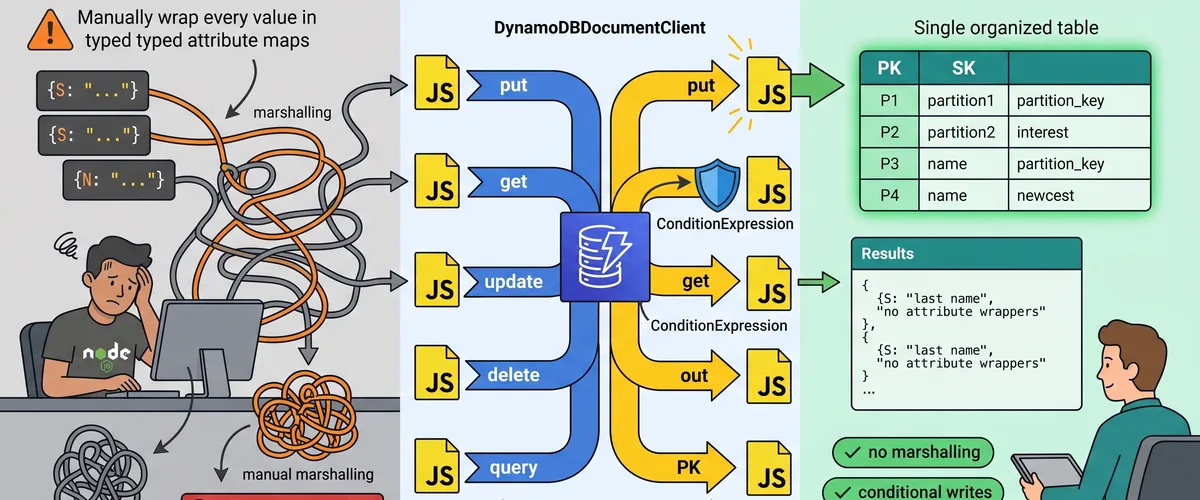
The low-level DynamoDB API doesn’t speak JavaScript. Every value has to be wrapped in a typed attribute map, so a simple { id: "42", count: 3 } turns into { id: { S: "42" }, count: { N: "3" } } on the way in, and you have to unwrap all of it on the way out. Write that marshalling by hand across a codebase and it becomes a steady drip of ValidationException errors and off-by-one type bugs.
Why raw attribute maps hurt
The attribute-map format leaks into every call site. You can’t just hand DynamoDB the object your app already has, you first translate it, then translate the response back, and you repeat that boilerplate for put, get, update, and query. It’s easy to send a number as a string or forget a nested map, and DynamoDB rejects the whole request rather than coercing anything for you.
The real-world impact
That friction shows up as slow feature work and brittle data access. New team members trip over the { S: ... } wrappers, updates accidentally overwrite fields they never meant to touch, and someone reaches for Scan because it “just works,” quietly reading the entire table on every call. The result is code that’s harder to review and a bill that grows faster than the data.
The Solution
The Fix
Use the AWS SDK v3 DynamoDBDocumentClient. It wraps the base DynamoDBClient and handles marshalling in both directions, so your CRUD code deals in plain objects. Pair it with a single table, address items by their partition and sort keys, use UpdateCommand to change only the fields you name, and add a ConditionExpression when a write must not clobber existing data.
Script Implementation
Setup and the DocumentClient
Create the base client once, wrap it in a DynamoDBDocumentClient, and turn on the marshalling options that smooth over DynamoDB’s quirks. Reuse this single instance across your app so connections get pooled.
// dynamo.ts - CRUD helpers for a single DynamoDB table with the AWS SDK v3.import {DynamoDBClient} from '@aws-sdk/client-dynamodb';import { DynamoDBDocumentClient, PutCommand, GetCommand, UpdateCommand, DeleteCommand, QueryCommand,} from '@aws-sdk/lib-dynamodb';
const TABLE_NAME = process.env.TABLE_NAME ?? 'AppTable';
// One low-level client for the process; region comes from the environment.const baseClient = new DynamoDBClient({});
// The DocumentClient marshals plain JS objects to/from attribute maps.export const ddb = DynamoDBDocumentClient.from(baseClient, { marshallOptions: { // Drop undefined fields instead of erroring on them. removeUndefinedValues: true, // Store empty strings and sets as-is rather than converting to null. convertEmptyValues: false, },});
// A tiny item shape for the examples: single-table keys plus data.export interface User { pk: string; // partition key, e.g. "USER#42" sk: string; // sort key, e.g. "PROFILE" name: string; email: string; loginCount?: number;}Create and read: put and get
PutCommand writes a whole item, overwriting any existing item with the same key. GetCommand fetches one item by its full primary key and returns a plain object, or undefined when nothing matches.
// Create or overwrite an item. Pass the object as-is, no attribute maps.export async function putUser(user: User): Promise<void> { await ddb.send( new PutCommand({ TableName: TABLE_NAME, Item: user, }), );}
// Fetch a single item by its partition + sort key.export async function getUser( pk: string, sk: string,): Promise<User | undefined> { const {Item} = await ddb.send( new GetCommand({ TableName: TABLE_NAME, Key: {pk, sk}, }), ); // Item is already a plain object, cast it to the known shape. return Item as User | undefined;}Update and delete safely
UpdateCommand changes only the fields you name in the UpdateExpression, so you never overwrite the rest of the item. The ConditionExpression makes the update fail loudly if the item doesn’t already exist, which stops accidental “upserts.” DeleteCommand removes an item by key.
// Update named fields only, and require that the item already exists.export async function bumpLoginCount(pk: string, sk: string): Promise<User> { const {Attributes} = await ddb.send( new UpdateCommand({ TableName: TABLE_NAME, Key: {pk, sk}, // ADD creates loginCount at 1 if missing, otherwise increments it. UpdateExpression: 'ADD loginCount :one', ConditionExpression: 'attribute_exists(pk)', ExpressionAttributeValues: {':one': 1}, ReturnValues: 'ALL_NEW', }), ); return Attributes as User;}
// Delete an item by key. Idempotent: deleting a missing key is a no-op.export async function deleteUser(pk: string, sk: string): Promise<void> { await ddb.send( new DeleteCommand({ TableName: TABLE_NAME, Key: {pk, sk}, }), );}Query by key instead of scanning
QueryCommand reads every item that shares a partition key, optionally narrowed by the sort key. This is the read you want almost every time, it touches only the matching items instead of the whole table the way Scan does.
// Fetch every item under one partition key, e.g. all records for a user.export async function queryByUser(pk: string): Promise<User[]> { const items: User[] = []; let ExclusiveStartKey: Record<string, unknown> | undefined;
// Loop to follow pagination until DynamoDB stops returning a cursor. do { const page = await ddb.send( new QueryCommand({ TableName: TABLE_NAME, KeyConditionExpression: 'pk = :pk', ExpressionAttributeValues: {':pk': pk}, ExclusiveStartKey, }), ); items.push(...((page.Items ?? []) as User[])); ExclusiveStartKey = page.LastEvaluatedKey; } while (ExclusiveStartKey);
return items;}Entry point with error handling
Tie the helpers together in a small demo and catch the one error you actually expect: a failed ConditionExpression. DynamoDB reports it as a ConditionalCheckFailedException, which you handle rather than crash on.
import {ConditionalCheckFailedException} from '@aws-sdk/client-dynamodb';
async function main(): Promise<void> { const key = {pk: 'USER#42', sk: 'PROFILE'};
console.log('created:', await getUser(key.pk, key.sk));
try { const updated = await bumpLoginCount(key.pk, key.sk); console.log('login count is now', updated.loginCount); } catch (err) { if (err instanceof ConditionalCheckFailedException) { console.error('update skipped: that user does not exist yet'); } else { throw err; // Anything else is unexpected, let it surface. } }
console.log('all records:', await queryByUser(key.pk)); await deleteUser(key.pk, key.sk);}
main().catch((err) => { console.error(err); process.exit(1);});Usage and Benefits
Why This Helps
The DocumentClient deletes an entire category of bugs by letting you work in plain objects, and the CRUD helpers give every call site the same safe pattern: named updates, conditional writes, and key-based reads. You stop hand-writing attribute maps, stop accidentally overwriting fields, and stop reaching for Scan when a Query is right there.
Real invocations
# Install the SDK v3 packages.pnpm add @aws-sdk/client-dynamodb @aws-sdk/lib-dynamodb
# Set the table and region, then run the compiled script.export AWS_REGION=us-east-1export TABLE_NAME=AppTablenode dynamo.js
# Or run the TypeScript directly during development.pnpm exec tsx dynamo.tsTuning for single-table design
The pk/sk pair is the heart of single-table design: you overload one table with many item types by encoding the type into the key. A user profile might use pk = "USER#42", sk = "PROFILE", while their orders use the same pk with sk = "ORDER#1001". One QueryCommand on USER#42 then pulls the profile and every order in a single call.
// Same partition key, different sort keys, one query returns them all.await putUser({ pk: 'USER#42', sk: 'PROFILE', name: 'Ada',});await putUser({pk: 'USER#42', sk: 'ORDER#1001', name: 'order', email: '-'});
// begins_with narrows a query to just the orders under this user.const orders = await ddb.send( new QueryCommand({ TableName: TABLE_NAME, KeyConditionExpression: 'pk = :pk AND begins_with(sk, :prefix)', ExpressionAttributeValues: {':pk': 'USER#42', ':prefix': 'ORDER#'}, }),);Comparison
How the SDK v3 DocumentClient stacks up against the other common ways to talk to DynamoDB from Node.js.
| Approach | Marshalling | API style | Maintained | Best for |
|---|---|---|---|---|
SDK v3 DynamoDBDocumentClient | Automatic | Command objects | Yes | New Node.js apps on the SDK v3 |
SDK v3 low-level DynamoDBClient | Manual maps | Command objects | Yes | Fine-grained control, edge cases |
SDK v2 DynamoDB.DocumentClient | Automatic | Method calls | Maintenance only | Legacy code still on v2 |
| An ORM/ODM like Dynamoose | Automatic + schema | Model methods | Yes | Teams wanting model abstractions |
The low-level client is worth dropping to only when you need something the DocumentClient doesn’t expose. For everyday CRUD, the document client’s automatic marshalling is the reason it exists.
Frequently Asked Questions
DynamoDBClient is the low-level client: it speaks DynamoDB’s native format, so every value is a typed attribute map like { S: "text" } or { N: "3" }. DynamoDBDocumentClient wraps it and adds marshalling in both directions, so you pass and receive plain JavaScript objects. You still create the base client, then build the document client from it with DynamoDBDocumentClient.from(baseClient). Use the document client for CRUD and drop to the base client only for the rare feature it doesn’t cover.
Query reads only the items that share a partition key, using the index directly, so it stays fast and cheap as the table grows. Scan reads every item in the table and then filters, which means its cost and latency scale with the whole dataset, not with the rows you want. Design your keys so the reads you need are Query calls. Keep Scan for genuine full-table jobs like exports or backfills, and even then paginate it.
Use UpdateCommand with an UpdateExpression that names only the fields you’re changing, such as SET #n = :name or ADD loginCount :one. That leaves every other attribute on the item untouched. PutCommand, by contrast, replaces the entire item, so any field you don’t include is dropped. When a name collides with a DynamoDB reserved word, alias it through ExpressionAttributeNames (the #n above) so the expression still parses.
A ConditionExpression makes a write happen only if the condition holds, and fail otherwise. attribute_exists(pk) blocks an update from silently creating a new item, attribute_not_exists(pk) blocks a put from overwriting an existing one, and a version check like version = :expected gives you optimistic locking. When the condition fails, DynamoDB throws ConditionalCheckFailedException, which you catch and handle instead of letting a bad write through.
DynamoDB returns at most 1 MB of data per Query or Scan. When there’s more, the response includes a LastEvaluatedKey cursor. Pass it back as ExclusiveStartKey on the next call and loop until the response stops returning one, which is exactly what queryByUser does. Skip the loop and you silently read only the first page, a bug that hides until your data crosses the 1 MB boundary in production.
Only for code that already runs on it. The SDK v2 is in maintenance mode, so new work should use v3, which is modular (you install just @aws-sdk/client-dynamodb and @aws-sdk/lib-dynamodb), tree-shakeable, and actively developed. The v3 DynamoDBDocumentClient gives you the same automatic marshalling the v2 DocumentClient did, just with the command-object API. Migrate when you can, but there’s no need to rush a rewrite that works.