Quick Tip
Wrap any script that must not run twice at once in a PID-file lock, and a second copy simply exits instead of corrupting your data.
The Problem
The Problem
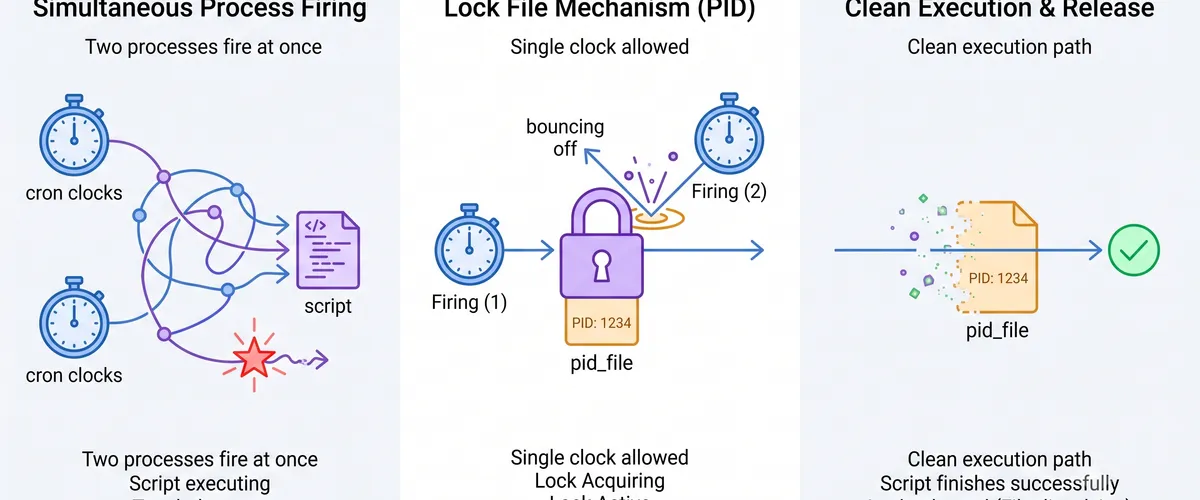
Cron does not care whether your last run finished. If a job is scheduled every five minutes but one run takes seven, cron cheerfully starts a second copy while the first is still going. Now two processes are reading the same input, writing the same output file, and racing each other to a half-written mess.
The same thing happens with a webhook that fires twice, a retry that overlaps the original, or an impatient human running the script by hand while the scheduled run is live.
Real-world impact
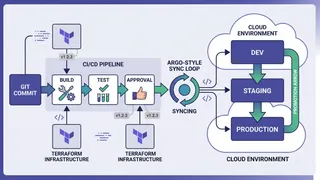
Overlapping runs are the kind of bug that only shows up under load, which is exactly when you can least afford it. You get truncated files, doubled database rows, and log output interleaved from two processes so you cannot even tell what happened. The flow below shows what a single guarded run should do instead.
The Solution
The Fix
Before doing any work, the script writes its own process ID into a lock file. If that file already exists, it checks whether the process it names is still alive. If it is, this run backs off and exits. If the process is gone, the lock is stale (a previous run crashed) so it clears it and carries on. A trap removes the lock file on the way out, whether the script finished cleanly or died.
Script Implementation
Setup
Start strict, and decide where the lock lives. Naming it after the script keeps different jobs from stepping on each other’s locks.
#!/usr/bin/env bashset -euo pipefail
# One lock per script name, in a writable runtime dir.LOCK_FILE="${TMPDIR:-/tmp}/$(basename "$0").pid"Acquiring the lock
This is the core. If a lock file exists and names a live process, exit. If it exists but the process is gone, treat it as stale and reclaim it.
acquire_lock() { if [[ -e "$LOCK_FILE" ]]; then local old_pid old_pid=$(cat "$LOCK_FILE" 2>/dev/null || echo "")
# kill -0 checks the process exists without sending a real signal. if [[ -n "$old_pid" ]] && kill -0 "$old_pid" 2>/dev/null; then echo "Already running as PID $old_pid, exiting." >&2 exit 1 fi
# The owner is gone: stale lock from a crashed run. Reclaim it. echo "Clearing stale lock from PID ${old_pid:-unknown}." >&2 fi
echo $$ > "$LOCK_FILE"}Releasing on exit
Register the cleanup once, right after acquiring, so it runs on normal exit, on error (thanks to set -e), and on Ctrl-C.
release_lock() { rm -f "$LOCK_FILE"}
acquire_locktrap release_lock EXITEntry point
Everything after the trap is your real work. It runs knowing no other copy is active.
main() { echo "Running with lock held (PID $$)..." # ... the actual job goes here ... sleep 5 echo "Done."}
main "$@"Usage and Benefits
Why This Helps
The whole guard is about fifteen lines and needs nothing outside of Bash itself. Drop it at the top of any script and overlapping runs stop being a problem: the first run works, the rest exit immediately, and a crash never leaves a lock that blocks every future run.
Running it
Prove it to yourself by starting one in the background and immediately launching a second:
./with_lock.sh & # first run grabs the lock./with_lock.sh # second run prints "Already running..." and exits 1The first run holds the lock for its full duration; the second sees a live PID and steps aside. Kill the first mid-run and the next invocation clears the stale lock instead of getting stuck.
Community Discussion
Your Turn
How do you keep your cron jobs from overlapping? PID files, lock directories, or something your scheduler does for you? I would like to hear what has held up in production.
Alternative approaches
If you are on Linux, flock is worth a look. It locks a file descriptor at the kernel level, so there is no stale-PID logic to write yourself:
exec 9>"${TMPDIR:-/tmp}/$(basename "$0").lock"flock -n 9 || { echo "Already running, exiting." >&2; exit 1; }# lock is released automatically when fd 9 closes on exitThe PID-file version is more portable (it works the same on macOS and older shells) and it records who holds the lock, which is handy for debugging. flock is simpler and race-free where you have it. Pick whichever matches where your scripts run.