Quick Tip
Wrap any flaky command in one reusable retry function and stop re-running red pipelines by hand.
The Problem
The Problem
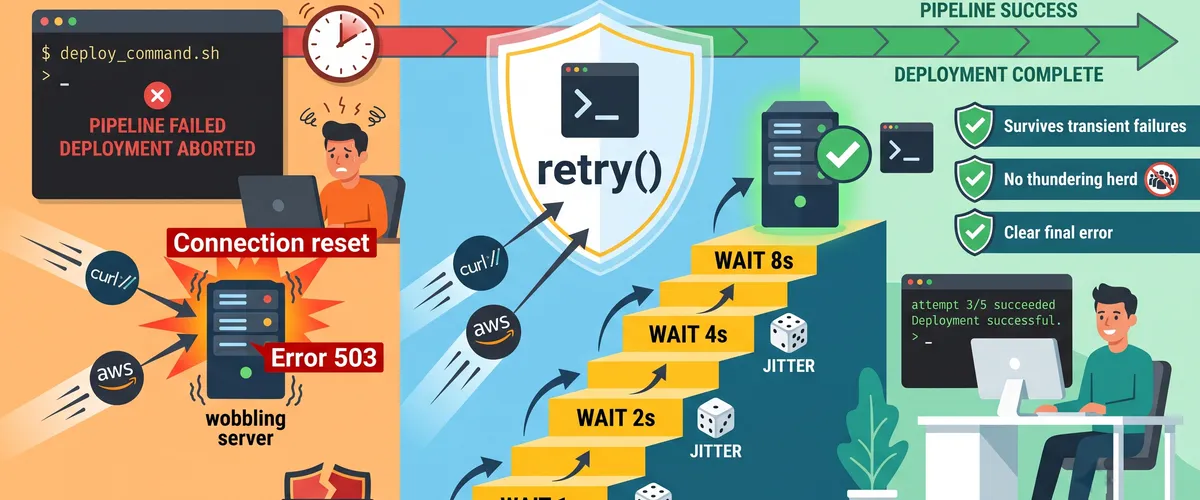
Some commands fail for reasons that have nothing to do with your code. A registry hiccups, an API rate-limits you for a second, a DNS lookup blips, an AWS endpoint returns a 503. Run the exact same command again and it works. That’s a transient failure, and it’s everywhere in scripts that touch the network.
Why blind retries make it worse
The naive fix is a quick loop that retries immediately, but that often makes things worse. If a service is already struggling, a tight retry loop hammers it harder. Worse, if a hundred CI jobs all fail at the same moment and all retry at the same moment, they come back in a synchronized wave. That’s the thundering herd, and it can keep a recovering service down.
The real-world impact
The everyday cost is a pipeline that goes red for no real reason, so someone re-runs it by hand and loses ten minutes and their focus. The worse cost is a deploy script that gives up on the first blip and leaves a release half-applied. Both come from treating a temporary failure as a permanent one.
The Solution
The Fix
Retry the command a few times, but wait longer between each attempt, and add a little randomness so retries spread out instead of stacking up. That’s exponential backoff with jitter, and it fits in one small Bash function you can wrap around anything.
Script Implementation
Setup and defaults
Start with a safe shell, then read the knobs from the environment so the same function works in a laptop shell and a CI job without editing the code.
#!/usr/bin/env bash# retry.sh - retry a command with exponential backoff and jitter.set -euo pipefail
# Tunables (override via environment):: "${RETRY_MAX_ATTEMPTS:=5}" # how many tries before giving up: "${RETRY_BASE_DELAY:=1}" # first backoff, in seconds: "${RETRY_MAX_DELAY:=60}" # cap so backoff never runs awayThe retry function
The function takes the command and its arguments as "$@", so it wraps anything without quoting gymnastics. It returns the command’s own exit code on success, and the last exit code if it runs out of attempts.
retry() { local attempt=1 while true; do # Run the command exactly as passed. On success, we're done. if "$@"; then return 0 fi local exit_code=$?
# Out of attempts: surface the failure clearly and pass the code up. if ((attempt >= RETRY_MAX_ATTEMPTS)); then echo "retry: '$*' failed after ${attempt} attempts (exit ${exit_code})" >&2 return "$exit_code" fi
# Exponential backoff: base * 2^(attempt-1), capped at max delay. local delay=$((RETRY_BASE_DELAY * 2 ** (attempt - 1))) ((delay > RETRY_MAX_DELAY)) && delay=$RETRY_MAX_DELAY
# Full jitter: sleep a random amount between 0 and delay. local wait=$((RANDOM % (delay + 1))) echo "retry: attempt ${attempt}/${RETRY_MAX_ATTEMPTS} failed (exit ${exit_code}); waiting ${wait}s" >&2 sleep "$wait" ((attempt++)) done}Why the jitter matters
The backoff line grows the wait each round, and the cap stops it from turning a fifth attempt into a multi-minute stall. The jitter line is the part people skip, and it’s the one that prevents the thundering herd. Instead of every caller waiting exactly 4 seconds and retrying at the same instant, each one waits a random slice of that window, so the load spreads out and the recovering service gets room to breathe.
Entry point
If you run the file directly it retries whatever you pass on the command line. If you source it, you just get the retry function.
# Run directly: retry.sh <command...>if [[ "${BASH_SOURCE[0]}" == "${0}" ]]; then if (($# == 0)); then echo "usage: retry.sh <command> [args...]" >&2 exit 64 fi retry "$@"fiUsage and Benefits
Why This Helps
One function covers every flaky command in your scripts, so you stop copy-pasting sleep loops and you get consistent logging for free. Because it wraps "$@", it does not care whether the command is aws, curl, kubectl, or a script of your own.
Real invocations
# Wrap an AWS CLI upload that sometimes hits throttling.retry aws s3 cp ./build.tar.gz s3://artifacts/build.tar.gz
# Wrap a health check that races a service starting up.retry curl -fsS https://api.example.com/health
# Tune it inline for a slow, important step.RETRY_MAX_ATTEMPTS=8 RETRY_BASE_DELAY=2 retry ./deploy.shSourcing it in CI/CD
Keep retry.sh in a shared scripts library and source it at the top of your pipeline steps, so every job gets the same behavior.
source ./scripts/retry.shretry terraform apply -auto-approveComparison
How the function compares to the other common options.
| Approach | Backoff | Jitter | Works for any command |
|---|---|---|---|
retry() function | Yes, exponential | Yes | Yes |
Tight until loop | No | No | Yes |
curl --retry N | Yes (curl 7.66+) | Only with --retry-all-errors extras | No, curl only |
| AWS CLI built-in retries | Yes (adaptive mode) | Yes | No, AWS CLI only |
Tool-specific retries are great when you’re already in that tool, but the function is the one thing that wraps all of them the same way.
Frequently Asked Questions
A fixed delay treats a one-second blip and a thirty-second outage the same way. Exponential backoff waits a little after the first failure and progressively longer after each one, so you recover fast from a quick hiccup but stop hammering a service that’s genuinely down. The cap (RETRY_MAX_DELAY) keeps the later waits from becoming a stall.
Jitter is deliberate randomness added to the wait time. Without it, every script that failed at the same moment retries at the same moment, hitting the recovering service in a synchronized wave. With full jitter, each caller sleeps a random amount between zero and the backoff window, so the retries spread out and the load smooths.
Wrap the command in a small function that maps the failures you care about to a non-zero exit and everything else to zero. For example, treat a curl exit of 22 (HTTP error) or 28 (timeout) as retryable and return success for the rest, then pass that wrapper to retry. That keeps the retry loop generic while you decide what “failure” means.
It uses Bash features: RANDOM, local, ((...)) arithmetic with **, and BASH_SOURCE. In a strict POSIX sh you’d swap RANDOM for something like awk or /dev/urandom, replace local, and compute the power manually. If you can run #!/usr/bin/env bash, keep it as is; it’s simpler and clearer.
Those are excellent inside their own tool. curl --retry retries HTTP calls; the AWS CLI has adaptive retry modes for API throttling. The Bash function is the layer above: it retries anything, including your own scripts and combinations of commands, with one consistent policy and one consistent log format.
Either lower RETRY_MAX_ATTEMPTS and RETRY_MAX_DELAY so the worst case is bounded, or wrap the call in GNU timeout, for example timeout 120 retry ./deploy.sh. The timeout approach gives you a hard ceiling regardless of how the backoff math works out.