If you run anything on Kubernetes, there’s a good chance you were pulling Bitnami images without even thinking about it. bitnami/postgresql, bitnami/redis, bitnami/nginx, the whole Helm charts library sitting on top of them. For years it was just there, free, maintained, and reasonably well hardened. You built on it and moved on.
Then in 2025 that quietly stopped being true.
Broadcom, which now owns VMware and Bitnami, announced they were moving the free Bitnami catalog on Docker Hub to a bitnamilegacy tier and pushing the actively maintained, security-hardened images into a paid product called Bitnami Secure Images. In plain terms: the free images you were pulling would keep existing, but they would stop getting patched. If you wanted the hardened, CVE-managed versions going forward, you needed a subscription.
For a lot of teams that’s a genuine problem, not just an annoyance. You suddenly have production workloads sitting on a base of container images that nobody upstream is patching anymore. So I did the thing every engineer eventually does when a tool they depend on disappears. I rebuilt it.
This is the story of QuenchWorks, and how it actually works under the hood.
What actually happened to Bitnami?
Let me be precise here, because “Bitnami is dead” is not quite right and I don’t want to spread the panicky version.
The free catalog didn’t vanish. What changed is the maintenance story. The images that used to receive regular security updates for free got moved behind Bitnami Secure Images, and the free tier became a frozen legacy snapshot. A frozen container image is fine on day one and a slowly growing liability on day ninety, because CVEs get discovered in software you already shipped. An image that isn’t rebuilt is an image that only accumulates known vulnerabilities.
So the gap isn’t “there are no more Bitnami images.” The gap is “there is no more free, continuously patched, hardened catalog that a small team can just adopt.” That’s the hole QuenchWorks fills.
So what is QuenchWorks?
QuenchWorks is a security-first, from-scratch replacement for the Bitnami catalog. Right now it ships over 150 container images and more than 120 Helm charts, and it’s growing on a daily build cadence.
The rules I set for myself on day one:
- Every image is built from source. Not repackaged, not re-tagged, not “pull the upstream binary and slap a label on it.” The source is compiled inside the build.
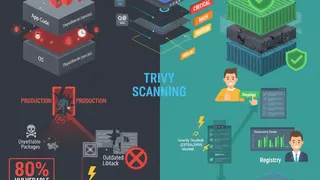
- Zero fixable CVEs, enforced by the build itself. If a scan finds a vulnerability that has a fix available, the build fails. I’ll come back to the word “fixable” because it matters a lot.
- Minimal and locked down by default. Nonroot, read-only root filesystem, no shell where one isn’t needed, multi-arch for
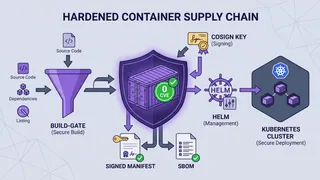
x86_64andarm64. - Signed and verifiable. Every image is cosign-signed and ships a software bill of materials and build provenance you can check yourself.
- Clean-room. QuenchWorks does not copy Bitnami’s charts or configs. It’s an independent implementation, not a fork.
The whole thing lives at quench-works.com, the images are on GitHub Container Registry, and the charts are published to ArtifactHub as a verified publisher.
Why build on Wolfi instead of Debian or Alpine?
This is the decision everything else hangs on, so it’s worth explaining.
Most base images are general-purpose Linux distributions. Debian, Ubuntu, Alpine. They’re built to be a complete operating system you can log into and work in. That’s exactly the problem for a container. A container running Postgres does not need a package manager, a shell, curl, wget, or ninety other packages. Every one of those is more code, and more code means more CVEs that have nothing to do with the app you actually care about.
Wolfi is different. It’s a distroless-friendly, container-native Linux built by Chainguard specifically to have as little in it as possible and to get security fixes fast. Two tools go with it:
- melange builds a package from source into a signed APK.
- apko assembles a container image from a declarative list of those APKs, with no Dockerfile and no layers full of leftover build tools.
The payoff is that the final image contains the app, its runtime dependencies, and almost nothing else. There’s no apt, no busybox shell, no build toolchain hiding in a layer. A smaller image isn’t just faster to pull. It’s a smaller attack surface and a much shorter CVE scan.
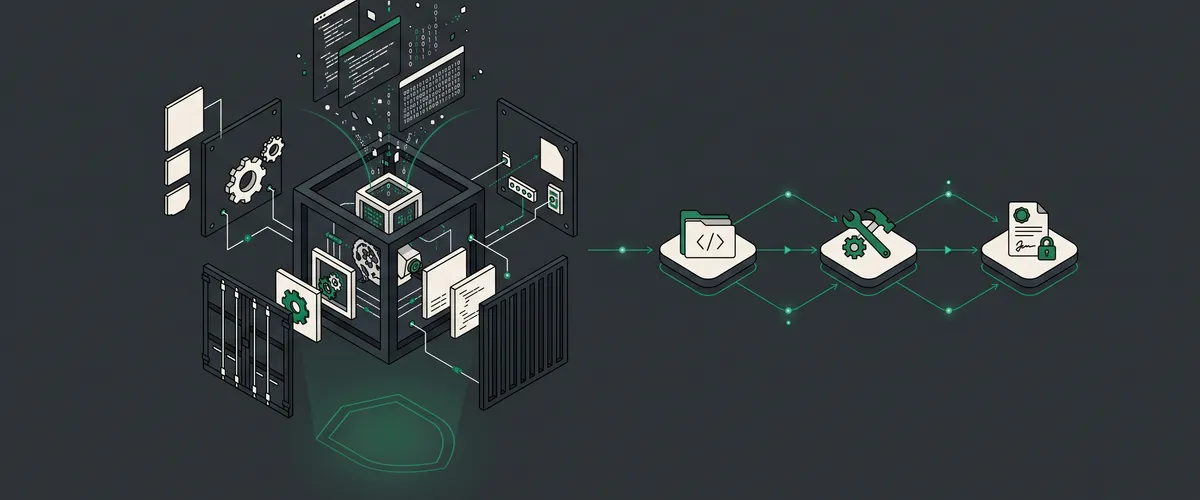
Here’s the shape of the pipeline for a single app:
upstream source (a specific, pinned version) │ ▼ melange build ← compile from source, CGO off where possible, │ stamp the real version, sign the APK ▼ apko assemble ← nonroot uid 1001, read-only rootfs, │ multi-arch, only the runtime deps ▼ Trivy scan (the gate) ← fail the build on ANY fixable CVE │ ▼ cosign sign + SBOM + SLSA ← keyless signature, bill of materials, │ build provenance attestation ▼ GHCR, pinned by digestThe Trivy step is the one that makes the whole project mean something, so let’s talk about it honestly.
What “zero CVE” actually means (and why I refuse to fake it)
“Zero CVE” is a phrase people love to put on a marketing page, and most of the time it’s not true. Any non-trivial piece of software has open vulnerabilities somewhere in its dependency graph at any given moment. Anyone who tells you their image has literally zero known vulnerabilities is either not scanning hard enough or not telling you the whole story.
So here’s the precise claim QuenchWorks makes: zero fixable CVEs.
The scanner runs in thorough mode and I filter to vulnerabilities that have a fix available. If a CVE has a patched version out there, the build must include it or the build fails. No exceptions, no allowlist to sneak something past the gate. That’s the part I control, and I hold it at zero.
What I can’t control is upstream. If a project depends on a library that has a known CVE and there’s simply no patched release yet, no amount of rebuilding fixes it. The fix doesn’t exist. In that case QuenchWorks reports the unfixable count openly instead of pretending it’s zero. When upstream ships the patch, the nightly rebuild picks it up automatically and the number drops.
I think that distinction is the most important thing about the project. “Zero fixable CVEs, and here’s the honest count of what’s still unfixable upstream” is a claim you can actually trust and verify. “Zero CVEs” with no asterisk is a claim you should be suspicious of.
Signed, documented, and pinned by digest
A hardened image you can’t verify is just a hardened image you’re taking on faith. So every QuenchWorks image ships three things beyond the bits themselves:
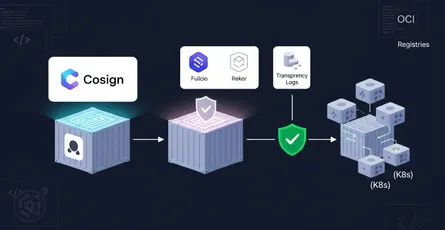
- A cosign signature, using keyless Sigstore signing. You can verify the image was built by the QuenchWorks pipeline and not swapped out somewhere in transit.
- An SBOM, a software bill of materials in SPDX format that lists exactly what’s inside. When the next big CVE drops, you can grep your SBOMs instead of guessing which images are affected.
- SLSA provenance, an attestation of how and where the image was built.
You verify them with the GitHub CLI:
gh attestation verify \ oci://ghcr.io/quenchworks/images/postgresql:<version> \ --owner quenchworksAnd in your charts and manifests, images are always pinned by digest, never by a floating tag. A tag like :16 can be moved to point at different bits tomorrow. A digest like @sha256:... is the content. If the digest matches, you’re running exactly what was signed. This is the difference between “probably the image I tested” and “provably the image I tested.”
The Helm charts, and the piece that keeps them consistent
Images are half the story. The other half is the 120-plus Helm charts, because that’s how most people actually deploy this stuff.
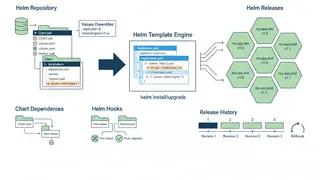
The thing I wanted to avoid was 120 charts that each reinvent the same security boilerplate slightly differently. So there’s a shared library chart called quench-common that every application chart depends on. It defines all the cross-cutting pieces in one place: the pod and container security contexts, the labels, how the image digest gets wired in, the probes, the service account handling.
An individual chart, say the one for SeaweedFS or Tempo, only has to describe what’s actually specific to that app. The hardening comes from the library, so it’s identical everywhere and I fix it in exactly one spot. Every chart is validated in a real kind cluster before release, published to ArtifactHub with verified-publisher metadata, and pinned to its image by digest.
How to actually use it
The nice part is there’s almost nothing to learn. If you were pulling Bitnami, you already know the shape of this.
Pull an image directly:
docker pull ghcr.io/quenchworks/images/postgresql:<version>Or install a chart from the OCI registry:
helm install my-postgres \ oci://ghcr.io/quenchworks/charts/postgresql \ --version <chart-version>Browse the full catalog, with the live CVE count for every image, at quench-works.com, and find the charts on ArtifactHub under the QuenchWorks publisher.
Now let’s stop talking about it and actually use it. The rest of this post is hands-on. I’ll build a full observability stack, wire up GitOps so it deploys itself, ship a real application end to end, and keep the whole thing verifiable and zero-CVE over time. Every command and manifest here is real and runs against the live catalog.
Tip
Everything below pins images by digest and verifies signatures before trusting them. If you copy nothing else from this post, copy that habit. A tag tells you what an image is called. A digest tells you what it actually is.
How do you verify an image before you trust it?
Before we deploy anything, let’s do the step almost everyone skips: proving the image is what it claims to be. QuenchWorks signs every image with keyless cosign and attaches an SBOM and SLSA provenance, so you can check all of it in about ten seconds.
- Install the tools you need. You want the GitHub CLI for attestation checks and cosign for signature verification.
# GitHub CLI (attestations live on GHCR)brew install gh # macOS / Linuxbrew# cosign for Sigstore signaturesbrew install cosign- Verify the build provenance. This proves the image was built by the QuenchWorks pipeline in GitHub Actions and not swapped out somewhere along the way.
gh attestation verify \ oci://ghcr.io/quenchworks/images/postgresql:17.5 \ --owner quenchworks- Inspect the software bill of materials. When the next headline CVE drops, you grep this instead of guessing whether you’re affected.
gh attestation verify \ oci://ghcr.io/quenchworks/images/postgresql:17.5 \ --owner quenchworks \ --predicate-type https://spdx.dev/Document \ --format json | jq '.[].verificationResult.statement.predicate.name'- Resolve the tag to its digest, and use that digest everywhere from now on.
docker buildx imagetools inspect \ ghcr.io/quenchworks/images/postgresql:17.5 \ --format '{{.Manifest.Digest}}'# sha256:... <- this is what you pin in values.yaml and manifestsCareful here
If gh attestation verify fails, do not deploy the image. A failed
verification means either the image was tampered with or you’re pointing at
something that isn’t a QuenchWorks build. That’s exactly the signal the whole
supply chain exists to give you.
Example 1: A full observability stack you can trust
Let’s start with the thing every cluster needs and nobody enjoys wiring up: observability. Metrics, logs, and traces, with dashboards on top. The classic Grafana stack is often called LGTM (Loki, Grafana, Tempo, Mimir), and QuenchWorks ships all of the pieces plus an umbrella chart that assembles them.
Here’s the data flow we’re building:
your apps + kubernetes collection storage query + view ┌─────────────────────┐ ┌──────────────────┐ ┌────────────────────┐ ┌──────────────┐ │ app metrics /logs │────▶│ OTel Collector │──▶│ VictoriaMetrics │─┐ │ │ │ traces (OTLP) │ │ (receivers + │ │ (metrics, TSDB) │ │ │ │ ├─────────────────────┤ │ processors + │──▶│ Loki (logs) │ ├──▶│ Grafana │ │ node_exporter │────▶│ exporters) │ │ Tempo (traces) │ │ │ dashboards │ │ kube-state-metrics │ │ │──▶│ │─┘ │ │ │ Vector (log tail) │────▶│ │ └────────────────────┘ └──────────────┘ └─────────────────────┘ └──────────────────┘ all images: nonroot, read-only rootfs, 0 fixable CVEs, pinned by digestWhat’s in the box
The lgtm-stack umbrella chart pulls these QuenchWorks charts as dependencies, every one of them a hardened, signed, digest-pinned image:
- VictoriaMetrics for metrics storage (a faster, lighter drop-in for Prometheus TSDB)
- Loki for logs
- Tempo for distributed traces
- Grafana for dashboards and querying
- OTel Collector as the single ingest point for OTLP metrics, logs, and traces
- Vector for tailing and shipping node and pod logs
- kube-state-metrics and node-exporter for cluster and host metrics
- Alertmanager for routing alerts
A few opinionated defaults worth calling out:
- VictoriaMetrics over vanilla Prometheus for storage. It speaks PromQL, uses far less memory, and handles long retention without falling over. You can still scrape with Prometheus conventions.
- OTel Collector as the front door. Everything sends OTLP to one place. If you later swap a backend, your apps don’t change, only the collector’s exporters do.
- Vector for logs because it’s a single fast binary with backpressure handling, rather than a JVM log shipper eating a gig of RAM per node.
The repository layout
I’m going to do this the GitOps way from the start, so here’s the repo we’ll build up across the next two examples:
Directoryplatform-gitops/
Directoryclusters/
Directoryproduction/
- kustomization.yaml the entry point Argo CD or Flux watches
- observability.yaml the Argo CD Application for this stack
- platform.yaml cert-manager, ingress, external-secrets
Directorystaging/
- kustomization.yaml
Directorystacks/
Directoryobservability/
- values.yaml the lgtm-stack values we’re about to write
Directorydashboards/ your own Grafana dashboard JSON
- …
Directoryplatform/
- cert-manager-values.yaml
- ingress-values.yaml
Directoryapps/
Directoryacme-web/
- values.yaml the app we ship in example 3
- database.yaml postgresql + redis
- ingress.yaml
- README.md
Step by step: install the stack
- Create a namespace for everything observability-related.
kubectl create namespace observability- Write the stack’s values. This is the real shape of
lgtm-stackvalues, with the toggles that matter for a first install.
# Grafana: the front end. Stateless by design; dashboards come from config.grafana: enabled: true adminPassword: '' # leave empty, pull from a secret (see example 3) persistence: enabled: false # dashboards are provisioned, not hand-drawn ingress: enabled: true hostname: grafana.internal.example.com
# Metrics storage. PromQL-compatible, memory-friendly.victoriametrics: enabled: true retentionPeriod: 30d persistence: enabled: true size: 50Gi
# Logs.loki: enabled: true persistence: enabled: true size: 50Gi
# Traces.tempo: enabled: true persistence: enabled: true size: 20Gi
# The single ingest point for OTLP metrics, logs, and traces.otelCollector: enabled: true
# Log shipping from every node.vector: enabled: true
# Cluster + host metrics.kubeStateMetrics: enabled: truenodeExporter: enabled: true
# Alert routing.alertmanager: enabled: true
# Provision your own dashboards from JSON in the repo.dashboards: enabled: true- Install the umbrella chart from the OCI registry, pointing at your values.
helm install lgtm \ oci://ghcr.io/quenchworks/charts/lgtm-stack \ --version 0.1.0 \ --namespace observability \ --values stacks/observability/values.yaml \ --wait- Confirm everything reached Ready.
kubectl -n observability get podskubectl -n observability rollout status deploy/lgtm-grafana- Port-forward Grafana and log in. The metrics, logs, and traces data sources are already wired to VictoriaMetrics, Loki, and Tempo.
kubectl -n observability port-forward svc/lgtm-grafana 3000:3000# http://localhost:3000Note
The values above are the ones you’ll touch on day one. For the full schema,
run helm show values oci://ghcr.io/quenchworks/charts/lgtm-stack --version 0.1.0. Every sub-chart also installs on its own if you’d rather compose the
stack yourself.
Sending data to the collector
Your apps point at one endpoint, the OTel Collector, using standard OTLP. Nothing app-side is QuenchWorks-specific, which is the point.
env: - name: OTEL_EXPORTER_OTLP_ENDPOINT value: 'http://lgtm-otel-collector.observability.svc:4317' - name: OTEL_EXPORTER_OTLP_PROTOCOL value: 'grpc' - name: OTEL_SERVICE_NAME value: 'acme-web' - name: OTEL_RESOURCE_ATTRIBUTES value: 'deployment.environment=production'And here’s a minimal collector config that fans OTLP out to all three backends:
receivers: otlp: protocols: grpc: {endpoint: 0.0.0.0:4317} http: {endpoint: 0.0.0.0:4318}
processors: batch: {} memory_limiter: check_interval: 5s limit_percentage: 80
exporters: otlphttp/metrics: endpoint: http://lgtm-victoriametrics.observability.svc:8428/opentelemetry loki: endpoint: http://lgtm-loki.observability.svc:3100/loki/api/v1/push otlp/tempo: endpoint: lgtm-tempo.observability.svc:4317 tls: {insecure: true}
service: pipelines: metrics: { receivers: [otlp], processors: [memory_limiter, batch], exporters: [otlphttp/metrics], } logs: { receivers: [otlp], processors: [memory_limiter, batch], exporters: [loki], } traces: { receivers: [otlp], processors: [memory_limiter, batch], exporters: [otlp/tempo], }Common questions
Prometheus is a great scraper and a mediocre long-term store. VictoriaMetrics speaks the same PromQL and remote-write protocol, uses a fraction of the memory, and handles months of retention without sharding gymnastics. You keep the Prometheus ecosystem and lose the operational pain. If you specifically want the Prometheus server, that chart is in the catalog too.
In PersistentVolumes, sized by the persistence.size values you set.
VictoriaMetrics, Loki, and Tempo each get their own PVC. Grafana is
deliberately stateless: its dashboards are provisioned from JSON in your Git
repo, so a Grafana pod can be deleted and recreated with zero data loss.
That’s a feature, not a limitation.
Drop the dashboard JSON into stacks/observability/dashboards/ in your repo
and reference it through the dashboards values. Because Grafana is stateless
and provisioned, your dashboards are code, reviewed in pull requests like
everything else, and they survive pod restarts.
Example 2: CI/CD and GitOps that deploys itself
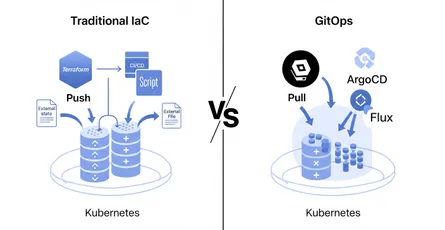
A stack you install by hand is a stack that drifts. The fix is GitOps: your Git repo is the single source of truth, and a controller in the cluster continuously reconciles reality against what’s committed. You don’t run helm install from your laptop anymore. You open a pull request.
The difference from traditional push-based CI/CD is worth stating plainly:
PUSH model (traditional) PULL model (GitOps) ┌──────────┐ kubectl/helm ┌──────────┐ commit │ CI job │ ───────────────▶ cluster │ Git repo │ ◀─────────── you └──────────┘ (credentials └──────────┘ live in CI) ▲ watches + reconciles │ ┌──────────────┐ │ Argo CD/Flux │ (in-cluster) └──────────────┘In the pull model your CI never needs cluster credentials. The in-cluster controller pulls. That’s a real security win, and it pairs perfectly with digest-pinned, signed images.
Bootstrap the controller
Argo CD watches your Git repo and applies what’s there. Install it, then point it at the repo with an Application per stack.
kubectl create namespace argocdkubectl apply -n argocd \ -f https://raw.githubusercontent.com/argoproj/argo-cd/stable/manifests/install.yamlAn Application that deploys our observability stack straight from the QuenchWorks OCI registry, with values from Git:
apiVersion: argoproj.io/v1alpha1kind: Applicationmetadata: name: observability namespace: argocdspec: project: default sources: # The hardened chart, pinned to an exact version - repoURL: ghcr.io/quenchworks/charts chart: lgtm-stack targetRevision: 0.1.0 helm: valueFiles: - $values/stacks/observability/values.yaml # Your Git repo, providing the values file above - repoURL: https://github.com/your-org/platform-gitops targetRevision: main ref: values destination: server: https://kubernetes.default.svc namespace: observability syncPolicy: automated: prune: true selfHeal: true syncOptions: - CreateNamespace=trueFlux does the same job with a set of custom resources. You declare where the chart lives and where the values come from, and Flux reconciles.
flux bootstrap github \ --owner=your-org \ --repository=platform-gitops \ --branch=main \ --path=clusters/productionapiVersion: source.toolkit.fluxcd.io/v1beta2kind: OCIRepositorymetadata: name: lgtm-stack namespace: flux-systemspec: interval: 10m url: oci://ghcr.io/quenchworks/charts/lgtm-stack ref: tag: 0.1.0---apiVersion: helm.toolkit.fluxcd.io/v2beta2kind: HelmReleasemetadata: name: observability namespace: observabilityspec: interval: 10m chartRef: kind: OCIRepository name: lgtm-stack namespace: flux-system valuesFrom: - kind: ConfigMap name: observability-values install: createNamespace: trueThe CI half: verify before you promote
GitOps handles deployment. CI’s job shrinks to something healthier: lint the manifests, render them, and above all verify the image signature before letting a digest into the repo. Here’s a GitHub Actions workflow that does exactly that.
name: verify-and-renderon: pull_request: paths: ['stacks/**', 'apps/**', 'clusters/**']
jobs: verify: runs-on: ubuntu-latest permissions: contents: read id-token: write # for keyless verification steps: - uses: actions/checkout@v4
- name: Install tooling run: | curl -sSfL https://github.com/sigstore/cosign/releases/latest/download/cosign-linux-amd64 \ -o /usr/local/bin/cosign && chmod +x /usr/local/bin/cosign curl -sL https://get.helm.sh/helm-v3.16.0-linux-amd64.tar.gz | tar xz sudo mv linux-amd64/helm /usr/local/bin/
- name: Verify every QuenchWorks image referenced in this PR run: | # pull the digests out of the values and prove each one is signed grep -rhoE 'ghcr.io/quenchworks/images/[a-z0-9-]+@sha256:[a-f0-9]+' stacks apps \ | sort -u \ | while read -r ref; do echo "Verifying $ref" gh attestation verify "oci://$ref" --owner quenchworks done env: GH_TOKEN: ${{ github.token }}
- name: Render the charts (catch template errors before merge) run: | helm template observability \ oci://ghcr.io/quenchworks/charts/lgtm-stack --version 0.1.0 \ --values stacks/observability/values.yaml > /dev/nullTip
The verify step is the one that earns its keep. It makes an unsigned or tampered image a merge blocker, not a production incident. The whole supply chain QuenchWorks builds is only worth anything if something actually checks it, and this is where you check it.
Keeping digests fresh automatically
Pinning by digest is great for reproducibility and terrible for staying current, unless you automate the bumps. Renovate does this. It watches the registry, opens a pull request when a new digest ships, and your CI verifies the signature on that new digest before you merge. QuenchWorks has a hardened Renovate image in the catalog, so you can even run the bot on your own hardened base.
{ "$schema": "https://docs.renovatebot.com/renovate-schema.json", "extends": ["config:recommended"], "helm-values": {"managerFilePatterns": ["/values\\.yaml$/"]}, "packageRules": [ { "matchDatasources": ["docker"], "matchPackagePatterns": ["^ghcr.io/quenchworks/"], "pinDigests": true, "groupName": "quenchworks images" } ]}GitOps questions people actually ask
You revert the commit. That’s the whole answer, and it’s why GitOps is worth
the setup. The controller sees the repo change back to the previous digest and
reconciles the cluster to match. No frantic helm rollback from memory, no
wondering what state the cluster is in. Git history is your deploy history.
Only if you don’t automate it. With Renovate opening digest-bump PRs and CI verifying each new digest’s signature, you get the best of both: every deploy is reproducible and provable, and you’re never more than a merged PR behind the latest hardened build. Reproducibility and freshness stop being a trade-off.
Because CI is the most attacked part of most pipelines. In the push model, a compromised CI job has the keys to your cluster. In the pull model, the in-cluster controller reaches out to Git and the registry, and CI only ever touches your repo. There’s no cluster credential to steal from CI because there isn’t one there.
Example 3: Shipping a real application end to end
Enough infrastructure. Let’s deploy an actual app with a database, a cache, TLS, and network isolation, using QuenchWorks charts for every piece. Call it acme-web.
The moving parts:
Directoryapps/acme-web/
- values.yaml the app itself
- database.yaml postgresql, digest-pinned
- cache.yaml redis
- secrets.yaml external-secrets pulling from your vault
- ingress.yaml ingress-nginx route + cert-manager TLS
- networkpolicy.yaml default-deny + explicit allows
- Create the namespace and a default-deny NetworkPolicy. Start locked down, then open only what’s needed. Every QuenchWorks image already runs nonroot with a read-only root filesystem, so the network is the next layer to harden.
apiVersion: networking.k8s.io/v1kind: NetworkPolicymetadata: name: default-deny namespace: acmespec: podSelector: {} policyTypes: [Ingress, Egress]---apiVersion: networking.k8s.io/v1kind: NetworkPolicymetadata: name: web-to-db namespace: acmespec: podSelector: matchLabels: {app.kubernetes.io/name: postgresql} ingress: - from: - podSelector: matchLabels: {app.kubernetes.io/name: acme-web} ports: - port: 5432- Pull secrets from your vault with external-secrets instead of committing them. The database password never touches Git.
apiVersion: external-secrets.io/v1beta1kind: ExternalSecretmetadata: name: acme-db namespace: acmespec: refreshInterval: 1h secretStoreRef: name: vault-backend kind: ClusterSecretStore target: name: acme-db-credentials data: - secretKey: password remoteRef: key: secret/acme/db property: password- Deploy PostgreSQL, pinned by digest, reading its password from that secret.
helm install acme-db \ oci://ghcr.io/quenchworks/charts/postgresql \ --namespace acme --create-namespace \ --set auth.existingSecret=acme-db-credentials \ --set primary.persistence.size=20Gi \ --wait- Deploy Redis for caching and sessions.
helm install acme-cache \ oci://ghcr.io/quenchworks/charts/redis \ --namespace acme \ --set auth.enabled=true \ --set master.persistence.size=8Gi \ --wait- Deploy the app, wiring it to both. This is where you’d point at your own application image; the pattern is identical.
image: repository: ghcr.io/your-org/acme-web # your app's own digest; the QuenchWorks charts pin theirs the same way digest: 'sha256:...'
replicaCount: 3
extraEnvVars: - name: DATABASE_HOST value: acme-db-postgresql.acme.svc - name: DATABASE_PASSWORD valueFrom: secretKeyRef: name: acme-db-credentials key: password - name: REDIS_HOST value: acme-cache-redis-master.acme.svc
# QuenchWorks charts default to a locked-down security context.# You inherit nonroot + read-only rootfs; declare writable scratch explicitly.extraVolumes: - name: tmp emptyDir: {}extraVolumeMounts: - name: tmp mountPath: /tmp- Expose it with ingress-nginx and get an automatic TLS cert from cert-manager.
apiVersion: networking.k8s.io/v1kind: Ingressmetadata: name: acme-web namespace: acme annotations: cert-manager.io/cluster-issuer: letsencrypt-prodspec: ingressClassName: nginx tls: - hosts: [app.example.com] secretName: acme-web-tls rules: - host: app.example.com http: paths: - path: / pathType: Prefix backend: service: name: acme-web port: {number: 8080}Note
Notice what you did not have to do: no runAsUser, no
readOnlyRootFilesystem, no dropping capabilities by hand. The QuenchWorks
charts set all of that through the shared quench-common library, so every
workload starts hardened and you only declare the exceptions, like the
writable /tmp above. Secure by default, not secure if you remember.
Example 4: Staying zero-CVE after day one
The hard part of a secure catalog isn’t launch day. It’s day ninety, when new CVEs have been found in software you already deployed. Here’s how the whole system stays honest without you babysitting it.
-
QuenchWorks rebuilds every image on a nightly schedule against a fresh vulnerability database. When upstream ships a fix, the next rebuild picks it up and the image’s fixable-CVE count stays at zero on its own.
-
New digests land in GHCR, signed and attested exactly like the originals.
-
Renovate (from example 2) opens a pull request bumping the digest in your Git repo.
-
Your CI verifies the new digest’s signature and provenance before the PR can merge.
-
Argo CD or Flux reconciles the merged change into the cluster. You went from an upstream patch to a verified, deployed fix without a human touching a cluster.
That loop is the actual product. Not any single image, but a pipeline where a security fix flows from upstream to your running pods through a chain that’s signed and checked at every hop.

Browse the full QuenchWorks catalog
150+ images · 120+ charts · verified publisher
Every image with its live CVE count, plus install commands for each chart.
Where it stands, honestly
I’ll close the way I started, without the marketing gloss.
QuenchWorks is real and it’s running. The daily cadence keeps adding apps, the nightly rebuild keeps the CVE counts honest, and the whole supply chain is signed and verifiable today. It is not a company and it is not trying to sell you a subscription. It exists because a useful free thing got taken away and rebuilding it turned out to be a genuinely interesting engineering problem in supply-chain security.
A few things are still upstream-blocked, where a project ships a dependency that nobody has patched yet. Those show up in the catalog with their real numbers rather than hidden. When upstream moves, the rebuild catches up on its own.
If you lost your Bitnami images and you’ve been putting off dealing with it, this is a drop-in place to land. And if you just care about how you build a container catalog that can prove what’s inside it, that’s the part I’d love to talk about.
You can find everything at quench-works.com.