Centralizing CI/CD automation across repositories
Why does copy-pasting the same workflow config into dozens of repositories turn into an operational risk?
If you’ve ever managed more than a handful of code repositories, you know how quickly things can spiral out of control. With modular architectures and microservices, the number of git repositories we manage is skyrocketing. That’s great for development speed, but it’s a massive headache for anyone handling DevOps.
When you copy and paste the same pipeline configurations across dozens of different repositories, you’re setting yourself up for a nightmare. Let’s say you need to upgrade a Node.js version, patch a security vulnerability, or add a compliance check. You’re stuck opening pull requests in fifty different places. Over time, some repositories get updated while others are forgotten. That’s configuration drift, and it shows up as weird deployment bugs.
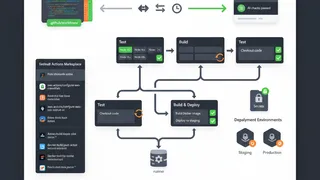
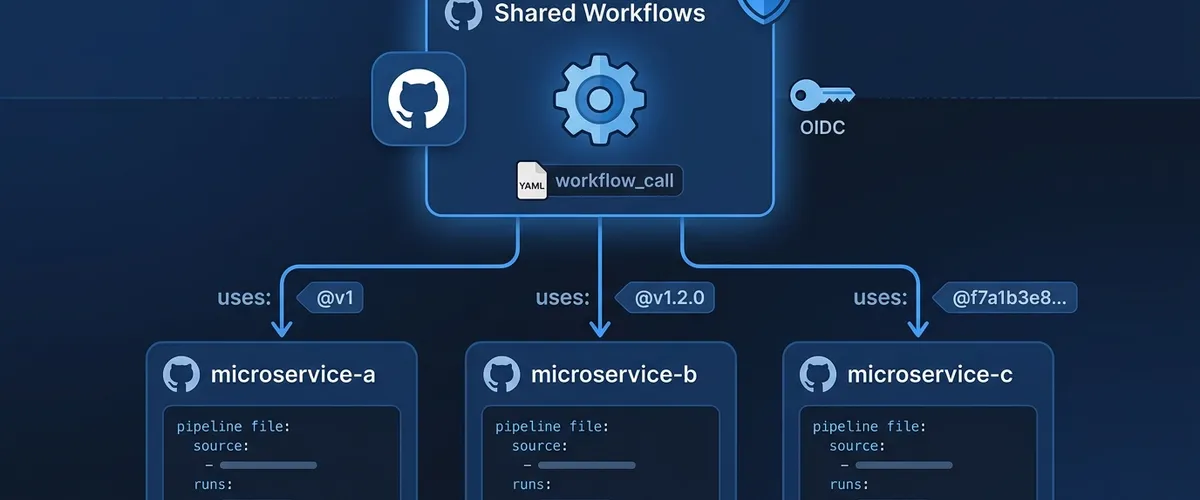
GitHub Actions has a built-in solution for this called reusable workflows. Instead of duplicating code, you can write your standard workflows in one central repository and reference them across your whole organization. When you need to make a change, you update it once in the central repo, and every single project using it gets the update instantly.
┌────────────────────────────────────────────────────────┐│ central-shared-workflows ││ (Internal Repository) ││ ││ ┌────────────────────────────────────────────────┐ ││ │ node-ci-reusable.yml │ ││ │ (defines workflow_call) │ ││ └────────────────────────────────────────────────┘ │└───────────────────────────┬────────────────────────────┘ │ References via │ "uses: corporate-org/..." │ ┌─────────────────────┼─────────────────────┐ ▼ ▼ ▼┌───────────────┐ ┌───────────────┐ ┌───────────────┐│ microservice-a│ │ microservice-b│ │ microservice-c││ (Caller Rep) │ │ (Caller Rep) │ │ (Caller Rep) ││ │ │ │ │ ││ ci-pipe.yml │ │ ci-pipe.yml │ │ ci-pipe.yml │└───────────────┘ └───────────────┘ └───────────────┘Even better, GitHub integrates these workflows directly into your repository’s dependency graph. That means you can see exactly which repositories are using which version of your shared workflows, which makes audits and updates much easier.
# A quick look at how clean your caller workflow becomesname: Quick Example Pipeline
on: push: branches: [main]
jobs: # Instead of writing 50 lines of test steps, you just call the template run-tests: uses: corporate-org/shared-workflows/.github/workflows/node-ci-reusable.yml@v1 secrets: inheritArchitectural differences: reusable workflows and composite actions
Where do reusable workflows end and composite actions begin, and what does each one cost you?
When you’re building a shared CI/CD library, you’ll constantly run into two features: reusable workflows and composite actions. They both help you keep your pipelines DRY (Don’t Repeat Yourself), but they work at different levels.
Think of reusable workflows as full pipeline templates that contain one or more jobs. Each job can run on different runners (like Windows or Linux) and run parallelized tasks. On the flip side, composite actions are like little bundles of steps that run inside a single job defined by the caller.
Choosing the right tool saves you a lot of refactoring later on. Let’s look at how they compare side-by-side:
| Architectural Attribute | Reusable Workflows | Composite Actions | DevOps Implication |
|---|---|---|---|
| Invocable Level | Job level (called directly inside a job) | Step level (called inside a job’s steps) | Reusable workflows act as top-level pipeline templates, while composite actions are task templates. |
| Multi-Job Execution | Supported (can define independent jobs and matrices) | Not supported (everything runs in one job) | Reusable workflows excel at complex, parallelized build-and-test stages. |
| Secret Management | Supports explicit secrets and automatic inheritance | Cannot directly accept or hide secrets natively | Reusable workflows provide a much more secure way to handle deployment keys. |
| Runner Selection | Declares runner properties (runs-on) internally | Inherits the runner defined by the calling job | Reusable workflows can dynamically allocate different machines for different jobs. |
| Nesting Capabilities | Supports up to 10 nested levels of workflows | Supports up to 10 nested composite actions | Recent platform updates expanded these limits to handle complex architectures. |
| Execution Logging | Logs each job and step in real-time independently | Collapses steps under a single execution block | Reusable workflows make debugging much easier by showing step-by-step logs. |
| Marketplace Support | Cannot be published to the GitHub Marketplace | Can be published and versioned in the Marketplace | Reusable workflows are best kept for internal organization standards. |
A smart way to design your pipelines is to use both together. Use reusable workflows as the overall skeleton of your pipeline, and use composite actions for small, repeated steps (like setting up a specific environment or managing a cache) inside those jobs.
Defining reusable workflows via workflow_call
How do you declare inputs, outputs, and secrets to build a configurable workflow template?
To make a workflow reusable, you trigger it using the workflow_call event in its on block. This block acts as the public interface for your workflow, letting you declare exactly what inputs, outputs, and secrets it expects from callers.
You’ll save these YAML files in your repository’s .github/workflows/ folder.
Here’s a practical, real-world example of a reusable Node.js pipeline. It checks out the code, sets up Node, handles dependencies, runs tests, and even sends a status output back to the caller:
name: Reusable Node.js CI
on: workflow_call: # Define the parameters that callers can pass in inputs: node-version: description: 'The Node.js version to run' required: false default: '20' type: string run-coverage: description: 'Set to true to run unit test coverage' required: false default: true type: boolean config-json: description: 'A JSON string for complex config overrides' required: false type: string # Define the secrets this workflow needs secrets: NPM_TOKEN: description: 'Auth token for private npm packages' required: true # Define outputs to pass data back to the caller outputs: build-status: description: 'The final outcome of the build step' value: ${{ jobs.build-and-test.outputs.status }}
jobs: build-and-test: runs-on: ubuntu-latest # Map the step output to the job output outputs: status: ${{ steps.set-status.outputs.status }} steps: - name: Checkout Application Code uses: actions/checkout@v4
- name: Set up Node.js uses: actions/setup-node@v4 with: node-version: ${{ inputs.node-version }}
- name: Install Dependencies run: | if [ -f package-lock.json ]; then npm ci else npm install fi env: NODE_AUTH_TOKEN: ${{ secrets.NPM_TOKEN }}
- name: Run Tests run: npm test
- name: Run Test Coverage if: ${{ inputs.run-coverage == true }} run: npm run test:coverage
- name: Parse Complex Configuration if: ${{ inputs.config-json != '' }} run: | # Use jq to parse the JSON input dynamically REGION=$(echo '${{ inputs.config-json }}' | jq -r '.region // "us-east-1"') echo "Target region is: $REGION"
- id: set-status name: Export Status run: echo "status=success" >> "$GITHUB_OUTPUT"There are a few key practices to call out in this example:
- Input Validation: Specifying types (like
stringorboolean) and default values helps prevent runtime crashes when callers forget to pass parameters. - Handling Complex Data: Passing a serialized JSON string (
config-json) lets you bypass flat-parameter limitations. You can easily parse nested properties at runtime using utility tools likejq. - Explicit Secrets: Declaring required secrets makes the template self-documenting, so developers know exactly what credentials they need to set up.
- Clean Outputs: Capturing the build state in
$GITHUB_OUTPUTallows the calling workflow to make smart, conditional decisions later on.
Invoking shared pipelines from caller repositories
What’s the syntax for referencing external workflows and passing parameters or inheriting secrets safely?
Once you’ve defined your reusable workflow, calling it from another pipeline is simple. You use the uses keyword at the job level of your caller workflow.
How you reference it depends on where the file is stored:
# If it's in the same repositoryuses: ./.github/workflows/node-ci-reusable.yml
# If it's in a different repositoryuses: {owner}/{repo}/.github/workflows/{filename}@{ref}To pass values, you use the with block for inputs and the secrets block for sensitive credentials. Remember that environment variables set at the top workflow level in the caller aren’t passed down to the called workflow. If you need variables inside the called workflow, you have to pass them explicitly as inputs or use repository-level variables through the vars context.
Here’s an example of a caller workflow (.github/workflows/app-delivery.yml) that runs our Node.js CI template and conditionally deploys the app if everything passes:
name: Build and Release App
on: push: branches: - main
jobs: # Job 1: Call our centralized CI template run-ci: with: node-version: '22' run-coverage: true config-json: '{"region": "us-west-2", "environment": "production"}' secrets: inherit # Safely passes all repository secrets down
# Job 2: Run a deployment step only if the CI template finishes successfully deploy-application: needs: run-ci if: ${{ needs.run-ci.outputs.build-status == 'success' }} runs-on: ubuntu-latest steps: - name: Deploy Artifacts run: echo "Deploying application to production..."See how clean that caller file is? It orchestrates a multi-step pipeline with barely any code duplication.
While secrets: inherit is convenient and clean, explicit mapping (like NPM_TOKEN: ${{ secrets.REGISTRY_TOKEN }}) is often preferred in highly regulated environments to make audits easier and limit credential exposure.
Security governance and cross-repository permissions
How do you enforce least-privilege access and keep private workflows private across repositories?
Sharing workflows within a single repo is easy, but sharing them securely across an entire enterprise requires a bit more care. To protect private build configurations and sensitive credentials, GitHub has strict permissions boundaries.
If your shared workflows live in a private repository, other repositories won’t be able to access them unless you explicitly allow it in the settings.
Here is how you configure this access:
-
Go to the main page of your private repository hosting the workflows.
-
Click Settings right under the repo name.
-
In the left sidebar, click Actions, then click General.
-
Scroll down to the Access section.
-
Choose Accessible from repositories in the ‘ORGANIZATION-NAME’ organization. If you’re on an enterprise plan, you can choose to share across all organizations owned by your enterprise.
-
Click Save.
┌────────────────────────────────────────────────────────┐│ Settings > Actions > General │├────────────────────────────────────────────────────────┤│ Access Control Policies ││ ││ ( ) Not accessible from other repositories ││ ││ (•) Accessible from repositories in the ││ 'corporate-org' organization ││ ││ ( ) Accessible from all organizations in the ││ Enterprise Account │└────────────────────────────────────────────────────────┘You should also keep in mind how outside collaborators interact with these shared workflows. If an outside collaborator has write access to a caller repository, they can run the workflow and view the logs. To prevent unauthorized access, GitHub passes a temporary, scoped token to the runner. This token automatically expires after one hour, so a leaked token buys an attacker very little.
If you’re working across separate organizations, the repository hosting the workflows must be public. The calling organization will also need to allow external workflows under Organization settings -> Actions -> General.
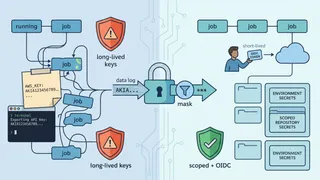
To make your security even tighter, you can use OpenID Connect (OIDC) with your cloud providers (like AWS, GCP, or Azure). Instead of storing long-lived, static cloud keys as GitHub secrets, GitHub issues short-lived JWT tokens on the fly.
Here’s what an OIDC-enabled step looks like inside a reusable workflow:
# Example step inside your reusable workflow using OIDC for keyless auth- name: Configure AWS Credentials via OIDC uses: aws-actions/configure-aws-credentials@v4 with: # Use a role ARN instead of storing access keys role-to-assume: arn:aws:iam::123456789012:role/github-actions-ci-role aws-region: us-east-1 # Request a JWT token from GitHub's OIDC provider audience: sts.amazonaws.comVersioning strategies and release management
How do you publish and maintain workflow updates without breaking every pipeline that depends on them?
Because multiple teams depend on your shared CI/CD library, you have to treat your workflows like production code. If you push an untested change directly to your main branch, you could accidentally break builds across the entire company.
To keep things stable, you should adopt a clear versioning strategy. Most teams rely on three main pinning methods:
- Pinning to a Semantic Version (Best for Stability): Referencing a patch version (like
@v1.2.0) means nothing changes under the hood without you knowing. It is as stable as pinning gets. - Pinning to a Major Version Tag: Pinning to a major tag (like
@v1) lets you push safe minor updates and security patches automatically without breaking anything for the end-user. - Pinning to a Branch: Referencing a branch (like
@main) is great for testing features quickly, but it’s dangerous for production because any change can break your pipelines instantly.
If you’re managing a major version tagging strategy, you’ll need to update your tags via the command line when promoting releases:
# Create and push a specific release taggit tag -a v1.2.0 -m "Release version 1.2.0"git push origin v1.2.0
# Force-update your major tag to point to this new commitgit tag -fa v1 -m "Point v1 tag to v1.2.0"git push origin v1 --forceIn highly secure environments, pinning to a mutable Git tag can still be a risk, since tags can technically be rewritten. The safest option is pinning directly to an immutable Git commit SHA (like @3a82c4...). Since a SHA can’t be repointed, your callers always run exactly the code you reviewed, which closes off the retagging trick behind a lot of supply chain attacks. You can use tools like Dependabot to open PRs automatically when new versions are released, so you get that safety without doing the bumps by hand.
# Secure caller using an immutable commit SHAjobs: secure-ci: # Pinned to a specific commit SHA for security uses: corporate-org/shared-workflows/.github/workflows/node-ci-reusable.yml@3a82c4b8b6c4b2b2b2b2b2b2b2b2b2b2b2b2b2b2 secrets: inheritOrganizing a dedicated workflows repository
What repository layout and templating make shared CI/CD configs easy to hand out?
As your shared library grows, you should host your workflows in a dedicated, read-only repository, like your-org/shared-workflows. This keeps your pipelines separate from application code, makes access control simple, and keeps your project history clean.
One platform quirk to keep in mind: GitHub Actions forces all reusable workflows to live in the .github/workflows/ directory. This flat layout can make independent versioning difficult for tools like Release Please, which usually depend on folder separation to detect independent packages. Because of this, most teams treat the entire repository as a single package and version all workflows under one release tag.
Here is a typical layout:
Directoryyour-org/shared-workflows
Directory.github/
Directoryworkflows/
- node-ci-reusable.yml
- python-ci-reusable.yml
- docker-publish-reusable.yml
To help developers adopt these standard pipelines quickly, you can set up starter templates in a repository named .github (e.g., your-org/.github). When someone creates a new repository in your organization, these templates will show up directly in their Actions initialization menu.
To set this up, create a folder named workflow-templates inside your .github repository. This folder should hold your template YAML file and a JSON metadata file that describes it.
The folder ends up looking like this:
Directoryyour-org/.github
Directoryworkflow-templates/
- ci-nodejs.yml
- ci-nodejs.properties.json
Here is a sample properties file:
{ "name": "Node.js Enterprise CI", "description": "Standardized Node.js build pipeline using our approved reusable workflow.", "iconName": "nodejs", "categories": ["Continuous Integration", "Node"]}Inside your template file, you can use the $default-branch placeholder so GitHub dynamically swaps it with the repository’s default branch on setup:
name: Node.js CI Pipeline
on: push: branches: [$default-branch] pull_request: branches: [$default-branch]
jobs: run-ci: # Automatically targets your organization's shared workflow uses: your-org/shared-workflows/.github/workflows/node-ci-reusable.yml@v1 secrets: inheritAdvanced testing patterns, optimization, and maintenance
How do you test workflow changes locally and keep execution fast inside the platform’s limits?
Testing updates to a shared workflow can be tricky. GitHub Actions validates your entire pipeline structure before it ever starts a runner. If you try to run a test workflow that points to an unmerged change on a remote branch, the pre-flight check will fail, crashing the run immediately.
To bypass this without cluttering your production code with messy test flags, you can use a “Patch-on-Test” strategy. This lets you keep your production files pointing to clean references, while dynamically swapping them for local relative paths on the runner during test runs.
Here is a test workflow (.github/workflows/test-suite.yml) that checks out the repository and uses a sed command to patch the references right before running them:
name: Test Shared Workflows
on: push: branches: - 'feature/*' pull_request:
jobs: test-workflow: runs-on: ubuntu-latest steps: - name: Checkout Code uses: actions/checkout@v4
# Use sed to temporarily swap the remote ref for the local relative file path - name: Patch Reusable Reference for Testing run: | sed -i 's|your-org/shared-workflows/.github/workflows/node-ci-reusable.yml@v1|./.github/workflows/node-ci-reusable.yml|g' .github/workflows/integration-test-caller.yml
# Run the caller workflow using our local file changes - name: Run Integration Tests uses: ./.github/workflows/integration-test-caller.ymlTo solve this natively, the GitHub Actions team proposed the relative path syntax prefix $/. When this is fully supported, writing uses: $/path/to/action tells the runner to resolve the path relative to the workflow file that called it, keeping references safe and clean across PRs and releases.
As your CI/CD platform scales, you should also focus on keeping execution times fast and costs low:
- Caching Dependencies: Use deterministic installation commands (like
npm cioryarn/pnpmcommands with--frozen-lockfile) to speed up builds. Keep an eye on storage limits, since GitHub caps caching at 10 GB per repository. - Parallel Execution: Run independent jobs in parallel instead of chaining them sequentially.
- Concurrency Controls: Use concurrency keys to automatically cancel older, outdated runs when a developer pushes a new commit to the same branch.
- Bypassing Matrix Limits: While GitHub limits job matrices to 256 combinations, you can bypass this by nesting reusable workflows. By nesting matrices up to three levels deep, you can theoretically run up to 256^3 (over 16 million) jobs per run, which is perfect for heavy matrix testing.
These patterns give you a CI/CD library that’s secure, fast, and easy for your team to maintain.
Frequently Asked Questions
No, environment variables defined in the env context of a caller workflow don’t propagate to the called reusable workflow. Similarly, any environment variables you set inside the called workflow won’t be accessible back in the caller workflow. You must pass data explicitly using inputs or return it to the caller via job outputs.
GitHub Actions supports up to 10 nested levels of reusable workflows. Additionally, you can call a maximum of 50 unique reusable workflows across your entire nested execution tree in a single run.
You can use the secrets: inherit directive inside your caller job. This automatically passes all of your caller repository’s secrets, along with your organization-level secrets, straight to the called reusable workflow.
No, you can’t publish reusable workflows to the GitHub Marketplace. They can only be shared by hosting them in public, internal, or private repositories and referencing them directly by their repository path and Git reference.
By default, your called workflow inherits the GITHUB_TOKEN permissions of the caller. You can tighten those privileges inside your reusable workflow by declaring a custom permissions block under the workflow_call trigger. A called workflow can only narrow what the caller granted, never widen it.
GitHub Actions runs a pre-flight static analysis on your entire pipeline graph before it actually runs anything. If your workflow references a remote branch or tag that doesn’t exist yet, this check fails and stops your pipeline in its tracks. This happens regardless of any conditional if statements, which is why we use the “Patch-on-Test” strategy.
Conclusion
Reusable workflows turn CI/CD from a copy-paste chore into a single source of truth. By defining your standard pipelines once with workflow_call, calling them with a clean uses line, and locking everything down with explicit secrets and OIDC, you get pipelines that are easier to audit and far less prone to drift. Pair that with a clear versioning strategy (semantic tags or immutable SHAs), a dedicated workflows repository, and a “Patch-on-Test” approach for safe changes, and you’ve built a shared CI library that scales with your organization instead of fighting it.
References
- How to Create Reusable Workflows in GitHub Actions - OneUptime, accessed on May 27, 2026, https://oneuptime.com/blog/post/2026-01-25-github-actions-reusable-workflows/view
- Reusing workflow configurations - GitHub Docs, accessed on May 27, 2026, https://docs.github.com/en/actions/concepts/workflows-and-actions/reusing-workflow-configurations
- Organization best practices for reusable workflows and actions for an enterprise? - GitHub Community, accessed on May 27, 2026, https://github.com/orgs/community/discussions/171037
- Best practices for structuring complex GitHub Actions workflows? - GitHub Community, accessed on May 27, 2026, https://github.com/orgs/community/discussions/187543
- GitHub Actions Workflows: Patterns & Best Practices - DEV Community, accessed on May 27, 2026, https://dev.to/thesius_code_7a136ae718b7/github-actions-workflows-github-actions-patterns-best-practices-pge
- New releases for GitHub Actions - November 2025 - GitHub Changelog, accessed on May 27, 2026, https://github.blog/changelog/2025-11-06-new-releases-for-github-actions-november-2025/
- Reusable Workflow Depth Limit - GitHub Community, accessed on May 27, 2026, https://github.com/orgs/community/discussions/8488