GitHub Actions
The workflow YAML you write over and over. Triggers, jobs and steps, secrets, matrix builds, caching, artifacts, and reusable workflows in one reference.
GitHub Actions runs your CI/CD directly from YAML files in .github/workflows/, and most of the job is knowing which key does what. A workflow reacts to events, splits into jobs that run on runners, and each job is an ordered list of steps that either call a reusable action or run a shell command.
This cheatsheet walks the parts you touch on every pipeline: triggers that decide when things run, the job and step structure, env and secrets across their three scopes, matrix builds for testing many versions at once, caching and artifacts to stay fast, and reusable workflows and composite actions to stop copy-pasting the same YAML into every repo.
Key features
- Trigger precisely: filter
pushandpull_requestby branch and path, plusscheduleandworkflow_dispatch. - Structure jobs:
needsfor ordering,iffor conditions,runs-onfor the machine. - Handle secrets safely: three
envscopes, maskedsecrets, and a least-privilegeGITHUB_TOKEN. - Scale and reuse: matrix builds, dependency caching, artifacts, reusable workflows, and composite actions.
No commands found
Try adjusting your search term
Workflow Triggers
The on key decides when a workflow runs. Most workflows use one or two of these, but knowing the full set saves you from cron hacks and manual reruns.
Event Triggers
Fire on repository activity like pushes and pull requests, and filter down to the branches, tags, and paths you actually care about.
Trigger on push and pull request with filters
paths and paths-ignore skip runs that can't matter, which keeps queues short and saves runner minutes on docs commits.
on: # Run on pushes to main, but only when source or workflows change push: branches: [main] paths: - 'src/**' - '.github/workflows/**' # Run on PRs targeting main, ignoring docs-only changes pull_request: branches: [main] paths-ignore: - '**.md'- Use branches-ignore or paths-ignore for the inverse of branches/paths. Don't set both the positive and negative form for the same key.
- Tag pushes need a tags filter (for example, tags:['v*']). A branches filter alone never matches a tag push.
Scheduled and manual triggers
workflow_dispatch gives you a manual run button plus typed inputs, and schedule runs on cron without any external trigger.
on: # Cron runs in UTC. This is 02:00 UTC every day. schedule: - cron: '0 2 * * *' # A "Run workflow" button in the Actions tab, with inputs workflow_dispatch: inputs: environment: description: 'Target environment' type: choice options: [staging, production] default: staging- Scheduled workflows only run from the default branch, and GitHub can delay or skip them under heavy load. Don't rely on exact timing.
- Reach an input at runtime with ${{ inputs.environment }} (or github.event.inputs.environment on older syntax).
workflow_call and Reuse
workflow_call turns a workflow into something other workflows can invoke, which is the foundation of reusable pipelines.
Expose a workflow as callable
A workflow with on:workflow_call declares typed inputs and named secrets, so callers pass exactly what it needs and nothing more.
on: workflow_call: inputs: node-version: required: false type: string default: '20' secrets: npm-token: required: true- Reusable-workflow inputs are typed (string, number, boolean). This is stricter than workflow_dispatch, which historically treated everything as a string.
Jobs and Steps
Jobs run on runners and can depend on each other. Steps run in order inside a job, either calling an action with uses or running a shell command with run.
Job Structure
runs-on picks the machine, needs builds a dependency graph, and if gates whether a job runs at all.
Chain jobs with needs and conditions
needs makes deploy wait for build to succeed, and the if guard stops deploys from running on pull requests or feature branches.
jobs: build: runs-on: ubuntu-latest steps: - run: echo "building"
deploy: # Wait for build, and only deploy from main needs: build if: github.ref == 'refs/heads/main' runs-on: ubuntu-latest environment: production steps: - run: echo "deploying"- By default a needed job must succeed. Use if:always() or if:needs.build.result == 'success' to control behaviour when an upstream job fails.
- An environment: with required reviewers pauses the job for manual approval before it runs.
Run a job across multiple OSes
Setting runs-on to a matrix value fans the same job out across every listed OS in parallel.
jobs: test: runs-on: ${{ matrix.os }} strategy: matrix: os: [ubuntu-latest, macos-latest, windows-latest] steps: - uses: actions/checkout@v4 - run: echo "testing on ${{ matrix.os }}"Steps, uses, and run
Every step either reuses a published action (uses) or runs shell commands (run). with passes inputs, env sets variables.
Combine actions and shell steps
uses pulls in a reusable action and with feeds it inputs, while run executes shell directly. The | starts a multi-line script block.
steps: # An action from the marketplace, pinned to a major version - uses: actions/checkout@v4
- uses: actions/setup-node@v4 with: node-version: '20' cache: 'npm'
# A multi-line shell command with a step id and env - name: Build id: build env: NODE_ENV: production run: | npm ci npm run build- Give a step an id when a later step needs its outputs via ${{ steps.build.outputs.name }}.
- Default shell is bash on Linux/macOS and pwsh on Windows. Override per step with shell:bash for consistency.
Variables and Secrets
env holds plain configuration at three scopes, while secrets and the GITHUB_TOKEN handle anything sensitive without ever printing it in logs.
Environment Variables
Set env at the workflow, job, or step level. The narrowest scope wins when the same name is defined twice.
env at three levels and dynamic values
A step-level env wins over job-level, which wins over workflow-level. To pass a computed value forward, append it to the $GITHUB_ENV file.
env: APP_NAME: my-app # available to every job and step
jobs: build: runs-on: ubuntu-latest env: LOG_LEVEL: debug # available to every step in this job steps: - name: One-off value env: STAGE: build # only this step run: echo "$APP_NAME $LOG_LEVEL $STAGE"
- name: Export to later steps # Writing to $GITHUB_ENV persists a var to the next steps run: echo "VERSION=1.2.3" >> "$GITHUB_ENV"- Read repository or environment configuration variables (non-secret) with ${{ vars.NAME }}, distinct from ${{ secrets.NAME }}.
Secrets and GITHUB_TOKEN
Secrets are encrypted, masked in logs, and injected only where you reference them. Every run also gets a scoped GITHUB_TOKEN for free.
Use secrets and pass them to a reusable workflow
Reference a secret with ${{ secrets.NAME }}, and forward secrets to a called workflow explicitly or with secrets:inherit.
jobs: publish: runs-on: ubuntu-latest steps: - env: NPM_TOKEN: ${{ secrets.NPM_TOKEN }} run: npm publish
call-shared: uses: ./.github/workflows/deploy.yml # Forward a named secret to the reusable workflow secrets: npm-token: ${{ secrets.NPM_TOKEN }} # Or hand over everything the caller has: # secrets: inherit- GitHub masks secret values in logs automatically, but a secret you echo after transforming (base64, for example) can leak. Don't print them.
- Prefer OIDC (id-token:write plus a cloud role) over long-lived cloud keys stored as secrets.
Least-privilege GITHUB_TOKEN
Set a restrictive top-level permissions block, then widen it per job. The auto-generated GITHUB_TOKEN inherits exactly those scopes.
# Default to read-only for the whole workflowpermissions: contents: read
jobs: release: runs-on: ubuntu-latest # Grant just what this job needs permissions: contents: write packages: write steps: - run: gh release create v1.0.0 env: GH_TOKEN: ${{ secrets.GITHUB_TOKEN }}- Secrets are not passed to workflows triggered by pull_request from a fork, which is a deliberate safeguard against untrusted PRs.
Matrix Builds
A matrix runs the same job across a grid of parameters (versions, OSes) in parallel, with include and exclude to fine-tune the combinations.
strategy.matrix
List the axes and GitHub generates one job per combination. include adds extra entries, exclude removes specific ones.
Multi-axis matrix with include and exclude
The two axes create 6 jobs, exclude removes one, and include appends a tailored entry, so you end up with a precise test grid.
strategy: # Keep other jobs running if one combo fails fail-fast: false # Cap parallel jobs so you don't exhaust runners max-parallel: 4 matrix: node: [18, 20, 22] os: [ubuntu-latest, windows-latest] # Drop a combo that isn't supported exclude: - node: 18 os: windows-latest # Add an extra one-off combo with a custom flag include: - node: 22 os: ubuntu-latest experimental: true- fail-fast:true (the default) cancels every other matrix job the moment one fails. Set it false when you want the full result grid.
- Reference any axis value in the job with ${{ matrix.node }} or ${{ matrix.os }}.
Caching and Artifacts
Caching reuses dependencies between runs to save time. Artifacts pass build outputs between jobs or hand them to you after the run.
Dependency Caching
actions/cache keys a directory by a hash of your lockfile, restoring it when the hash matches and saving a fresh copy when it doesn't.
Cache dependencies keyed by lockfile
A cache hit restores ~/.npm instantly. On a miss, restore-keys grabs the newest partial match and the run saves a new cache under the exact key.
- uses: actions/cache@v4 with: path: ~/.npm # Exact key: changes when the lockfile changes key: ${{ runner.os }}-npm-${{ hashFiles('**/package-lock.json') }} # Fallback prefixes for a partial (warm) restore restore-keys: | ${{ runner.os }}-npm-- Many setup actions have caching built in (setup-node with cache:'npm'). Prefer that over a manual actions/cache step when it exists.
- Caches are scoped to a branch and its base. A PR can read the base branch cache but a branch can't read an unrelated branch's cache.
Build Artifacts
Upload files from one job and download them in another, or keep them attached to the run for later inspection.
Pass a build between jobs
upload-artifact stores dist/ from the build job, and download-artifact pulls it into the deploy job by matching the artifact name.
jobs: build: runs-on: ubuntu-latest steps: - run: npm run build - uses: actions/upload-artifact@v4 with: name: dist path: dist/ retention-days: 7
deploy: needs: build runs-on: ubuntu-latest steps: - uses: actions/download-artifact@v4 with: name: dist path: dist/ - run: ls dist/- Artifacts are not caches. Use artifacts to move files between jobs or keep outputs, and use actions/cache to speed up dependency installs.
- v4 of the artifact actions is not cross-compatible with v3. Keep upload and download on the same major version.
Reuse and Composition
Kill the copy-paste. Reusable workflows share a whole pipeline across repos, and composite actions bundle a sequence of steps into one uses call.
Reusable Workflows
Call an entire workflow from another with uses, passing inputs and secrets. This is how you standardize deploys across many repos.
Call a reusable workflow
A job that sets uses to a workflow file calls it wholesale, forwarding typed inputs and either named secrets or secrets:inherit.
jobs: deploy: # Local reusable workflow uses: ./.github/workflows/deploy.yml with: node-version: '20' secrets: npm-token: ${{ secrets.NPM_TOKEN }}
deploy-shared: # Reusable workflow from another repo, pinned to a tag uses: my-org/ci-workflows/.github/workflows/deploy.yml@v2 secrets: inherit- A caller can nest reusable workflows up to 4 levels deep. Beyond that GitHub refuses to run the chain.
- Pin cross-repo reusable workflows to a tag or SHA, never a moving branch, so a change upstream can't silently alter your pipeline.
Composite Actions
Bundle several steps into a single action defined by an action.yml, then call it like any marketplace action.
Define a composite action
runs.using:composite lets one action.yml wrap multiple steps, so callers replace a repeated block with a single uses:./.github/actions/setup.
name: 'Setup project'description: 'Checkout, install Node, and restore deps'inputs: node-version: default: '20'runs: using: composite steps: - uses: actions/setup-node@v4 with: node-version: ${{ inputs.node-version }} # Composite run steps MUST declare a shell - run: npm ci shell: bash- Every run step inside a composite action must set shell explicitly. Omitting it is the most common composite-action error.
Was this useful?
Continue on this topic
The same subject, covered a different way from the cheatsheet above.
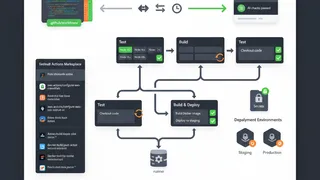 Quiz
QuizGitHub Actions: Workflow Automation Essentials
Master GitHub Actions fundamentals with this quiz covering Workflows, YAML syntax, the Actions Marketplace, Matrix builds, and secure secret management.
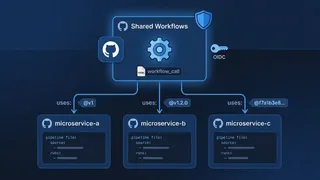 Article
GitHub Actions Reusable Workflows: Build a Shared CI Library Across All Your Repos
Simplifying and securing CI/CD at scale with GitHub Actions reusable workflows: the differences between reusable workflows and composite actions, OIDC keyless authentication, versioning strategies, and testing methods like "Patch-on-Test" for a centralized pipeline library.
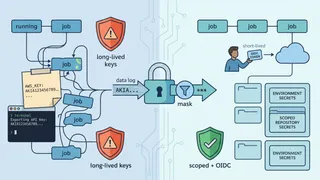 Dev tip
GitHub Actions Secrets and Environment Variables: Handle Config the Right Way
Stop leaking credentials in your workflows. This dev tip shows how to scope GitHub Actions secrets, swap long-lived keys for OIDC, mask sensitive output, and pass config between jobs without it ending up in your logs.
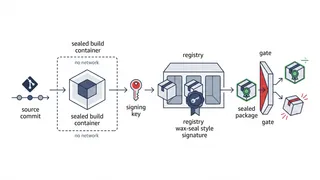 Case study
Hardening a CI/CD Supply Chain to SLSA Level 3
How we made a build pipeline tamper-evident end to end: hermetic builds, KMS-signed provenance, and an admission gate that refuses anything it cannot verify.
You might also enjoy
More posts on similar topics
AWS CLI
- Mohammad Abu Mattar
- Cloud Computing
- AWS
- DevOps
- CLI
- Automation
The AWS Command Line Interface (CLI) lets you orchestrate infrastructure, move cloud data, and configure security entirely from the terminal. This reference covers configuring identity profiles, manag
YAML
- Mohammad Abu Mattar
- Data Format
- YAML
- Configuration
- Data Serialization
- DevOps
- Infrastructure
YAML (YAML Ain't Markup Language) is a human-friendly data serialization language widely used for configuration files, data exchange, and infrastructure-as-code. It emphasizes readability and uses ind
Linux Networking
- Mohammad Abu Mattar
- Linux
- Networking
- DevOps
- CLI
- SysAdmin
Every Linux box speaks the network through a small set of tools, and knowing them turns "the network is broken" into a specific, fixable answer. This cheatsheet covers the modern stack: ip for inter
kubectl
- Mohammad Abu Mattar
- DevOps
- Kubernetes
- CLI
- Container Orchestration
- Cloud Native
kubectl is the command-line tool you use to talk to a Kubernetes cluster. Whatever you can do through a dashboard, you can do faster here: deploy apps, inspect resources, stream logs, run commands ins
jq
- Mohammad Abu Mattar
- CLI Tool
- Config & Data Formats
- DevOps
jq clicked for me the day I stopped thinking of it as a JSON string transformer. It is a stream of values, and every filter takes a stream in and emits a stream out. That one idea explains the parts t
Terraform Cheatsheet
- Mohammad Abu Mattar
- Infrastructure as Code
- DevOps
A practical cheatsheet covering the Terraform CLI commands engineers reach for constantly: init, plan, apply, import, taint, and state operations. It also covers the key HCL patterns for variables, lo
6 related posts