Kubernetes has a reputation for keeping applications online, but it is not magic. Out of the box, the cluster is blind to what happens inside your container. If your application deadlocks or exhausts its database connection pool, the process is often still running. To Kubernetes, a running process looks like a healthy pod, so it keeps forwarding traffic to an endpoint that stopped responding minutes ago.
To get a genuinely self-healing application, you have to translate your app’s internal state into signals the control plane understands. That is what health probes are for. Configure them well and the cluster routes traffic away from overwhelmed pods and restarts frozen ones on its own. Configure them badly and you hand yourself a new failure mode: cascading restarts that take down the whole service at once.
Worth knowing
Probes are cheap to add and easy to get subtly wrong. The rest of this post is as much about the mistakes as the mechanics, because a bad liveness probe is worse than no probe at all.
What self-healing actually means
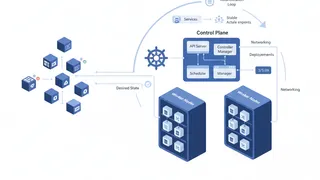
Self-healing is the cluster automatically detecting, isolating, and replacing unhealthy workload instances with no human in the loop. Pods and containers are meant to be disposable. Instead of nursing one fragile server, Kubernetes uses higher-level controllers (Deployments, StatefulSets) to constantly compare the current state of the cluster against the state you declared.
The local node agent, the kubelet, runs a continuous polling loop to track container health. If a container process crashes and exits with a non-zero code, the kubelet notices right away and restarts it per the pod’s restartPolicy.
The harder problem is that modern systems fail quietly. A background thread panics, a memory leak triggers endless garbage-collection pauses, an upstream API stops answering. The process never exits, so the kubelet sees nothing wrong. Probes are how you give the kubelet the diagnostics to catch those invisible failures and act, either by pulling the pod out of rotation or by terminating and replacing it.
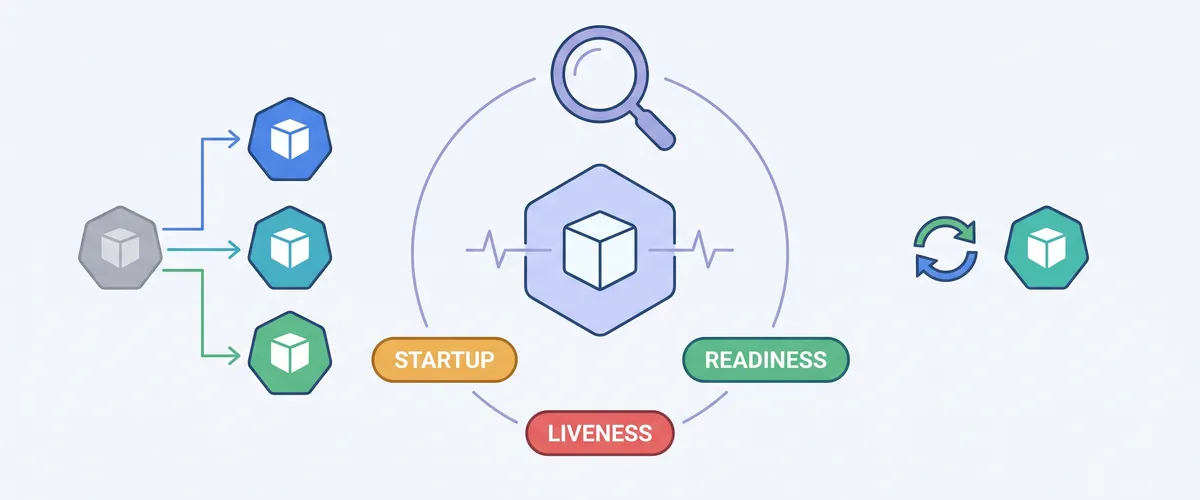
The three probes, and what each one controls
Kubernetes gives you three probe types. Each answers a different question and triggers a very different action on failure. Mixing up their jobs is a leading cause of cluster instability.
| Probe | The question it answers | Action on failure | Use it for |
|---|---|---|---|
| Startup | Has the app finished booting? | Kill the container, trigger restartPolicy | Shielding slow-starting apps from premature liveness kills |
| Liveness | Is the process wedged in an unrecoverable state? | Kill the container, trigger restartPolicy | Deadlocks, memory leaks, frozen event loops |
| Readiness | Can it process traffic right now? | Remove the pod’s IP from Service endpoints | Cache warmups, dropped DB connections, temporary overload |
When a pod launches, the kubelet checks whether a startup probe is defined. If it is, liveness and readiness checks are paused until the startup probe succeeds, which gives your code time to initialize. Once the startup probe passes, the kubelet begins running the liveness and readiness probes periodically.
How a probe failure turns into an action
The two failure paths are handled by different parts of the cluster, and the difference matters.
When a liveness probe fails failureThreshold times in a row, the kubelet treats the container as unhealthy and starts terminating it: it sends SIGTERM, waits out terminationGracePeriodSeconds, and issues SIGKILL if the container refuses to exit. Then it restarts the container behind an exponential backoff that starts at 10 seconds and grows up to 300 seconds, so a fast crash loop cannot melt the node’s CPU.
When a readiness probe fails, nothing gets killed. The kubelet sets the pod’s Ready condition to False. The Endpoints controller watches those conditions, and the moment a pod goes unready it removes the pod’s IP from the EndpointSlice for that Service. kube-proxy on each node picks up the update and rewrites the local network rules, so new traffic stops going to the struggling pod. Established TCP connections usually stay put; new requests route cleanly to healthy replicas.
That is the whole point of keeping the two separate: readiness is a reversible “step out of the line for a moment,” liveness is a final “you are broken, start over.”
The misconfigurations that cause outages
Probes are simple, but a couple of architectural misunderstandings turn them into self-inflicted incidents.
Checking your database in a liveness probe
This is the most dangerous probe mistake there is. The tempting move is to point both liveness and readiness at one generic /health endpoint that checks the database, the Redis cache, and a couple of third-party APIs.
Picture a service that talks to PostgreSQL. The database fails over to a new primary, and queries fail for about 30 seconds. If your liveness probe pings the database, liveness fails, and the kubelet kills the container. Every pod loses database connectivity at the same instant, so Kubernetes restarts your entire fleet at the same instant. A 30-second blip becomes a full cascading outage, even though your application runtime was perfectly fine. When the database comes back, it is immediately hit by a thundering herd of restarting pods each opening fresh connection pools, which frequently knocks the database over again.
Careful here
Liveness probes should test only the process itself, never its external dependencies. If a dependency is down, that is a readiness concern (step out of rotation and wait), not a liveness concern (restart). Restarting a healthy pod because a database hiccuped never helps.
Thresholds and timeouts that are too aggressive
timeoutSeconds is how long the kubelet waits for the probe handler to answer. Under CPU pressure an app might take two or three seconds to respond to a health check. If timeoutSeconds is 1 and failureThreshold is low, a single slow response or one dropped packet evicts and restarts the pod. Give probes enough headroom to survive a busy moment.
Writing the probe handlers
Kubernetes supports four handler mechanisms. You configure them inside spec.containers.
HTTP is the common choice for web services. The kubelet sends a GET and treats any status from 200 to 399 as success.
livenessProbe: httpGet: path: /healthz/live port: 8080 httpHeaders: - name: X-Custom-Auth value: internal-probe periodSeconds: 15 failureThreshold: 3TCP socket suits non-HTTP apps. The kubelet just opens a connection on the port; if the socket opens, the probe passes.
readinessProbe: tcpSocket: port: 5432 initialDelaySeconds: 5 periodSeconds: 10Exec runs a command inside the container and passes on exit code 0. Handy for apps that write a status file, but it is the most expensive option because the runtime spawns a process for every check.
readinessProbe: exec: command: - cat - /tmp/healthy periodSeconds: 5gRPC used to require bundling a separate health-check binary and calling it through an exec probe. Kubernetes now speaks the standard gRPC Health Checking Protocol natively.
livenessProbe: grpc: port: 50051 periodSeconds: 10When you actually need a startup probe
Before startup probes existed, health-checking apps with unpredictable boot times was painful. A legacy Spring Boot monolith might download config, run database migrations, and warm caches before it can serve anything.
The old workaround was a large initialDelaySeconds so liveness would not kill the app mid-boot. That created a nasty blind spot: if the app booted fine in 30 seconds but deadlocked two minutes later, Kubernetes would not notice until the whole padded initial delay elapsed. The startup probe fixes this by separating “still booting” from steady-state health, so liveness can stay tight without risking a premature kill during a slow start.
Zero-downtime rollouts
True zero-downtime deploys need Kubernetes internal routing to stay in sync with external infrastructure, and that is exactly where naive rollouts drop requests, especially behind a cloud load balancer like an AWS ALB.
The load balancer registration gap
During a rolling update the Deployment controller brings up a new pod. As soon as its readiness probe returns success, Kubernetes marks the pod Ready, adds it to the Service endpoints, and sends SIGTERM to an old pod to scale down. But the external load balancer runs on its own schedule: the target group may take another 10 to 15 seconds to register the new IP, run its own checks, and start routing. In that window the old pod is going away and the new pod is not receiving traffic yet, so users get dropped requests and 502s.
Readiness gates close the gap
A readiness gate says the pod cannot be marked Ready until an external controller confirms it, even after every container readiness probe passes. The ALB controller flips that condition once target registration is done.
apiVersion: apps/v1kind: Deploymentmetadata: name: payment-servicespec: template: spec: readinessGates: # The ALB controller flips this once target registration completes - conditionType: 'target-health.alb.k8s.aws' containers: - name: app image: payments:v2.1 readinessProbe: httpGet: path: /actuator/health/readiness port: 8080With the gate in place, Kubernetes will not terminate the old pods until the load balancer signals that the new pods are actually taking traffic.
The preStop hook and draining
At the end of a pod’s life the kubelet removes its IP from the endpoints and sends SIGTERM at the same time. Because endpoint removal takes a moment to propagate through iptables rules and external load balancers, in-flight requests can still arrive for a few seconds after shutdown begins. A preStop hook runs synchronously before SIGTERM, so a short sleep pauses shutdown long enough for the removal to propagate everywhere.
lifecycle: preStop: exec: command: ['/bin/sh', '-c', 'sleep 15']Careful here
The preStop hook counts against terminationGracePeriodSeconds. If
preStop sleeps 15 seconds and the app needs another 20 seconds to drain
connections, set terminationGracePeriodSeconds to at least 40, or the
kubelet will SIGKILL the pod mid-drain.
Frequently asked questions
Liveness answers “is this process wedged?” and its failure restarts the container. Readiness answers “can this pod take traffic right now?” and its failure only removes the pod from the load balancer without restarting it. Readiness is reversible and temporary; liveness is a last resort that throws the container away.
Because a database blip would then restart your whole fleet at once. A liveness failure kills the container, so if every pod’s liveness pings a database that just failed over, every pod restarts simultaneously and then stampedes the recovering database with new connections. Dependency health belongs in a readiness probe (step out of rotation and wait), not liveness (restart).
No. You need one when boot time is slow or unpredictable (migrations, cache
warmups, heavy frameworks). It lets you keep liveness thresholds tight for
steady-state without risking a premature kill during a long start. For apps
that boot in a second or two, a small initialDelaySeconds is enough.
Endpoint removal is not instant. It has to propagate through kube-proxy on
every node and out to external load balancers, which can lag by seconds.
Without the pause, the pod receives SIGTERM while traffic is still being
routed to it, so requests get dropped. The preStop sleep holds shutdown
until the removal has spread everywhere.